
 Need help?
Do you have a question about the TBA KM5S-LCD and is the answer not in the manual?
Information on the materials used and available color options for the KM5S products.
Lists the various functions and indicators provided by the KM5S display.
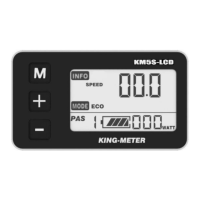
Explains the different parts and icons displayed on the KM5S screen.
Defines the function of each button (M, +, -) on the KM5S unit.
Instructions on how to turn the KM5S display and controller on and off.
Details on the various screens and information shown on the KM5S display.
Explanation of the push-assist function for walking the e-bike.
How to activate and deactivate the backlight and headlight for visibility.
Understanding the battery level display and low voltage warnings.
Information about error codes and their meanings for troubleshooting.
Essential checks and preparations before beginning user settings.
Accessing and modifying general system settings.
Enabling the password feature for secure startup.
Changing the existing power-on password.
Configuring the display for different wheel sizes.
Setting the maximum speed limit for the e-bike.
Entering the password to access personalized parameter settings.
Customizing the display of the battery power level.
Configuring the pedal assist system (PAS) levels.
Enabling or disabling the throttle function.
Enabling or disabling throttle level control.
Configuring the delay time for battery power management.
Setting the maximum speed limit for the e-bike.
Interface details for the slowly start-up configuration.
Procedures for saving or canceling settings and exiting configuration modes.
Detailed definitions for all error codes displayed by the system.
A table listing system passwords and their associated settings.
A reference table for personalized parameter settings and their options.
A table detailing power assist levels and their corresponding percentages.
A glossary of symbols used on the KM5S display.

 To Next Page
 General