HM10 Home AC Charger Mobile Application (APP) User Guide
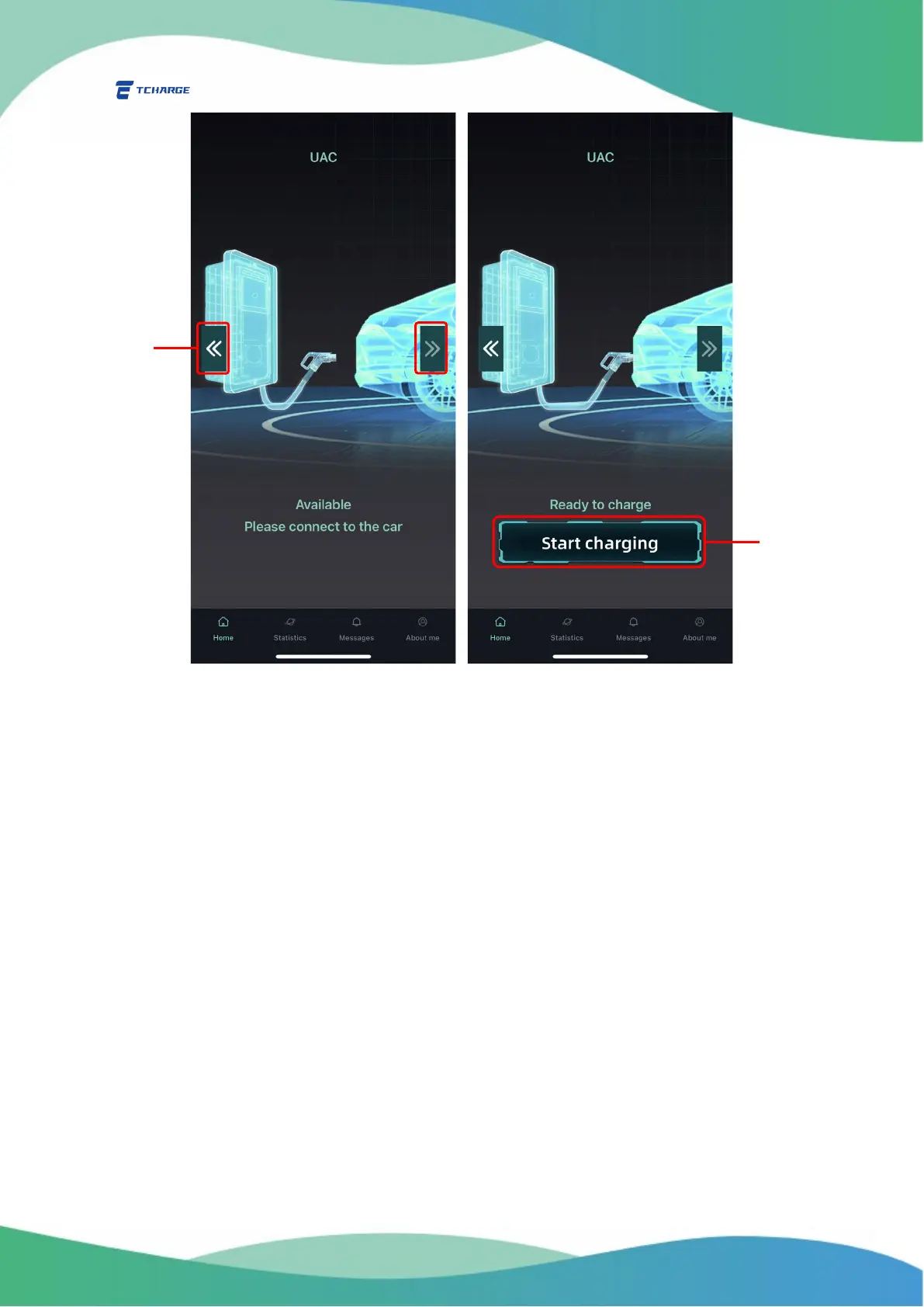
Figure 5.1 Start Charging
3) Click on “Start Charging” button (B in Figure 5.1) to start charging.
4) During the charging process, the Homepage will display charging statistics (Figure 5.2 left),
showing measures of charging current, charging voltage, total charged energy (in kWh)
and duration of the current charging session (C in Figure 5.2).
If you want to stop charging before the vehicle is fully charged, click on the “Stop
charging” button (D in Figure 5.2).
5) After the vehicle is fully charged or the charging session is stopped by clicking “Stop
charging” button as described in step (4), the “finishing charging” screen will display (Figure
5.2 right).
Summary of the charging session (total energy charged, duration of the charging
session, maximum current and voltage recorded throughout the session) will be shown
on the top (E in Figure 5.2).
You may see a summary of your finished charging sessions on Messages tab. See
Part 7 of this manual for details.


 To Next Page