HM10 Home AC Charger Mobile Application (APP) User Guide
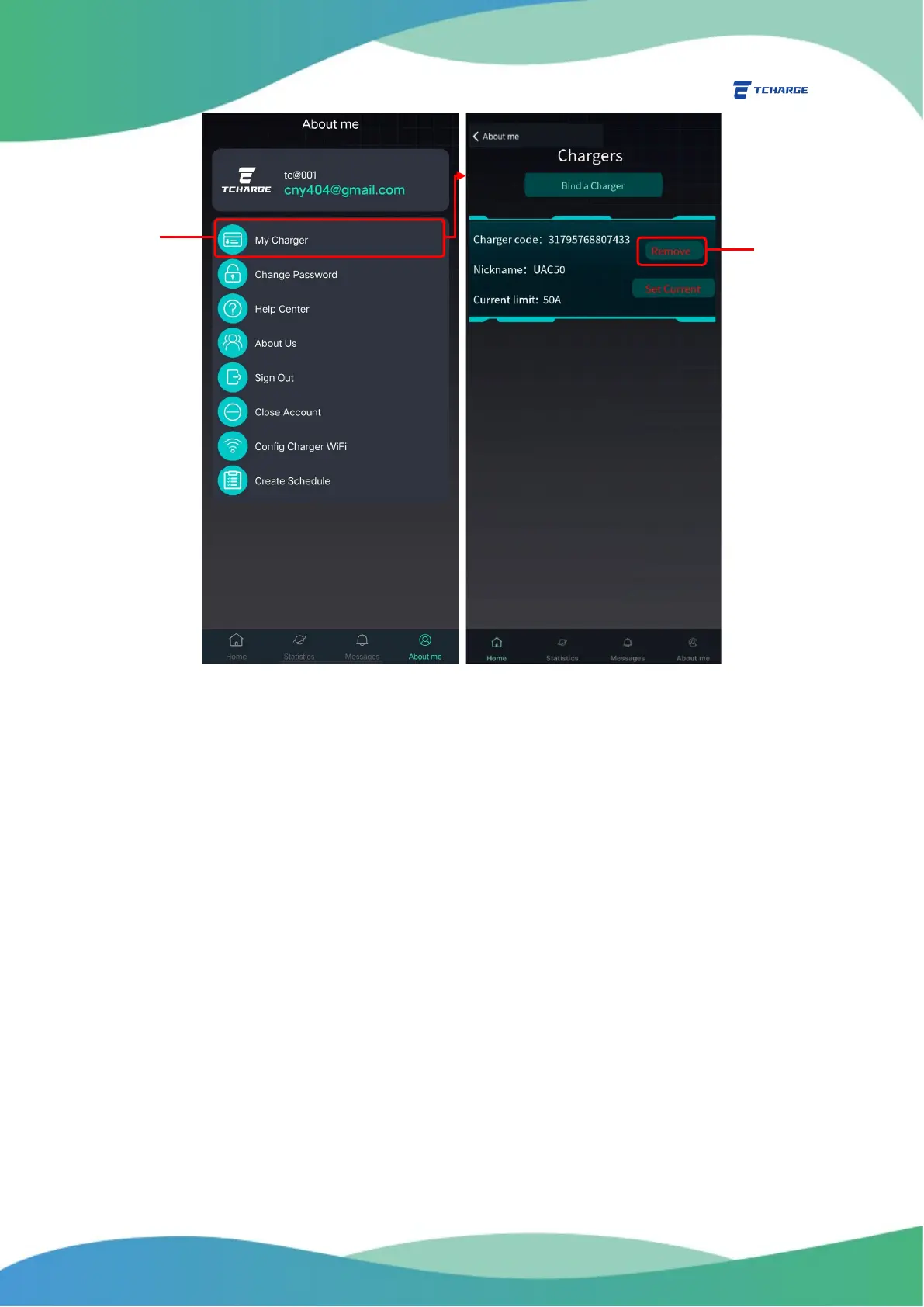
Figure 4.2 Unbinding a Charger
5. Charging Your Vehicle
After binding your charger to your APP account, you are ready to charge your EV with TCHARGE
®
HM10 home charger via home charging APP.
1) When at least one of the chargers bonded with your account is powered on, the
Homepage of the APP will display the image and message as shown on the left of Figure
5.1, indicating the charger to be ready and available.
If there are multiple chargers bonded with your account, you may click on the
arrow buttons to the sides of the Homepage (A in Figure 5.1) to find the charger
you intend to use. For each charger that you have given a nickname, the nickname
will be noted on top of that charger’s respective profile.
2) Connect the charger’s connector (charging port) with your vehicle (or another vehicle
that you want to charge). The image and message on the Homepage will become the ones
shown on the right of Figure 5.1 once a secure connection is established.


 To Next Page