HM10 Home AC Charger Mobile Application (APP) User Guide
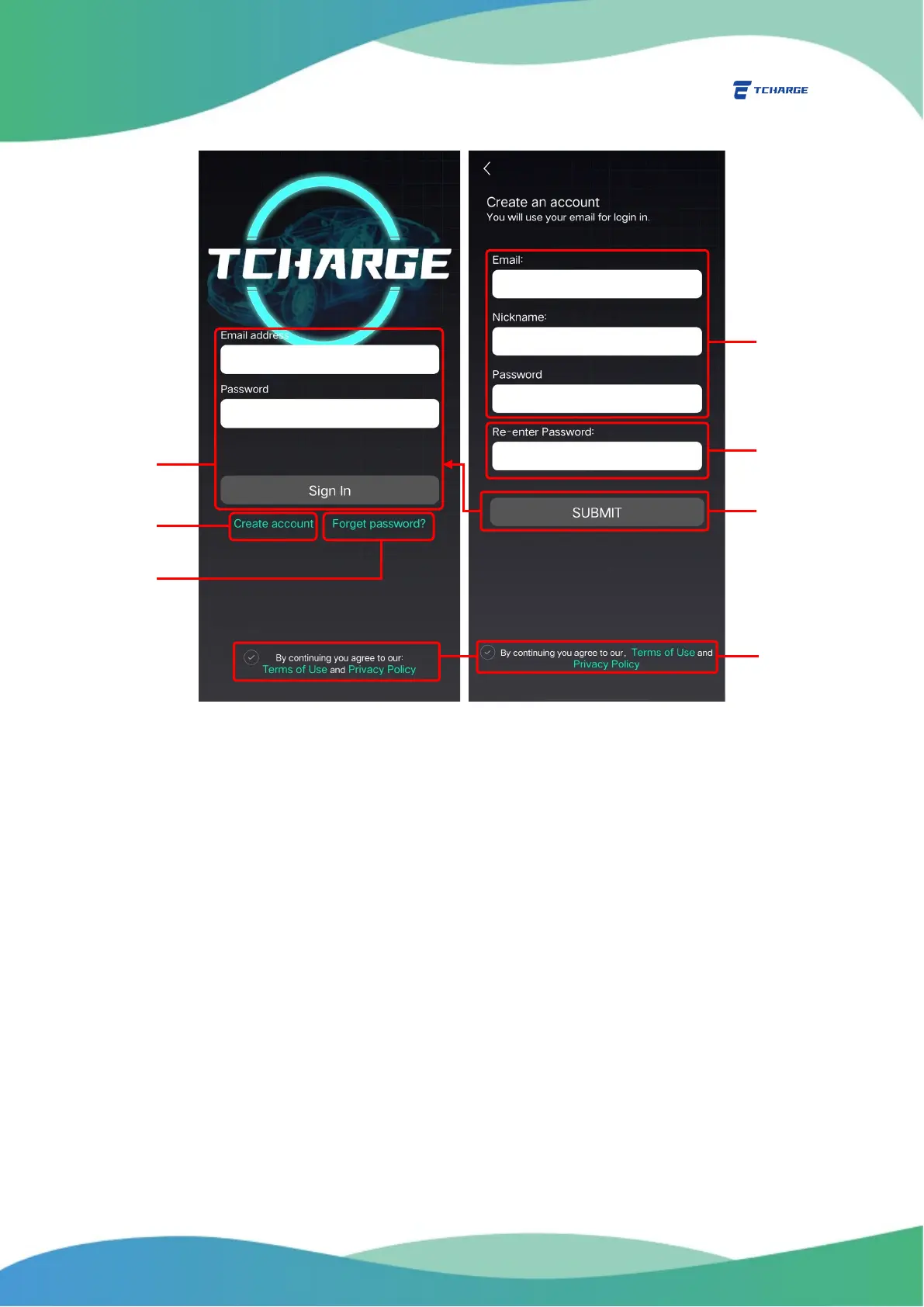
Figure 2.1 Register and Sign In
2.2.2 Forget Password
If you forget the password to your TCHARGE
®
account, you can use the reset password feature in the APP
to reset your password.
1) On the Sign In page, click on “Forget password?” (F in Figure 2.1) to open Reset Password
page (Figure 2.2 left).
2) Enter your email address (G1 in Figure 2.2), then click on “Get Code” button (G2 in Figure
2.2) to receive a verification code in your email. Please remember to check your junk
mail if you do not see the code in your inbox!
3) Enter the verification code you receive in the textbox in the second row (H in Figure 2.2).
Click “Reset Password” button below (J in Figure 2.2) to proceed to password resetting
(Figure 2.2 right).
4) Key in the new password you want to use and confirm it once more (K1 in Figure 2.2), then
click on “Confirm” button to finish resetting your password (K2 in Figure 2.2).


 To Next Page