HM10 Home AC Charger Mobile Application (APP) User Guide
6.3 Set a Charging Schedule
Set up a charging schedule is a very useful feature for using your home charger. This function will
allow the charger to automatically start charging your vehicle at a specific point of time if
you have connected the charger to your vehicle. In other words: no longer need to tap RFID cards
or check your APP. Simply remember to plug the connector of TCHARGE
®
home charger into
your vehicle after coming home, and the charger will do the charge for you by itself!
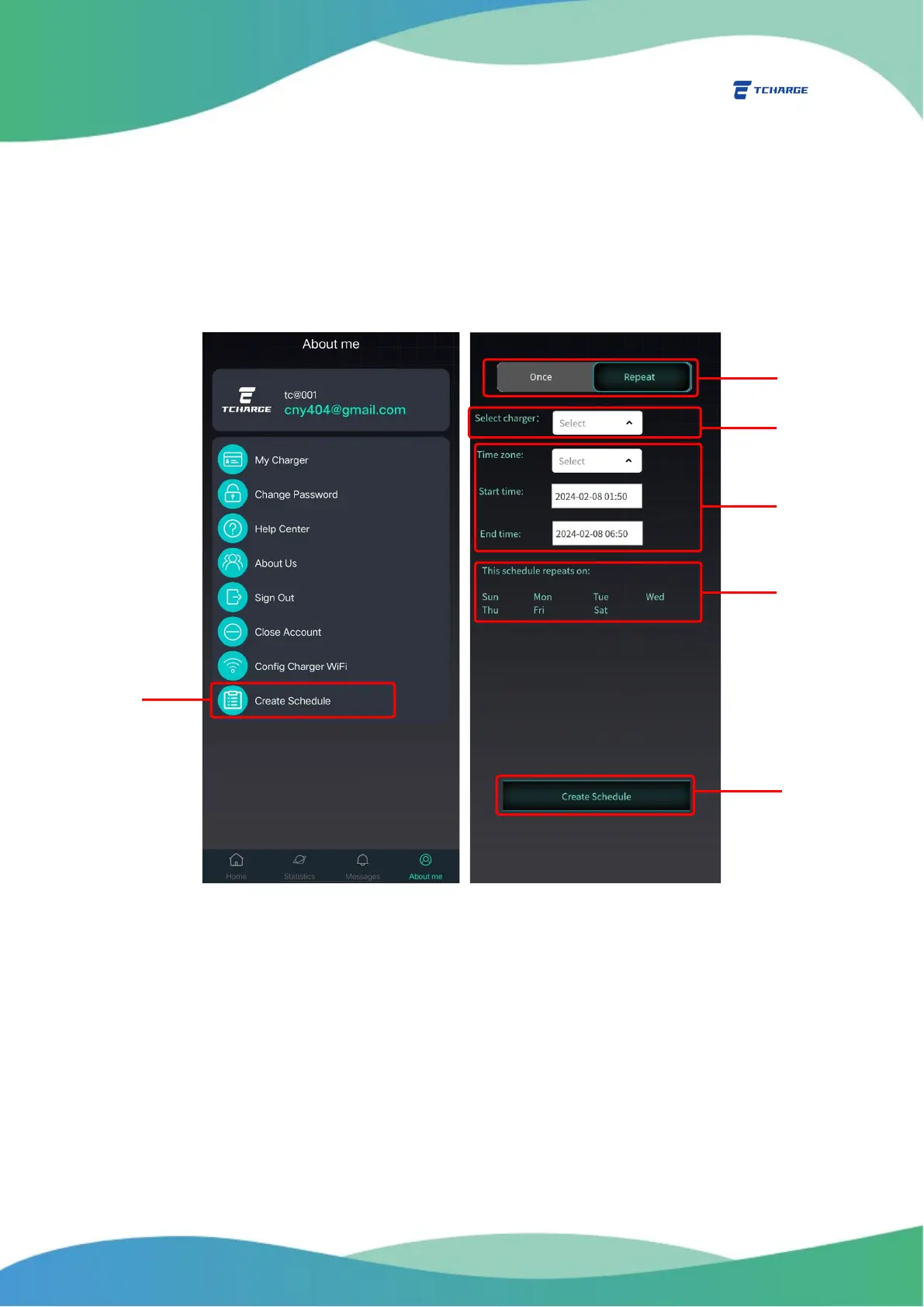
To create a charging schedule, select “Create Schedule” from the About me tab (A in Figure 6.2).
Figure 6.2 Creating a Charging Schedule
On the create schedule page (Figure 6.2 right), set the following parameters:
1) Set if it is a one-time charging schedule, or if it will be repeated on certain days of a week
(B in Figure 6.2).
2) Select the charger to be scheduled from the drop down menu “Select charger” (C in Figure
6.2)
3) Set the start and end date and time of the scheduled charging session, as well as the
time zone used to calculate this schedule. (D in Figure 6.2)


 To Next Page