14 14
4 Loading Media
4.1.4 Loading Media from External Supply
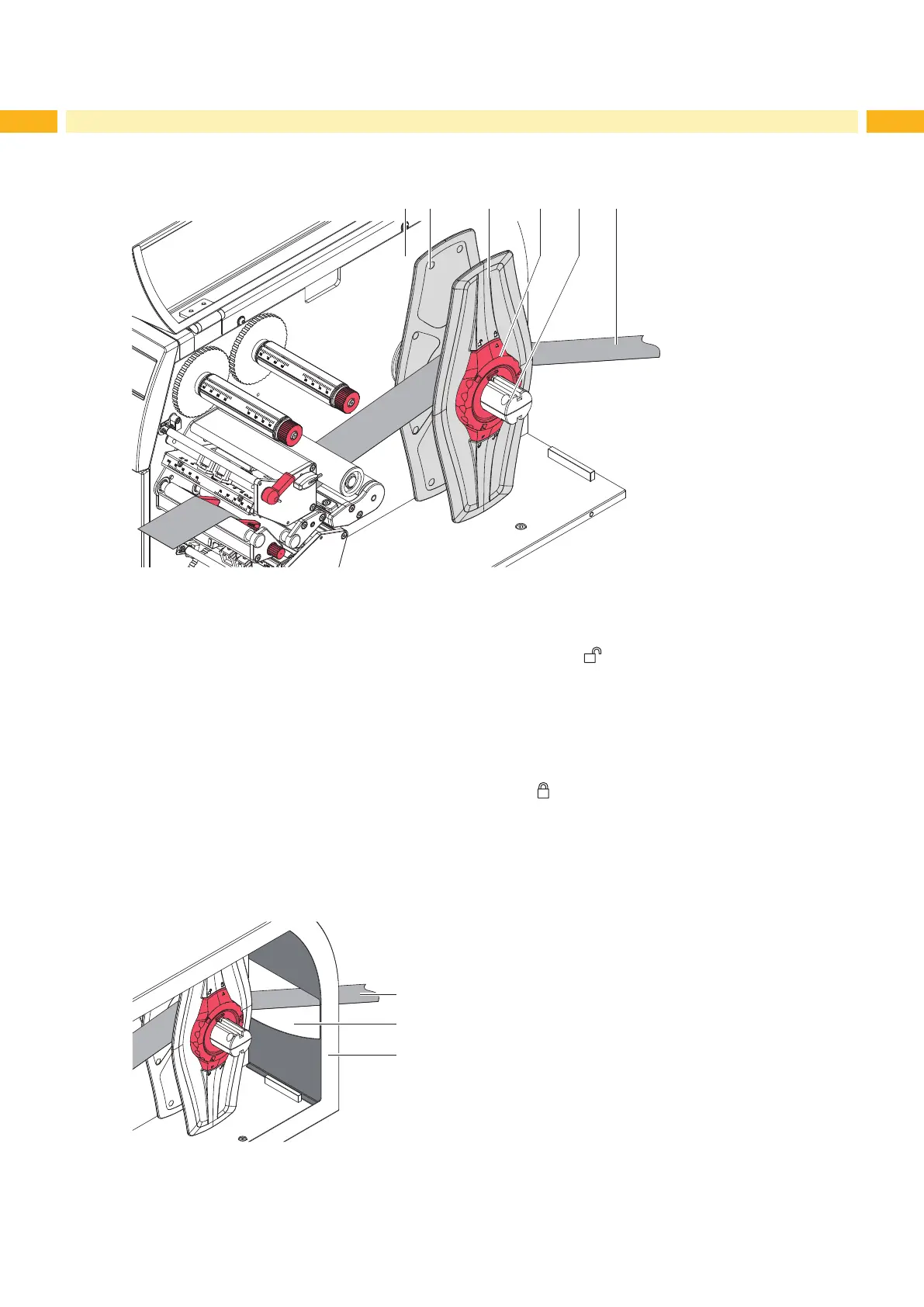
1 2 3 4 65
Fig. 11 Loading media from external supply
1. Position media supply behind the printer.
2. Turn ring (4) counterclockwise, so that the arrow points to the symbol , and thus release the margin stop (3).
Leave the margin stop on the roll retainer (5).
3. Push the inner margin stop (2) against the chassis (1) until it stops. Thus the other margin stop (3) will be moved
outwards.
4. Push label strip (6) between the margin stops (2,3) to print unit via the roll retainer (5).
5. Push the outer margin stop (3) until both margin stops (2, 3) touch the label strip (6) without clamping or bending
it.
6. Turn ring (4) clockwise, so that the arrow points to the symbol , and thus x the margin stop (3) on the roll
retainer.
7. Insert label strip into printhead ( 4.1.2 on page 13).
8. Set label sensor ( 4.1.3 on page 13).
9. Close the cover (8). Ensure that the media (6) coming from the supply will be inserted accurately into the slot (7)
of the cover.
6
7
8
Fig. 12 Inserting media through the cover slot


 To Next Page