23
8 Ofine Menu
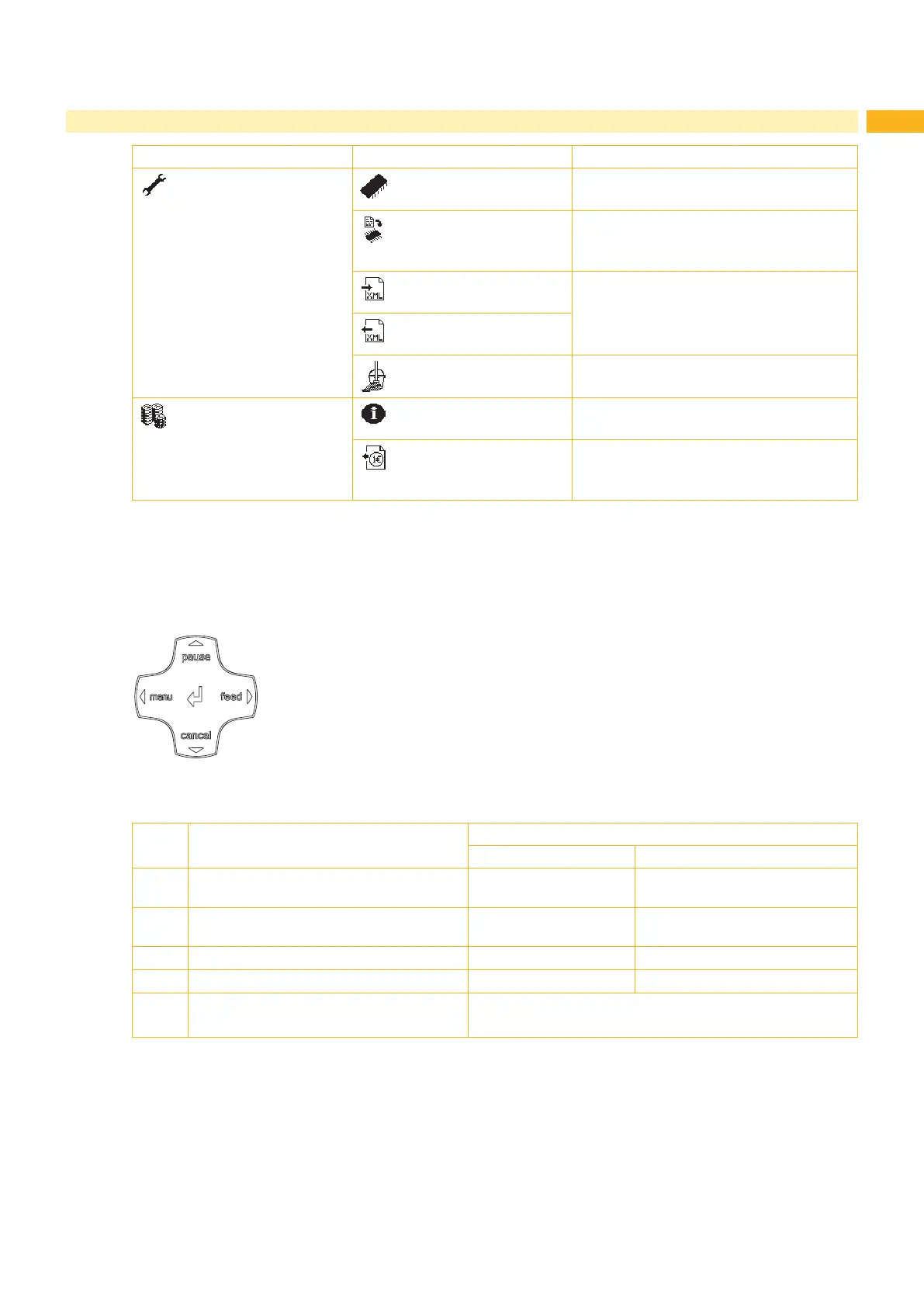
1st menu level 2nd menu level Access
Service Firmware upd.
PIN protection possible
Firmw. fr. card
¾ Only with memory medium inserted in
the default card slot
PIN protection possible
Save settings
¾ Only with memory medium inserted in
the default card slot
PIN protection possible
Load settings
Cleaning interval
PIN protection possible
PPP™ Short status PPP™
Load PPP voucher
¾ Only with memory medium inserted in
the default card slot
PIN protection possible
Table 8 Menu structure
8.2 Navigating in the Ofine Menu
All settings and functions in the ofine menu can be controlled with the navigator pad.
Fig. 21 Navigator pad
Key Menu Parameter setting
Parameter choice Numeric value
~
Return from a submenu - Increase of the number at the
cursor position
Jump into a submenu - Decrease of the number at the
cursor position
|
Menu option to the left Sheets to the left Cursor shift to the left
}
Menu option to the right Sheets to the right Cursor shift to the right
8
Start of a selected menu option
Pressing 2 s: Leaving the ofine menu
Conrmation of the selected value
Pressing 2 s: Abort without changing the value
Table 9 Key functions in the ofine menu


 To Next Page