EasyManua.ls Logo

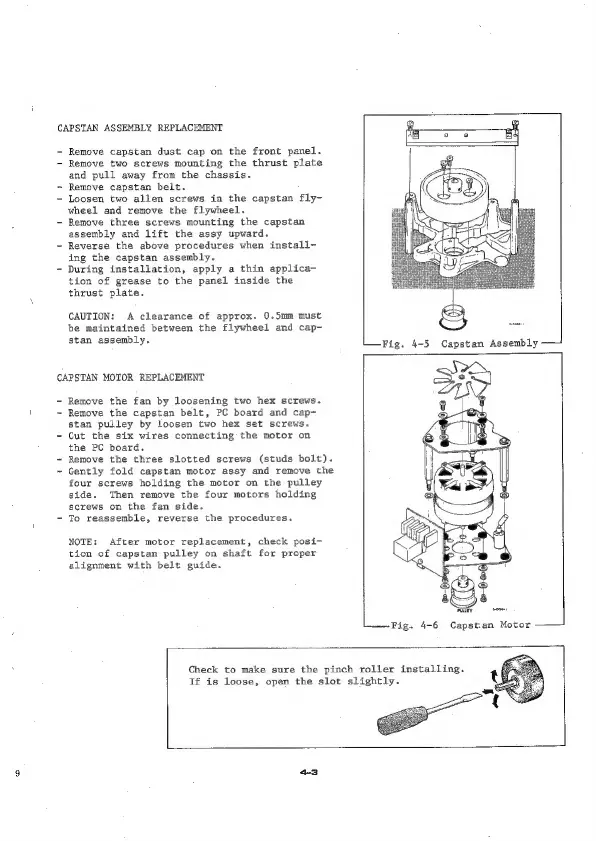
Teac A-6010GSL - Capstan Assembly Replacement; Capstan Motor Replacement

Teac A-6010GSL
73 pages
Print Icon
To Next Page IconTo Next Page
To Previous Page IconTo Previous Page
Loading...
CAPSTAN
ASSEMBLY
REPLACEMENT
-
Remove
capstan
dust
cap
on
the
front
panel.
-
Remove
two
screws
mounting
the
thrust
plate
and
pull
away
from
the
chassis.
-
Remove
capstan
belt.
-
Loosen
two
allen
screws
in
the
capstan
fly-
wheel
and
remove
the
flywheel.
-
Remove
three
screws
mounting
the
capstan
assembly
and
lift
the
assy
upward.
~
Reverse
the
above
procedures
when
install-
ing
the
capstan
assembly.
-
During
installation,
apply
a
thin
applica-
tion
of
grease
to
the
panel
inside
the
thrust
plate.
CAUTION:
A
clearance
of
approx.
0.5mm
must
be
maintained
between
the
flywheel
and
cap-
stan
assembly.
CAPSTAN
MOTOR
REPLACEMENT
-
Remove
the
fan
by
loosening
two
hex
screws.
~
Remove
the
capstan
belt,
PC
board
and
cap-
stan
pulley
by
loosen
two
hex
set
screws.
~
Cut
the
six
wires
connecting
the
motor
on
the
PC
board.
~
Remove
the
three
slotted
screws
(studs
bolt).
~
Gently
fold
capstan
motor
assy
and
remove
the
four
screws
holding
the
motor
on
the
pulley
side.
Then
remove
the
four
motors
holding
screws
on
the
fan
side.
-
To
reassemble,
reverse
the
procedures.
NOTE:
After
motor
replacement,
check
posi-
tion
of
capstan
pulley
on
shaft
for
proper
alignment
with
belt
guide.
Check
to
make
sure
the
pinch
roller
installing.
If is
loose,
open
the
slot
slightly.

Related product manuals