EasyManua.ls Logo

Teac A-6010GSL - Head Mechanical Alignment; Head Assembly Replacement; Individual Head Replacement

Teac A-6010GSL
73 pages
Print Icon
To Next Page IconTo Next Page
To Previous Page IconTo Previous Page
Loading...
HEAD
REPLACEMENT
NOTE:
Heads
can
be
replaced
individually
or
as
a
complete
assembly.
Azimuth
adjustment
(electronic)
is
not
to
be
performed
until
all
mechanical
alignments
have
been
performed.
After
replacing
the
heads,
proceed
to
the
next
page
for
mechanical
alignment.
CAUTION:
All
power
must
be
removed
from
the
unit
when
replacing
heads
to
prevent
transient
pulses
from
passing
through
the
heads.
These
may
cause
strong
magnetization
of
the
head
material
or
damage
the
delicate
winding.
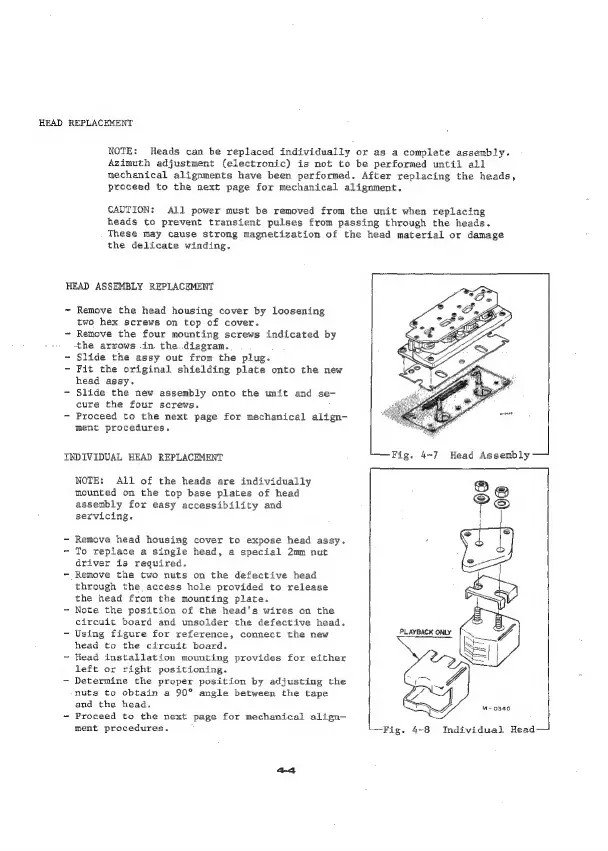
HEAD
ASSEMBLY
REPLACEMENT
~
Remove
the
head
housing
cover
by
loosening
two
hex
screws
on
top
of
cover.
~
Remove
the
four
mounting
screws
indicated
by
the
arrows
in
the.
diagram.
~
Slide
the
assy
out
from
the
plug.
-
Fit
the
original
shielding
plate
onto
the
new
head
assy.
-
Slide
the
new
assembly
onto
the
unit
and
se-
cure
the
four
screws.
-
Proceed
to
the
next
page
for
mechanical
align-
ment
procedures.
INDIVIDUAL
HEAD
REPLACEMENT
NOTE:
All
of
the
heads
are
individually
mounted
on
the
top
base
plates
of
head
assembly
for
easy
accessibility
and
servicing.
-
Remove
head
housing
cover
to
expose
head
assy.
~
To
replace
a
single
head,
a
special
2mm
nut
driver
is
required.
~-
Remove
the
two
nuts
on
the
defective
head
through
the,
access
hole
provided
to
release
the
head from
the
mounting
plate.
-
Note
the
position
of
the
head's
wires
on
the
circuit
board
and
unsolder
the
defective
head.
-
Using
figure
for
reference,
connect
the
new
head
to
the
circuit
board.
-
Head
installation
mounting
provides
for
either
left
or
right
positioning.
-
Determine
the
proper
position
by
adjusting
the
nuts
to
obtain
a
90°
angle
between
the
tape
and the
head.
~
Proceed
to
the
next
page
for
mechanical
align—
ment
procedures.
'-Fig.
4-8
Individual
Head—