EasyManua.ls Logo

Teac A-6300 - Page 10

Teac A-6300
112 pages
Print Icon
To Next Page IconTo Next Page
To Previous Page IconTo Previous Page
Loading...
REMOVAL
OF
CAPSTAN
MOTOR
1.
Remove
the
3
screws
holding
the
capstan
motor.
2.
Unsolder
the
6
wires
connecting
the
capstan
motor.
3.
Remove
the
4
screws
holding
the
capstan
motor.
Watch
for
the
Rubber
Cushions.
4.
Loosen
the
2
set
screws
(hex
head)
in
pulley
and
lift
off
pulley.
-
NOTE
-
Clean
the
drive
belt
with
TZ-261B
and
the
motor
pulley
and
capstan
flywheel
with
TZ-261A.
Be
sure
to
note
the
color
code
of
the
wires
so
you
can
replace
them
correctly.
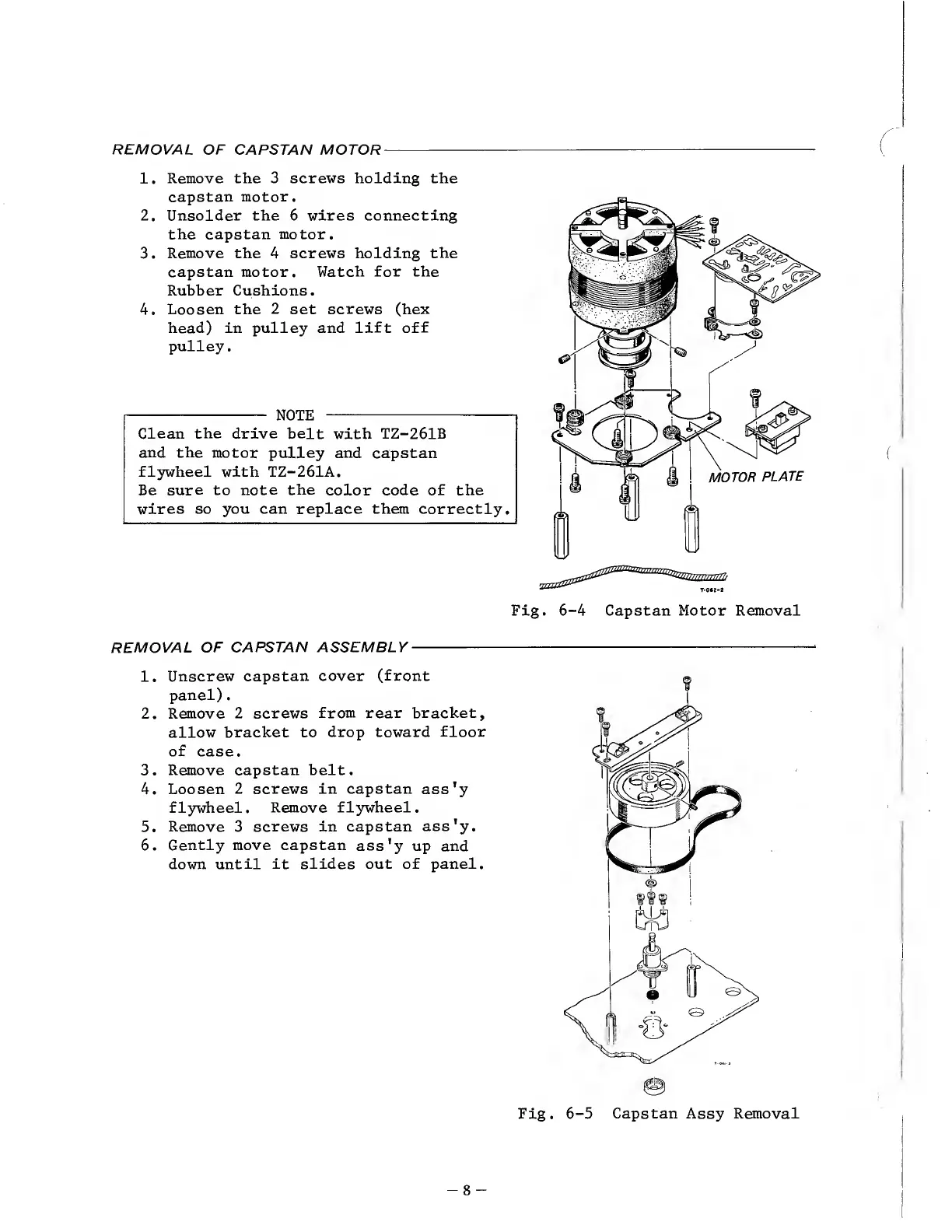
Fig.
6-4
Capstan
Motor
Removal
REMOVAL
OF
CAPSTAN
ASSEMBLY
-
1.
Unscrew
capstan
cover
(front
panel).
2.
Remove
2
screws
from
rear
bracket,
allow
bracket
to
drop
toward
floor
of
case.
3.
Remove
capstan
belt.
4.
Loosen
2
screws
in
capstan
ass'y
flywheel.
Remove
flywheel.
5.
Remove
3
screws
in
capstan
ass'y.
6.
Gently
move
capstan
ass'y
up
and
down
until
it
slides
out
of
panel.
Fig.
6-5
Capstan
Assy
Removal
-
8
-

Other manuals for Teac A-6300

Related product manuals