Connections
~
CAUTION
This
unit
does
not
have a
volume
adjustment
function
. Connect
this unit
to
a preamplifier or another device such
as
a
DAC
that
has
a preamplifier function, and
use
that
device to adjust the volume. If
you connect this unit to a device that cannot be used to adjust the
output
volume, you will
not
be able
to
adjust the volume
dur
ing
playback. Sound mi
ght
be
output
from the speakers at a very loud
volume, which could harm hearing or damage equipment.
The
use
of
this unit's
two
built-in amplifier chan
ne
ls depends on the
OUTPUT
MODE
switch setting.
Connection exampl
es
for each mode
are
provided below.
~
Complete all other connections before setting
the
STANDBY/ON switch
to
ON.
• Carefully
read
the manuals
of
the devices that you
are
connecting and follow their instructions when making connections.
• Do not bundle connecting cabl
es
with power cords. Doing
so
could cause noise.
• Connect
all
plugs
comp
letely.
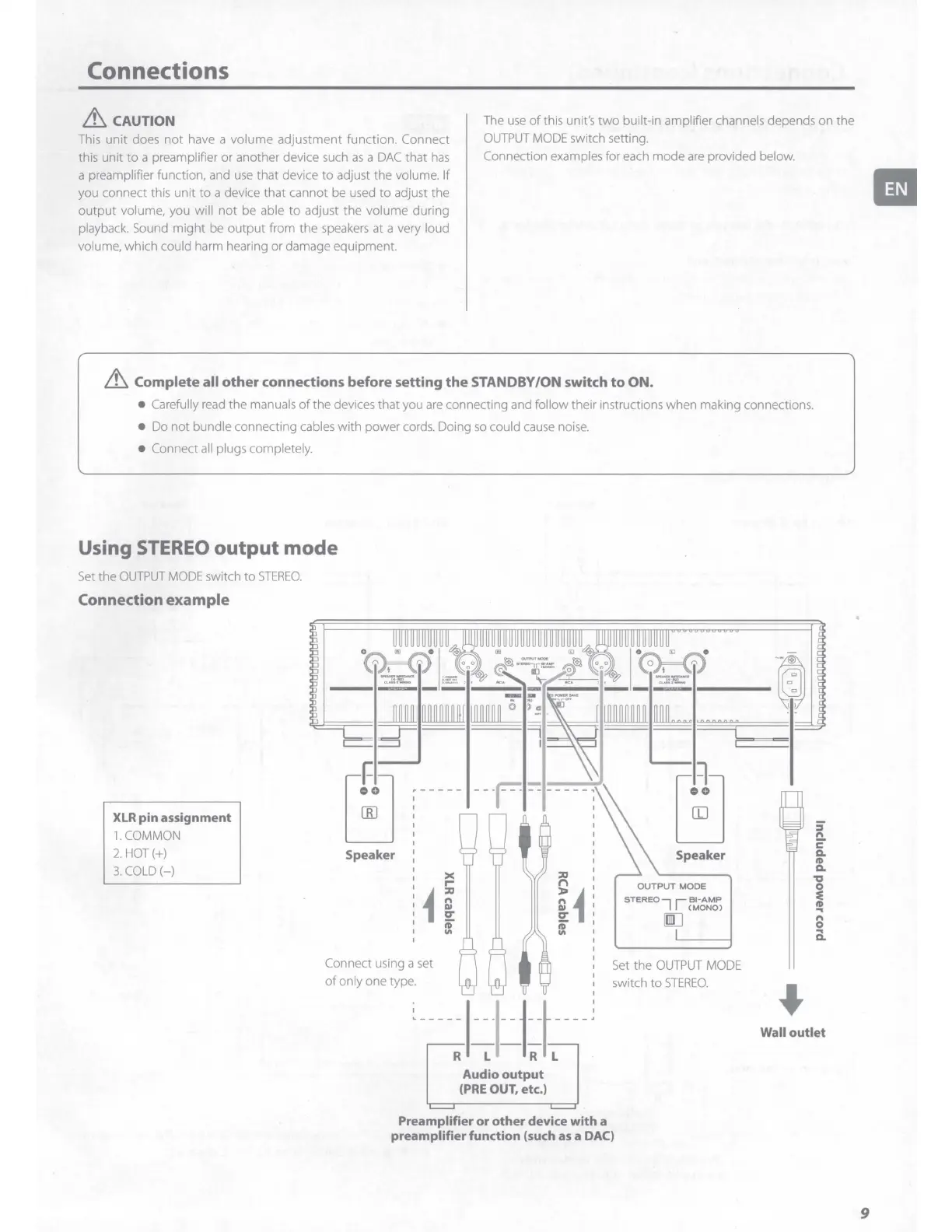
Using
STEREO
output
mode
Set
the
OUTPUT
MODE
switch
to
STEREO.
Connection example
XLR
pin assignment
1. COMMON
2. HOT(+)
3.
COLD
(-)
Speaker
><
I"'"
i
::0
@
er
iD"
Connect using a set
of
only one type.
"'
Speaker
OUTPUT
MODE
STEREO
7 1
~~
-
t~ci>
iJ
Set
the
OUTPUT
MODE
switch
to
STEREO.
:i
n
c
0.
~
0.
'ti
i
..
8
a.
Wall
outlet
Audio
output
(PRE
OUT, etc.)
Preamplifier or
other
device with a
preamplifier function (such
as
a DAC)
II
9



 To Next Page