EasyManua.ls Logo

Teac AP-701 - Front Panel Overview; Controls and Indicators

Teac AP-701
19 pages
Print Icon
To Next Page IconTo Next Page
To Previous Page IconTo Previous Page
Loading...
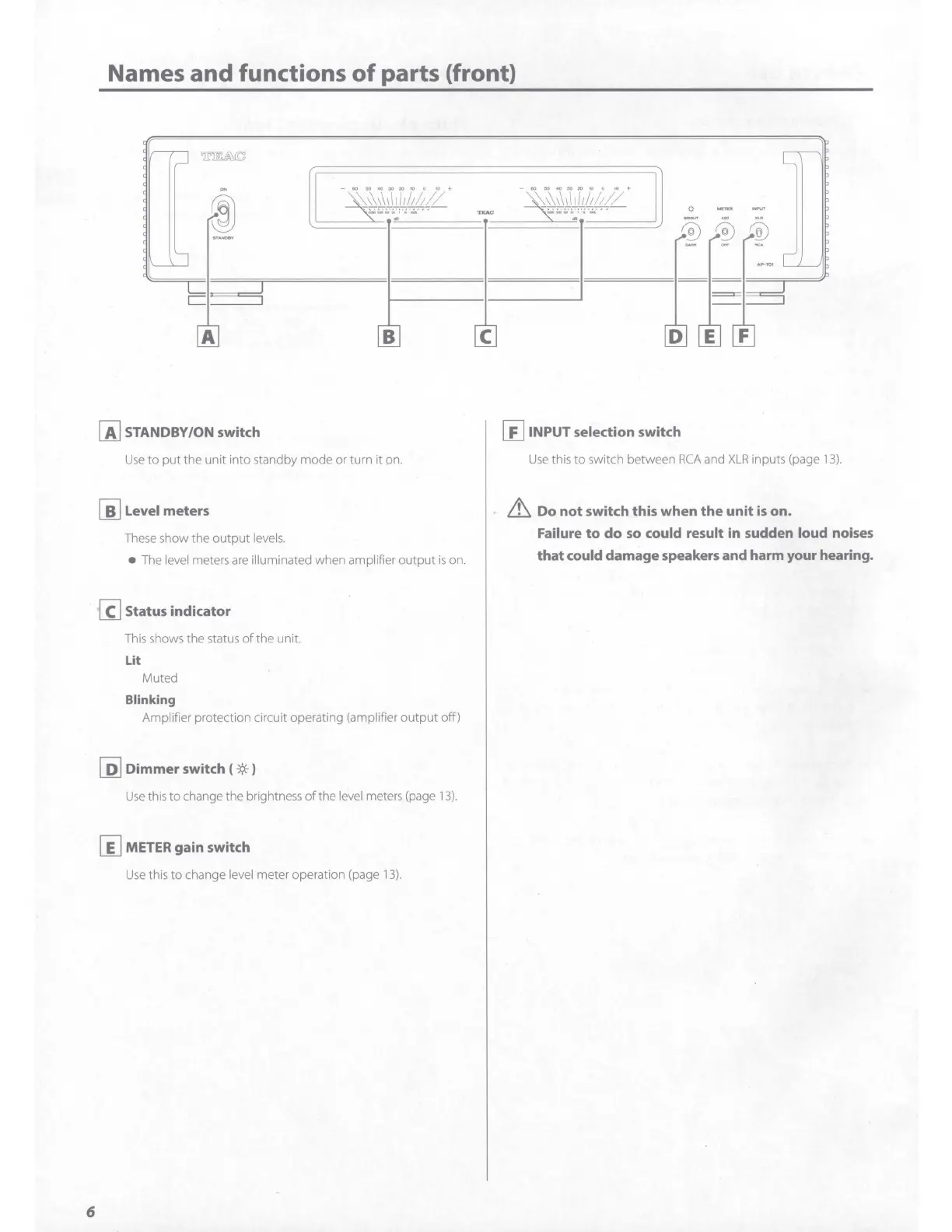
Names and functions
of
parts (front)
A
[ij
STANDBY/ON switch
'
'"
' " " " " '
''
..............
,
,._
B
Use
to
put
the unit into standby
mode
or turn it on.
[i] Level meters
These show
the
output
levels.
The level meters
are
illuminated when amplifier
output
is on.
@ Status indicator
6
This shows the status
of
the
unit.
Lit
Muted
Blinking
Amplifier protection circuit operating (amplifier
output
off)
[ii]
Dimmer
switch (
-;«-
)
Use
this
to
change the brightness
of
the level meters (page
13).
[iJ
METER gain switch
Use
this
to
change level meter operation (page
13).
C
@ INPUT selection switch
Use
this
to
switch between
RCA
and
XLR
inputs (page
13).
Lt,.
Do
not
switch this when
the
unit
is
on.
Failure
to
do
so
could result in sudden loud noises
that
could damage speakers and harm your hearing.

Related product manuals