Connections {continued)
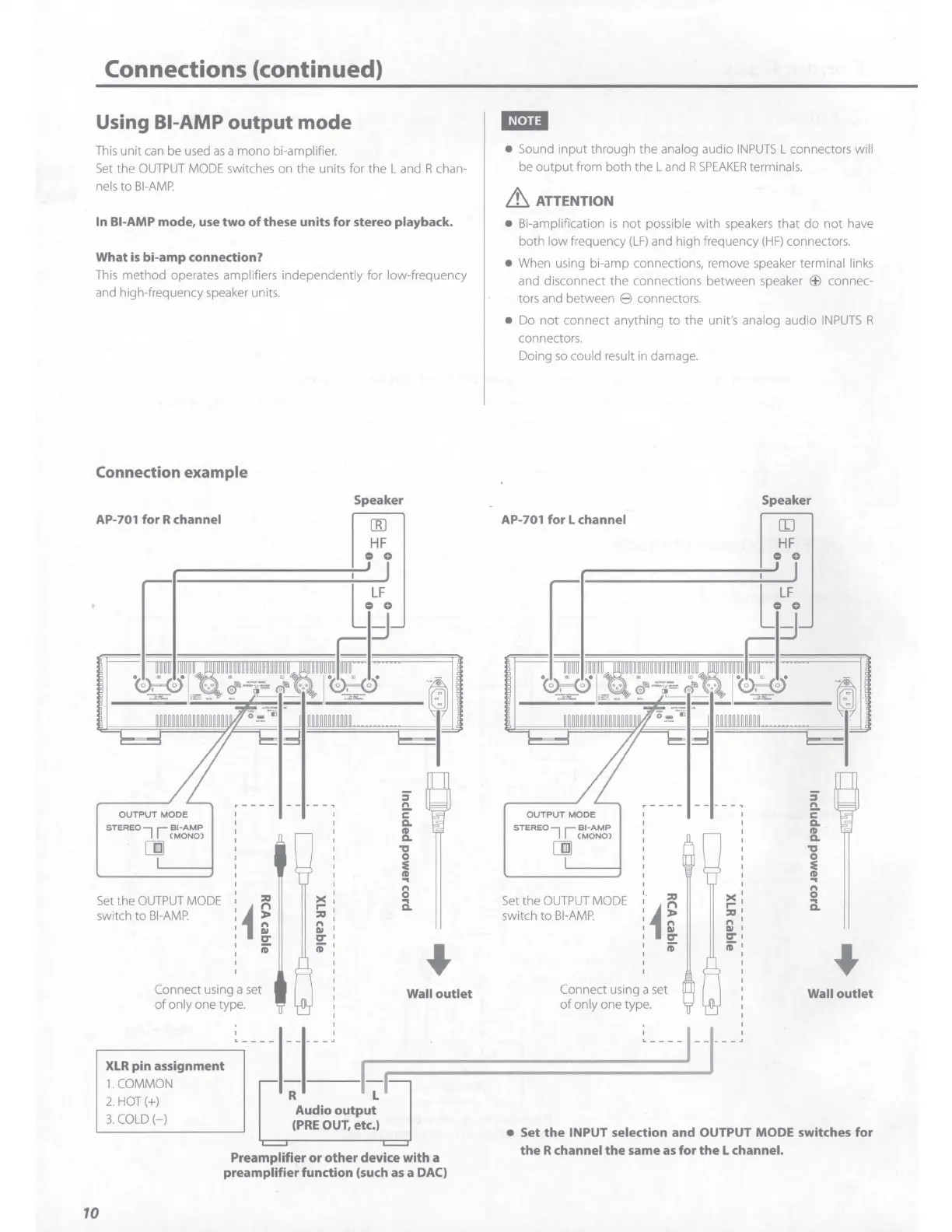
Using Bl-AMP
output
mode
This
unit
can
be used
as
a
mono
bi-amp
li
fier.
Set
the
OUTPUT
MODE
switches on
th
e units for the L and R chan-
ne
ls
to
Bl-AMP.
In Bl-AMP mode, use
two
of
these units for stereo playback.
What
is
bi-amp connection?
This method operates amplifiers independently for low-frequency
and high-frequency speaker units.
Connection example
AP-701 for R channel
OUTPUT
MODE
STEREO
7 1
r~-t~ti
cm
Set
the
OUTPUT
MODE
switch
to
Bl-AMP
:ll:J
ii
;-
Connect using a set
of
only one type.
XLR
pin assignment
1.COMMON
2.
HOT(+)
3.
COLD(-)
Speaker
R
I
)(
I
r-
,
:ll:J
I
Ii)
,
D'"
;-
[[)
HF
0 0
Audio
output
(PRE
OUT, etc.)
5'
n
2"
c..
ID
c..
'ti
I
..
n
0
a.
Wall outlet
Preamplifier
or
other device with a
preamplifier function (such
as
a DAC)
10
• Sound
input
through the analog audio I
NPUTS
L connectors will
be
output
from both
the
Land
R
SPEAKER
terminals.
it
ATTENTION
• Bi-amp
li
fication
is
not
possible
with
speakers that
do
not
have
both low frequency
(LF)
and high frequency
(HF)
connectors.
• When using bi-amp connections, remove speaker terminal links
and disconnect
the
connections between speaker
EB
connec-
tors and between 8 connectors.
• Do
not
connect anything
to
the
unit's analog audio
INPUTS
R
connectors.
Doing
so
could result in damage.
AP-701 for L channel
OUTPUT
MODE
STEREO
7 1
r~
-
t~ti
cm
Set
the
OUTPUT
MODE
switch
to
Bl-AMP
:ll:J
ii
;-
Connect using a
set
of
only one type.
><
r-
:ll:J
n
Ill
D'"
;-
Speaker
II)
HF
0 0
5'
n
2"
c..
ID
c..
'ti
I
..
n
0
a.
Wall
outlet
• Set
the
INPUT selection and OUTPUT MODE switches for
the
R channel
the
same
as
for
the
L channel.



 To Next Page