- -
26
TV Function
Time Setting
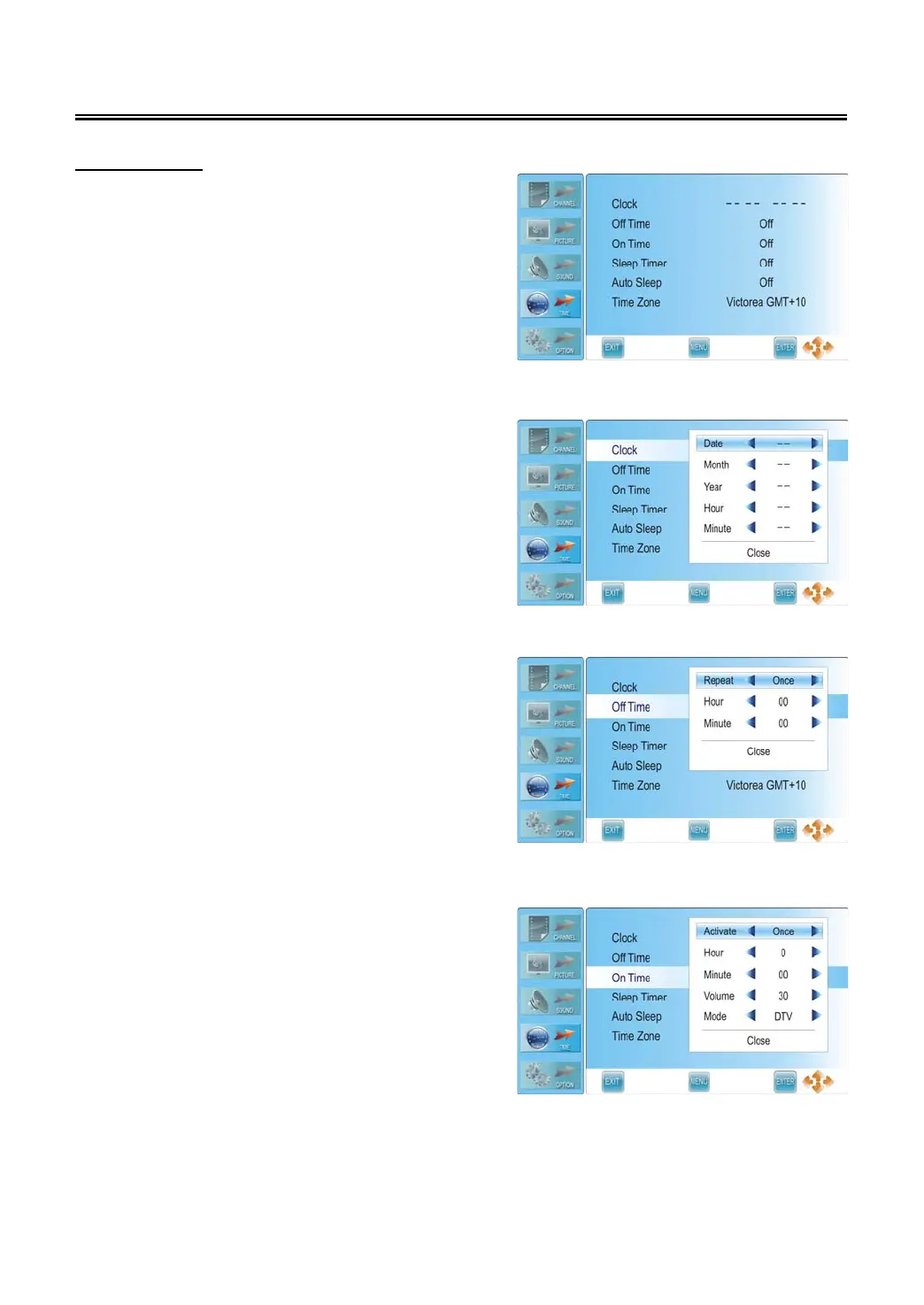
Press the MENU button once to enter CHANNEL
setup menu and press the ▲▼ button to select
TIME, the screen will display as shown.
Press the ENTER or ► button to enter the menu.
In the TIME setup menu, press the ▲▼ button to
select the desired item. Press the MENU button to
return to the previous menu. Press the EXIT button
to exit.
Clock
Press the ▲▼ button to select Clock and press the
► or ENTER button to prompt a information box, as
shown:
Press the ▲▼ button to select Date, Month, Year,
Hour or Minute, press the ◄► button to set.
Press the ENTER button to confirm after selecting
Close.
Off Time
Press the ▲▼ button to select Off Time and press
the ENTER or ► button to prompt a information
box, as shown:
Press the ▲▼ button to select Repeat, Hour or
Minute, press the ◄► button to set.
Press the ENTER button to confirm after selecting
Close.
On Time
Press the ▲▼ button to select On Time and press
the ENTER or ► button to prompt a information
box, as shown:
Press the ▲▼ button to select Activate, Hour,
Minute, Volume or Mode, press the ◄► button to
set. Press the ENTER button to confirm after
selecting Close.



 To Next Page