The equipment draws nominal non-operating power from
the AC outlet with its POWER switch in the OFF position.
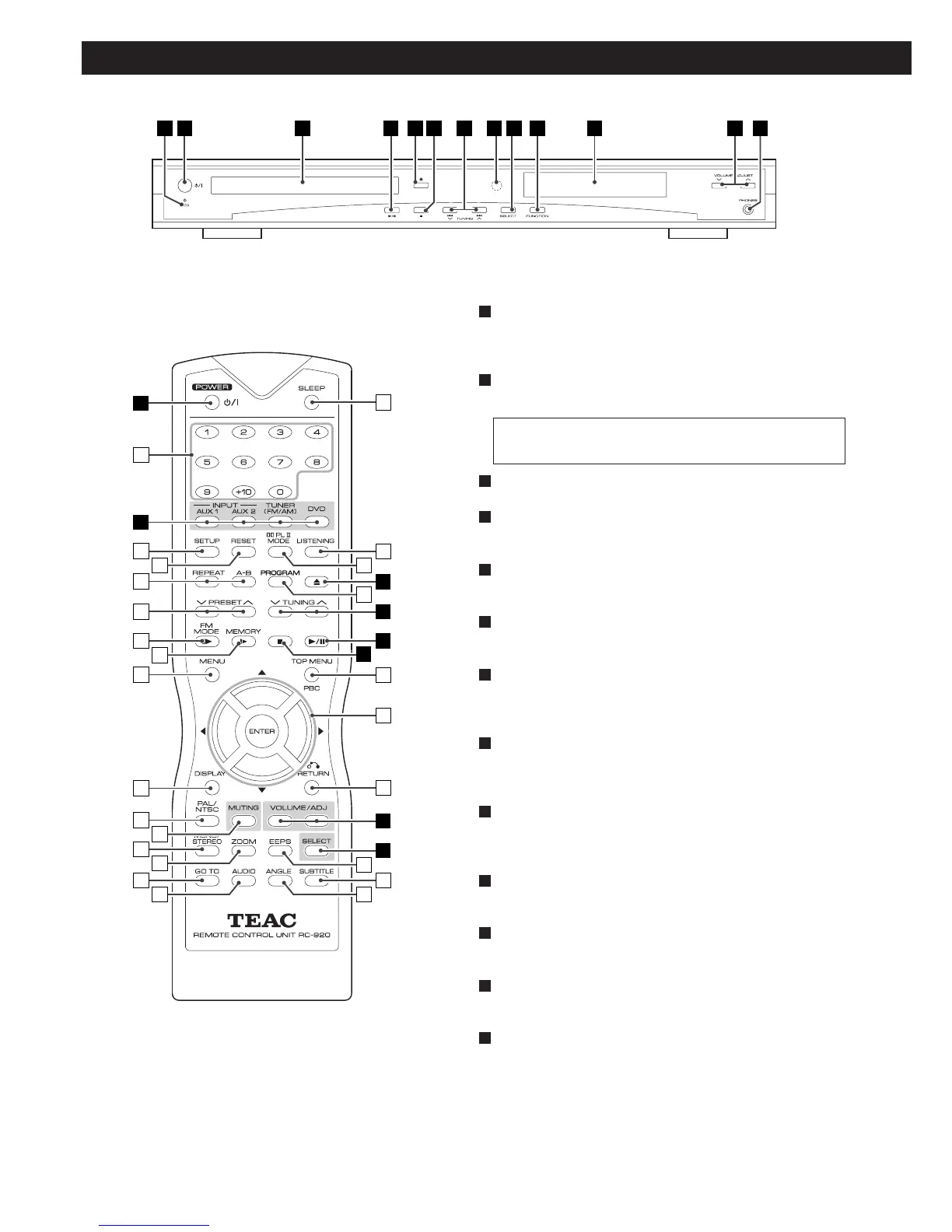
STANDBY indicator
This indicator lights when the unit is in the standby mode.
When the unit is turned on, it goes off.
POWER switch
Press this switch to turn the unit on or off (standby).
Disc tray
PLAY/PAUSE (y
/J)
In DVD mode, use this button to start or pause playback.
OPEN/CLOSE (L)
Use this button to open and close the disc tray.
STOP (H)
In DVD mode, use this button to stop playback.
SKIP/TUNING (.//)
In DVD mode, use these buttons to skip chapters or tracks.
In TUNER mode, use these buttons to tune in a station.
REMOTE SENSOR
When operating the remote control unit, point it towards the
REMOTE SENSOR.
SELECT
Select a speaker by pressing this button repeatedly, and adjust
the level using the VOLUME buttons.
FUNCTION (DVD, TUNER, AUX1, AUX2)
Used to select a function.
Display
When the unit is on, the current status of the unit is displayed.
VOLUME/ADJUST
Press the VOLUME buttons to adjust the master volume.
PHONES
For private listening, insert the headphones plug into this jack,
and adjust the volume using the VOLUME buttons.
M
L
K
J
I
H
G
F
E
D
C
B
A



 To Next Page