26
Settings
To change the setting, use the
5
/
b
buttons until the item you
want to change is highlighted, then press the ENTER button to
confirm your selection.
Use the numeric buttons (0 to 9) to key in numbers, such as the
password for parental control.
Use the
5
/
b
/
g
/
t
buttons and the ENTER button to select
and set other items.
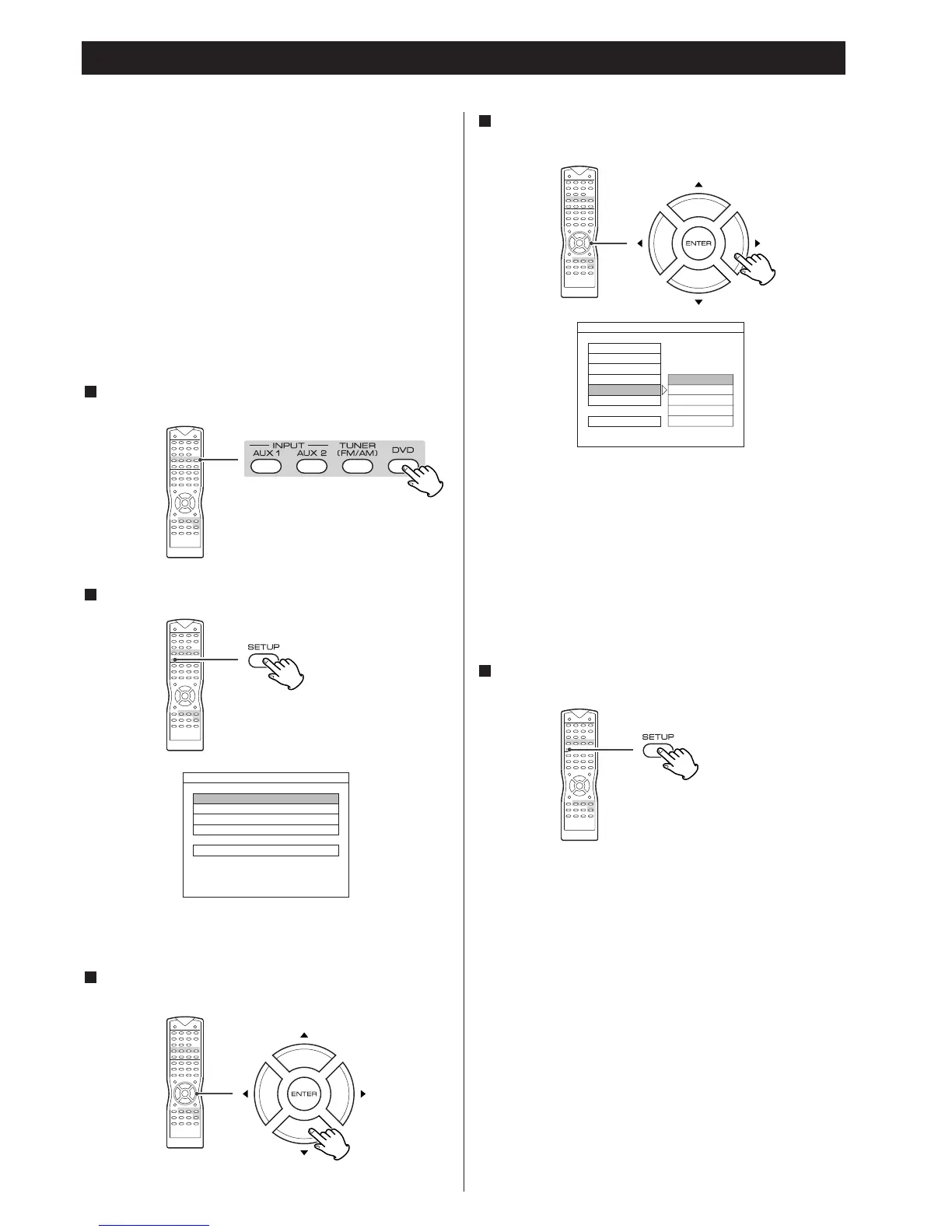
When the settings have been finished, press the SETUP button
to exit the SETUP menu.
4
This chapter describes how to use the SETUP menu. Most
settings and adjustments are required to be set when you first
use the system.
Using the SETUP menu, you can adjust the picture size, set a
language for the subtitles and the OSD (on screen displays), limit
playback by children, et cetera.
Notes
<
Some settings cannot be selected during playback and
RESUME mode. In that case, press the STOP button once or
twice to stop playback completely.
MAKE SURE YOUR TV IS CONNECTED TO THE DVD PLAYER AND
TURNED ON. SET UP USES ON-SCREEN MENUS TO PROGRAM.
If another function is selected, press the DVD button to select
DVD.
1
Press the SETUP button in the stop mode.
2
The setup menu appears on the TV screen.
Select an item using the
5
/
b
buttons, and then press the
ENTER button.
3
Select an item you want to change using the
5
/
b
buttons.
Press the
t
button to go to the right option list.
3



 To Next Page