EasyManua.ls Logo

Teac V-8030S - Page 10

Teac V-8030S
45 pages
Print Icon
To Next Page IconTo Next Page
To Previous Page IconTo Previous Page
Loading...
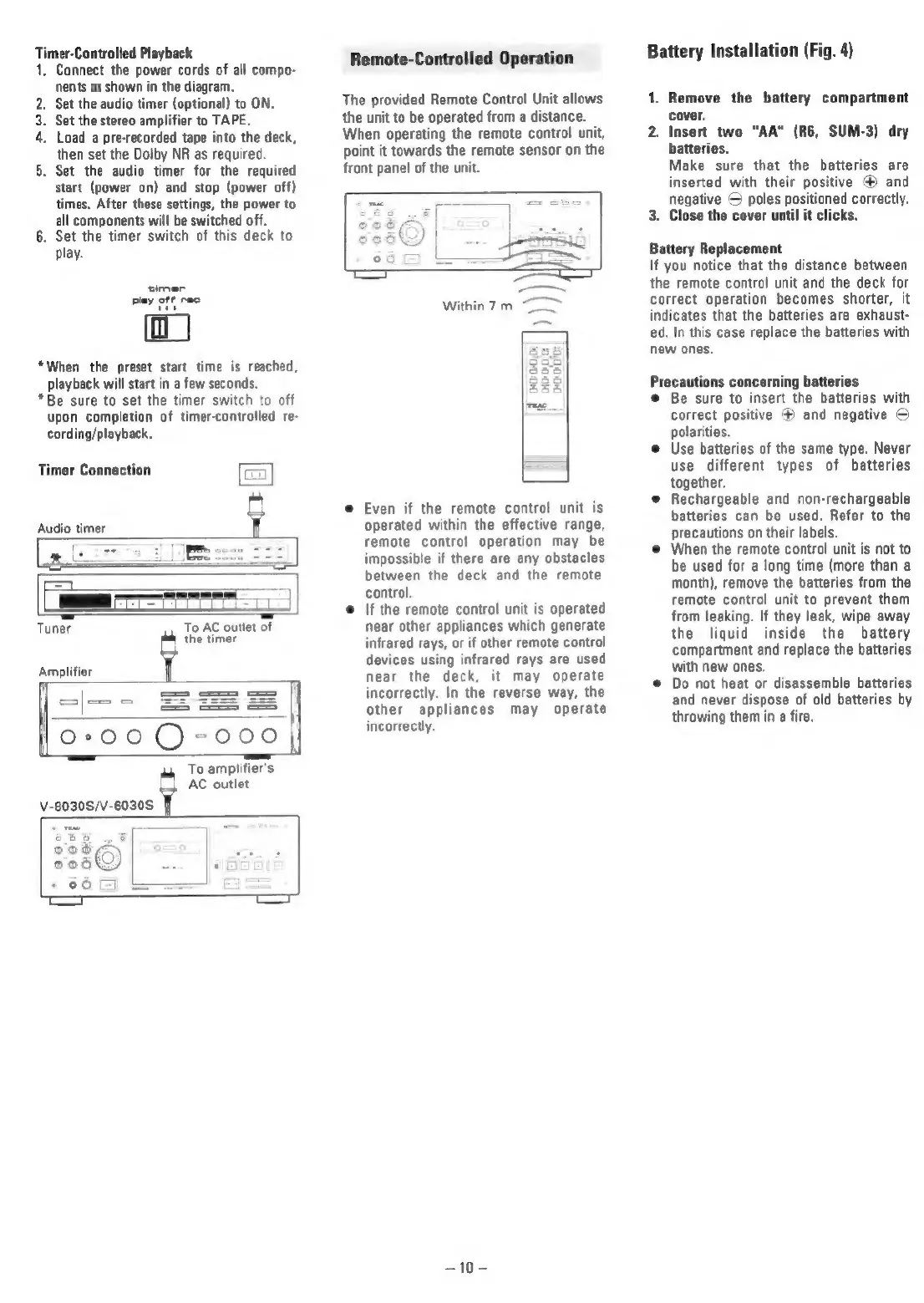
Timer-Controlled
Playback
1,
Connect
the
power
cords
of
all
compo-
nents
as
shown
in
the
diagram.
.
Set
the
audio
timer
(optional)
to
ON.
.
Set the
stereo
amplifier
to
TAPE.
.
Load
a
pre-recorded
tape
into
the
deck,
then
set
the
Dolby
NR
as
required.
.
Set
the
audio
timer
for
the
required
start
(power
on)
and
stop
(power
off)
times.
After
these
settings,
the
power
to
all
components
will
be
switched
off.
6.
Set the
timer
switch
of
this
deck
to
play.
PON
a
*When
the
preset
start
time
is
reached,
playback
will
start
in
a
few
seconds.
*Be
sure
to
set
the
timer
switch
to
off
upon
completion
of
timer-controlled
re-
cording/playback,
Timer
Connection
[umn
&
Audio
timer
r
=
=
Tuner
To
AC
outlet
of
Amplifier
alee
5
the
timer
=
||
fo-00Q-000|
To
amplifier's
AC
outlet
V-8030S/V-6030S
vo
—-=
Remote-Controlled
Operation
The
provided
Remote
Control
Unit
allows
the
unit
to
be
operated
from
a
distance.
When
operating
the
remote
control
unit,
point
it
towards
the
remote
sensor
on
the
front
panel
of
the
unit.
©
Even
if
the
remote
control
unit
is
operated
within
the
effective
range,
remote
contro!
operation
may
be
impossible
if
there
are
any
obstacles
between
the
deck
and
the
remote
control.
If
the
remote
control
unit
is
operated
near
other
appliances
which
generate
infrared
rays,
or
if
other
remote
control
devices
using
infrared
rays
are
used
near
the
deck,
it
may
operate
incorrectly.
In
the
reverse
way,
the
other
appliances
may
operate
incorrectly.
—10-
Battery
Installation
(Fig.
4)
1.
Remove
the
battery
compartment
cover.
2.
Insert
two
"AA"
(R6,
SUM-3)
dry
batteries.
Make
sure
that
the
batteries
are
inserted
with
their
positive
®
and
negative
©
poles
positioned
correctly.
3.
Close
the
cover
until
it
clicks.
Battery
Replacement
If
you
notice
that
the
distance
between
the
remote
control
unit
and
the
deck
for
correct
operation
becomes
shorter,
it
indicates
that
the
batteries
are
exhaust-
ed.
In
this
case
replace
the
batteries
with
new
ones.
Precautions
concerning
batteries
©
Be
sure
to
insert
the
batteries
with
correct
positive
@
and
negative
©
polarities.
©
Use
batteries
of
the
same
type.
Never
use
different
types
of
batteries
together.
@
Rechargeable
and
non-rechargeable
batteries
can
be
used.
Refer
to
the
precautions
on
their
labels.
©
When
the
remote
control
unit
is
not
to
be
used
for
a
long
time
(more
than
a
month),
remove
the
batteries
from
the
remote
control
unit
to
prevent
them
from
leaking.
If
they
leak,
wipe
away
the
liquid
inside
the
battery
compartment
and
replace
the
batteries
with
new
ones.
©
Do
not
heat
or
disassemble
batteries
and
never
dispose
of
old
batteries
by
throwing
them
in
a
fire.

Related product manuals