a Android smartphone, iPhone, etc.
Install the app to control this unit.
b Wireless LAN antenna connectors and
LAN antennas
Connect the included wireless LAN antennas.
c Analog audio input (LINE IN) connectors
Connect an analog audio output device.
Use commercially-available RCA audio cables
for connections.
Connect this unit’s R input connector to the R out-
put connector of the audio output device, and this
unit’s L input connector to the L output connector
of the other device.
RCA audio cables
White (L)
Red (R)
White (L)
Red (R)
d Digital audio input (DIGITAL IN)
connector
Connect a digital audio output device.
Use a commercially-available optical dig-
ital cable with rectangular connectors for
connection.
e Power inlet (~IN)
Connect the supplied power cord here.
After all other connections are complete, connect the
power cord’s plug to a wall outlet.
V
Do not use any power cord other than the
one included with this unit. Use of other
power cords could result in fire or electric
shock.
V
Unplug the cord from the outlet when not
using the unit for a long time.
f ETHERNET port
Connect a LAN cable to this port when you want to
this unit to a network with a wired connection.
Use a commercially-available LAN cable for
connection.
o When a LAN cable is connected, this unit’s wire-
less LAN function (Wi-Fi) will be disabled.
g USB port
Connect USB flash drives here.
o Install the dedicated app onto a smartphone or
tablet in advance, and use it to work with this
device.
h Wi-Fi™ router
Connect this unit, media servers, smart phones and
other devices to a router and create a network.
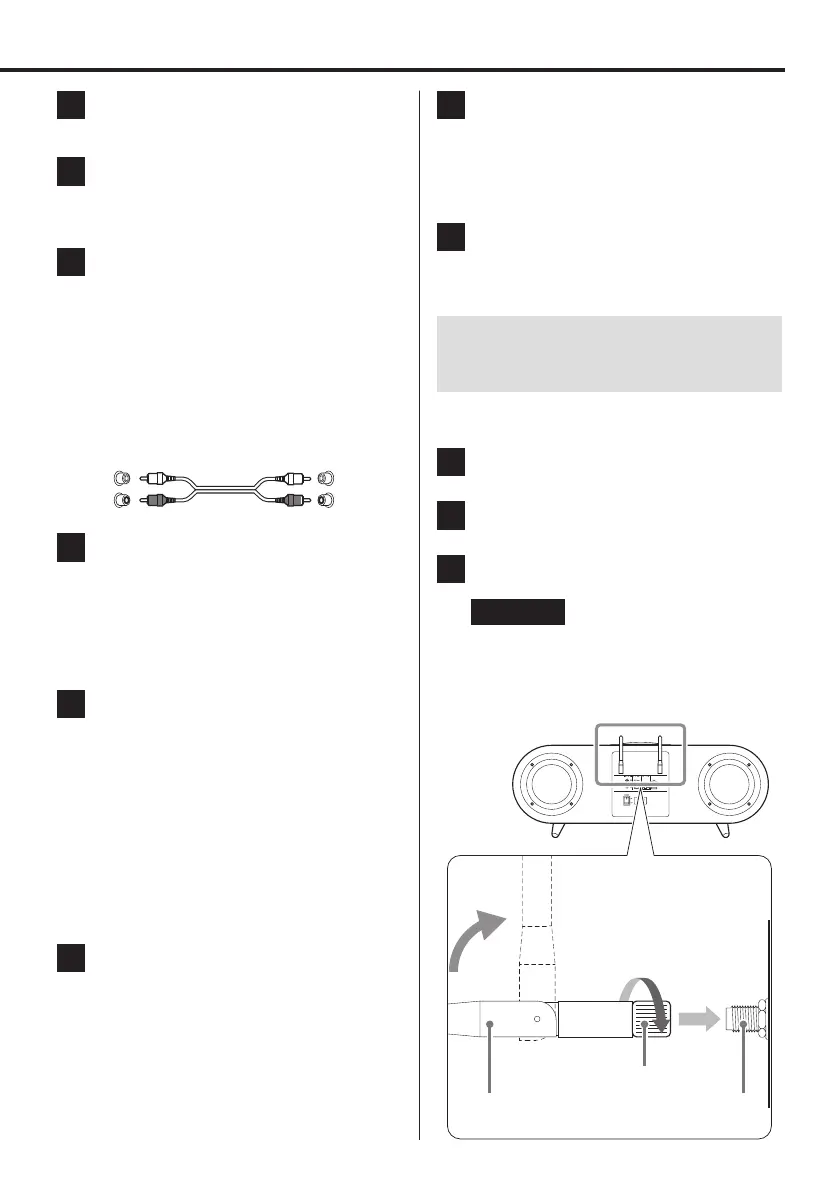
Connecting the wireless LAN
antennas
Follow these procedures to connect each of the two
included antennas.
1 Insert the antenna into an antenna
connector.
2 Turn the antenna nut to secure it in the
antenna connector.
3 Raise the antenna.
ATTENTION
o Be careful of the direction that you bend the
antennas.
The antennas only bend in one direction. Do
not forcibly bend the antennas.
Nut
Wireless LAN antenna
connector
Wireless LAN antenna
Connections
9



 To Next Page