17
CHboileroperationschedule
Oncethisoptionhasbeenselected,thedisplaysshowsiconsindicatingdaysoftheweek.Selectagivendayto
adjusttheoperationscheduletoindividualneeds.
ThistypeofweeklycontrolenablestheusertoconfiguretheperiodsofCHboileroperationonparticulardays
oftheweek,withtheaccuracyof30minutes.Duringtheperiodsofinactivity,theCHboilerremainsdamped
regardlessofotherfactors(e.g.signalfromtheroomregulator).
WEEKLYCONTROLSETTING
–
CH
BOILEROPERATION
SCHEDULE
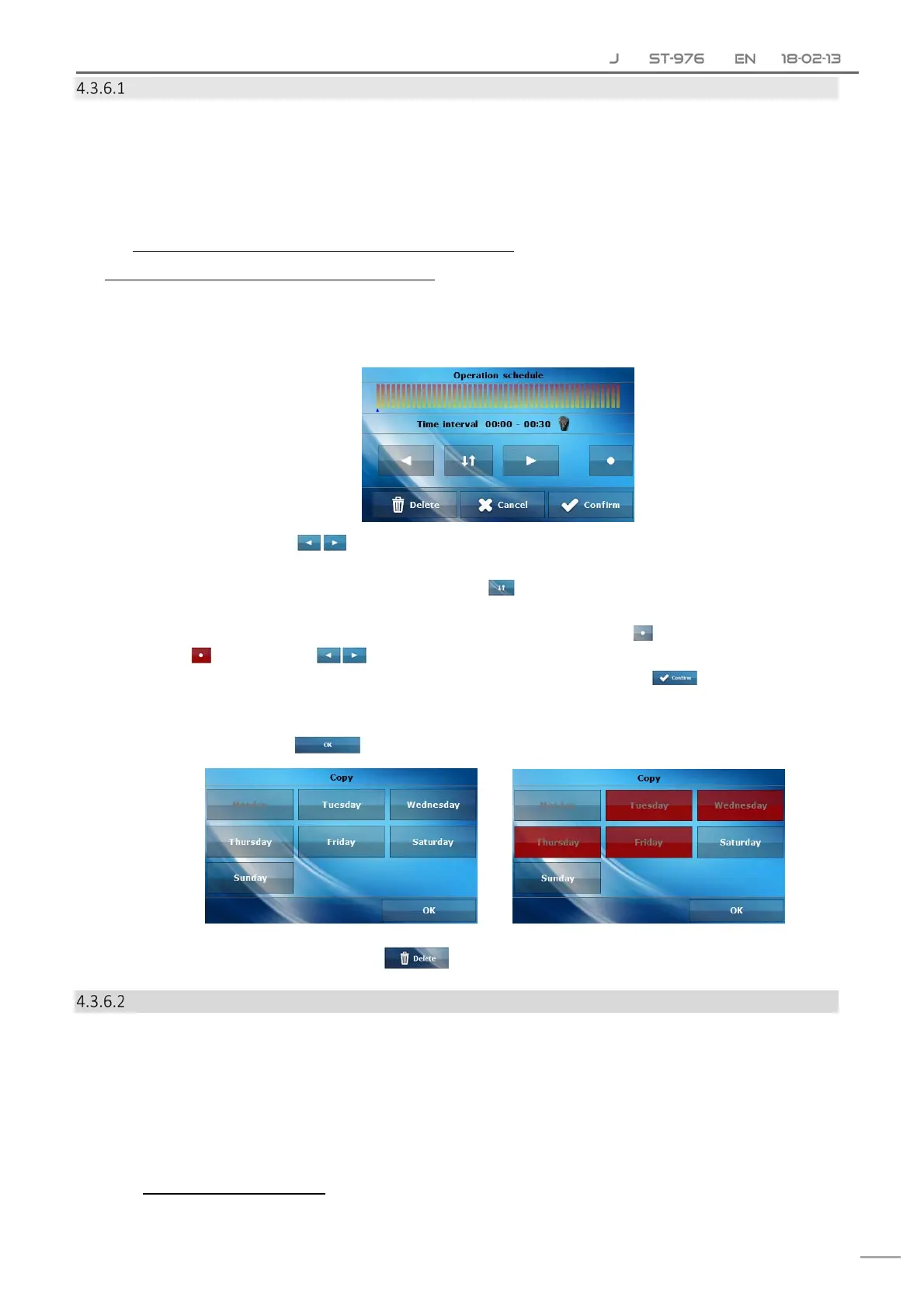
HowtoconfigureCHboileroperationschedule:
Activatethisoption.
Selectthedayoftheweektobeedited.
Thedisplayshowsthefollowingcontent:
First,usetheicons toselectthetimeperiodinwhichyouwanttoenableordisablethe
CHboiler.
Oncethehourhasbeenselected,usetheicon toenableordisabletheCHboileratagiven
time.
Inordertosavethesettingforanothertimeperiod,tapontheicon .Whenitishighlightedin
red ,usetheicons tocopythesettingintothenextortheprevioustimeperiod.
Oncetheoperationscheduleforeachdayhasbeenconfigured,select .
Thedisplayshowsapanelenablingtheusertocopythesettingintoanotherdayoftheweek.
IfyouwanttheCHboilertooperateaccordingtothesesettingonotherdaysoftheweek,select
thesedaysandtap .
Inordertoresetallsettings,tapon andconfirm.
CHboilerweeklycontrol
Weekly control function enables the user to program changes of the pre‐set CH boiler temperature for
particularhoursanddaysoftheweek.Thesettingrangeforthetemperaturedifferencesis+/‐10⁰C.
Inordertoactivatethisfunction,selectMode1orMode2.Detailedsettingsofeachmodeareavailablefurther
inthesubmenu:Setmode1andSetmode2.
Onceagivenmodeisselected,themainscreendisplaysthevalueofcurrenttemperaturedeviation(below
thepre‐setCHtemperature,alternatelywithPre‐set)informingtheuserthatthefunctionisactive.
H
OWTOSETWEEKLYCONTROL
Weeklycontrolmaybeprogrammedintwodifferentmodes:



 To Next Page