program
to search and select from other programs and templates saved on the unit. Selected
programs can be run directly or edited before running.
RUNNING A PROGRAM FROM THE SHORTCUT LIST
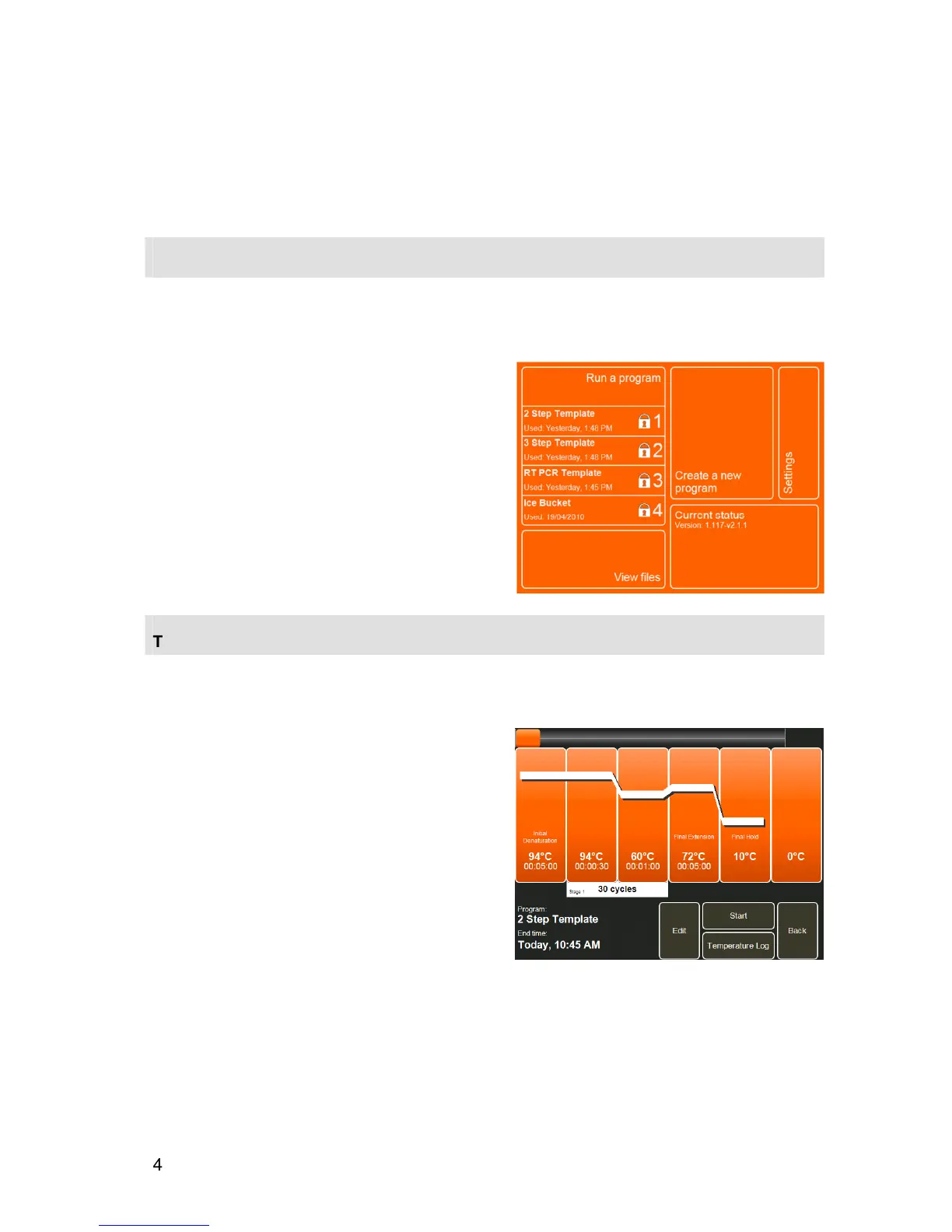
On the Home Screen, the Run a program area displays shortcuts to four programs. User Preferences
in the Settings module can be used to select whether this displays the four most
recently
used
programs or the four most
frequently
used programs.
•
To run one of the programs in the shortcut list,
touch the button to open the Pre-run Screen.
THE PRE-RUN SCREEN
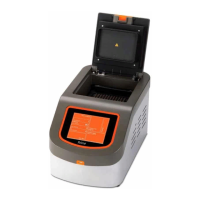
The Pre-run Screen shows a graphical representation of the program allowing for a rapid check of the
temperature parameters.
The centre of the screen shows each temperature step
and hold time (not to scale). Stages are indicated by a
white bar spanning the steps within the stage.
The bottom of the screen shows the program name,
the date and the expected end time if it was started
immediately.
•
Touch
Start
to start the program.
•
Touch
Edit
to edit the program.
•
Touch
Back
to return to the previous screen.
Note:
The temperature log will remain blank until the
program has been started.


 To Next Page