EasyManua.ls Logo

Technics RS-273US - Page 8

Technics RS-273US
35 pages
Print Icon
To Next Page IconTo Next Page
To Previous Page IconTo Previous Page
Loading...
ITEM
MEASUREMENT
&
ADJUSTMENT
REMARKS
Erase
Current
Equipment:
*
VTVM
*
Oscilloscope
*
Resistor
(1Q)
Overall
Gain
Equipment:
*
AF
Oscillator
*
VTVM
*
ATT
*
Oscilloscope
*
Test
Tape
(Reference
Blank
Tape)
...C-RF
(for
CrO2)
...C-RA
(for
Normal)
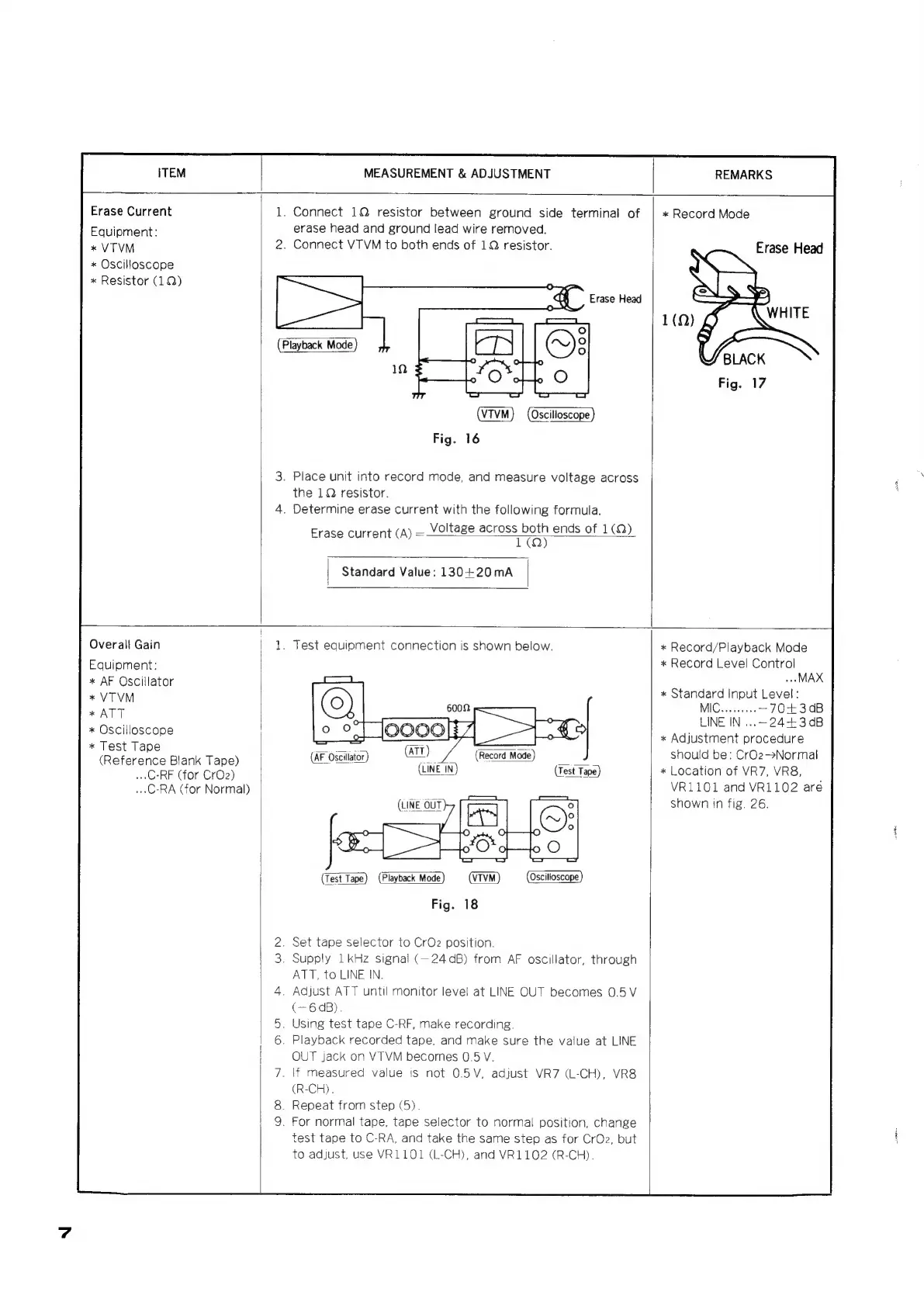
1.
Connect
1Q
resistor
between
ground
side
terminal
of
erase
head
and
ground
lead
wire
removed.
2.
Connect
VTVM
to
both
ends
of
1Q
resistor.
Erase
Head
(VTVM)
(Oscilloscope)
Fig.
16
3.
Place
unit
into
record
mode,
and
measure
voltage
across
the
1Q
resistor.
4.
Determine
erase
current
with
the
following
formula.
Voltage
across
both
ends
of
1(Q)
Erase
current
(A)
=
TO)
Standard
Value:
130+20mA
*
Record
Mode
Erase
Head
Ne
1.
Test
equipment
connection
is
shown
below.
(Test
Tape)
(Playback
Mode)
(VIVM
(Oscilloscope)
Fig.
18
2.
Set
tape
selector
to
CrO2
position.
3.
Supply
1
kHz
signal
(—24
dB)
from
AF
oscillator,
through
ATT,
to
LINE
IN.
4.
Adjust
ATT
until
monitor
level
at
LINE
OUT
becomes
0.5
V
(—6
dB).
5.
Using
test
tape
C-RF,
make
recording.
6.
Playback
recorded
tape,
and
make
sure
the
value
at
LINE
OUT
jack
on
VTVM
becomes
0.5
V.
7.
\f
measured
value
is
not
0.5V,
adjust
VR7
(L-CH),
VR8
(R-CH).
8.
Repeat
from
step
(5).
9.
For
normal
tape,
tape
selector
to
normal
position,
change
test
tape
to
C-RA,
and
take
the
same
step
as
for
CrOz,
but
to
adjust,
use
VR1101
(L-CH),
and
VR1102
(R-CH).
*
Record/Playback
Mode
*
Record
Level
Control
MAX
*
Standard
Input
Level:
MIC.........
—70+30B
LINE
IN
...~24+3
dB
*
Adjustment
procedure
should
be:
CrOz->Normal
*
Location
of
VR7,
VR8,
VR1101
and
VR1102
are
shown
in
fig.
26.

Related product manuals