EasyManua.ls Logo

Technics RS-273US - Page 9

Technics RS-273US
35 pages
Print Icon
To Next Page IconTo Next Page
To Previous Page IconTo Previous Page
Loading...
8,
MEASUREMENT
&
ADJUSTMENT
REMARKS
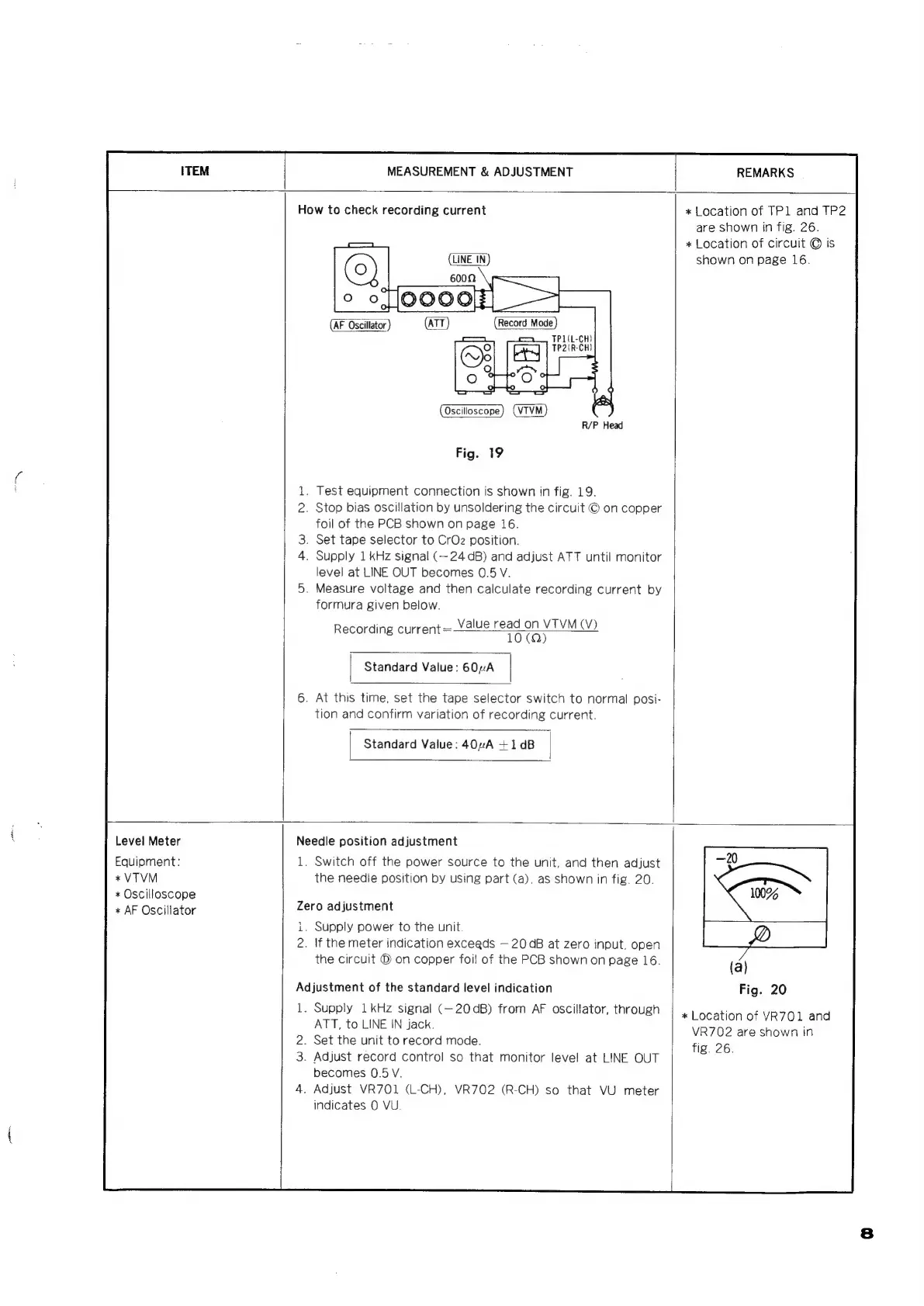
How
to
check
recording
current
(LINE
IN)
Oscilloscope
(VIVM)
R/P
Head
Fig.
19
.
Test
equipment
connection
is
shown
in
fig.
19.
2.
Stop
bias
oscillation
by
unsoldering
the
circuit
©
on
copper
foil
of
the
PCB
shown
on
page
16.
.
Set
tape
selector
to
CrOz
position.
.
Supply
1
kHz
signal
(~24
dB)
and
adjust
ATT
until
monitor
level
at
LINE
OUT
becomes
0.5
V.
.
Measure
voltage
and
then
calculate
recording
current
by
formura
given
below.
Value
read
on
VTVM
(V)
Recording
current
=
10
(Q)
|
Standard
Value:
60nA
|
.
At
this
time,
set
the
tape
selector
switch
to
normal
posi-
tion
and
confirm
variation
of
recording
current.
|
Standard
Value:
40”A
+1dB
|
*
Location
of
TP1l
and
TP2
are
shown
in
fig.
26.
*
Location
of
circuit
©
is
shown
on
page
16.
Level
Meter
Equipment:
*
VTVM
+
Oscilloscope
*
AF
Oscillator
Needle
position
adjustment
1.
Switch
off
the
power
source
to
the
unit,
and
then
adjust
the
needie
position
by
using
part
(a),
as
shown
in
fig.
20.
Zero
adjustment
i.
Supply
power
to
the
unit
2.
If
the
meter
indication
exceeds
20
aB
at
zero
input,
open
the
circuit
®
on
copper
foil
of
the
PCB
shown
on
page
16.
Adjustment
of
the
standard
level
indication
1.
Supply
1kHz
signal
(—20dB)
from
AF
oscillator,
through
ATT,
to
LINE
IN
jack.
2.
Set
the
unit
to
record
mode.
3.
Adjust
record
control
so
that
monitor
level
at
LINE
OUT
becomes
0.5
V.
4.
Adjust
VR701
(L-CH),
VR702
(R-CH)
so
that
VU
meter
indicates
0
VU.
)
(a)
Fig.
20
*
Location
of
VR701
and
VR702
are
shown
in
fig.
26.

Related product manuals