EasyManua.ls Logo

Technics RS-615US-D - Page 14

Technics RS-615US-D
30 pages
Print Icon
To Next Page IconTo Next Page
To Previous Page IconTo Previous Page
Loading...
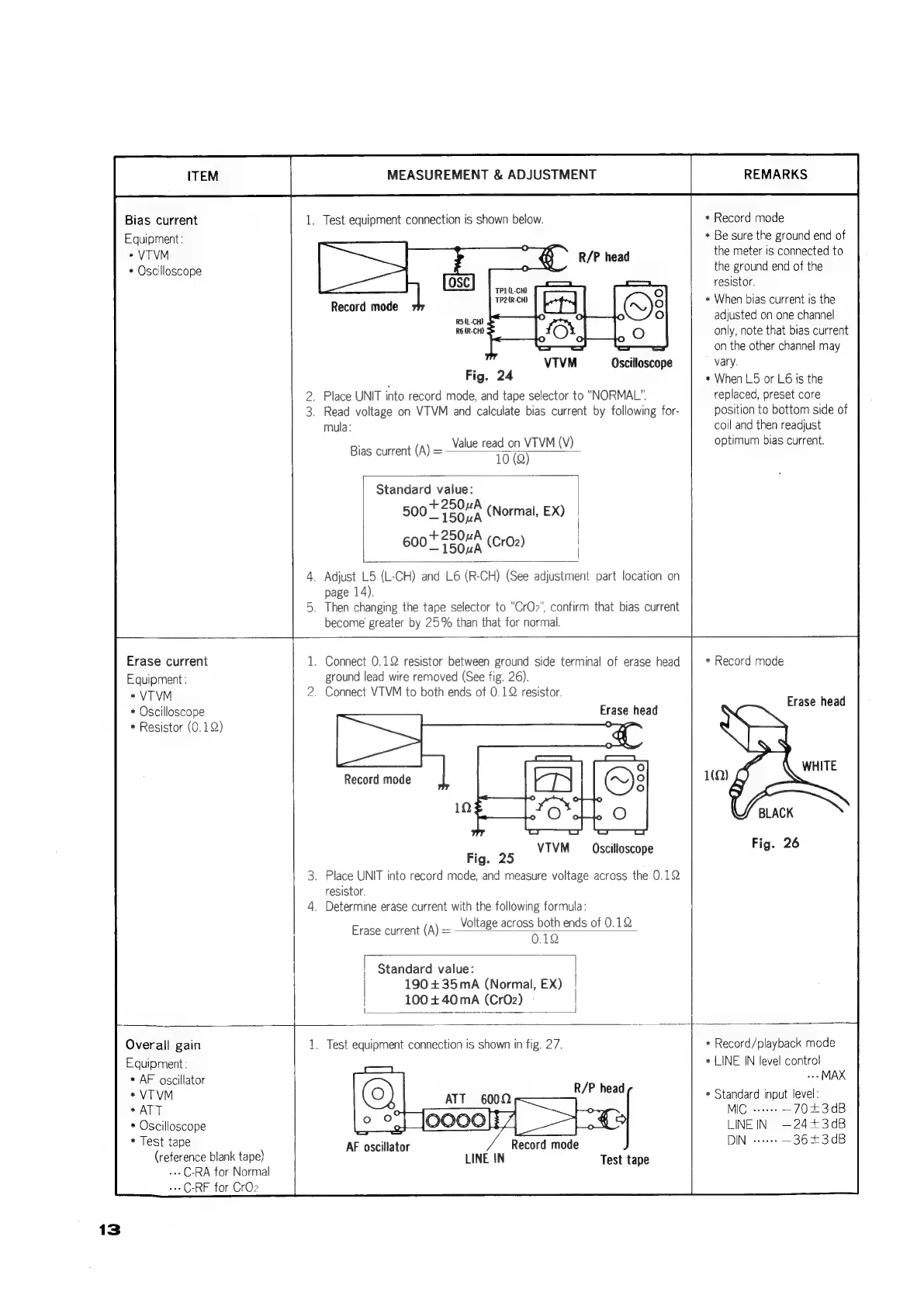
Bias
current
Equipment:
*
VTVM
*
Oscilloscope
Erase
current
Equipment
:
*
VTVM
*
Oscilloscope
*
Resistor
(0.1)
MEASUREMENT
&
ADJUSTMENT
1.
Test
equipment
connection
is
shown
below.
TP1(L-CH)
2
(R-CH)
Record
mode
ra
R5(L-CH)
VIVM
Oscilloscope
Fig.
24
2.
Place
UNIT
into
record
mode,
and
tape
selector
to
“NORMAL”.
3.
Read
voltage
on
VTVM
and
calculate
bias
current
by
following
for-
mula:
Value
read
on
VTVM
(V)
10
(Q)
Bias
current
(A)
=
Standard
value:
+250uA
500
_
TS
0A
(Normal,
EX)
+250uA
600
15
0uA
|
\
|
|
Adjust
L5
(L-CH)
and
L6
(R-CH)
(See
adjustment
part
location
on
page
14).
.
Then
changing
the
tape
selector
to
“CrOz”,
confirm
that bias
current
become
greater
by
25%
than
that
for
normal.
.
Connect
0.12
resistor
between
ground
side
terminal
of
erase
head
ground
lead
wire
removed
(See
fig.
26).
.
Connect
VTVM
to
both
ends
of
0.12
resistor.
Erase
head
VTVM
Oscilloscope
Fig.
25
.
Place
UNIT
into
record
made,
and
measure
voltage
across
the
0.12
resistor.
.
Determine
erase
current
with
the
following
formula:
Voltage
across
both
ends
of
0.12
Erase
current
(A)
=
0.10
Standard
value:
|
190
+35mA
(Normal,
EX)
|
100
+40
mA
(Cr02)
REMARKS
*
Record
mode
*
Be
sure
the
ground
end
of
the
meter
is
connected
to
the
ground
end
of
the
resistor,
*
When
bias
current
is
the
adjusted
on
one
channel
only,
note
that
bias
current
on
the
other
channel
may
vary.
+
When
L5
or
L6
ts
the
replaced,
preset
core
position
to
bottom
side
of
coil
and
then
readjust
optimum
bias
current.
*
Record
mode
Erase
head
BLACK
Fig.
26
13
Overall
gain
Equipment:
*
AF
oscillator
*VTVM
*
ATT
*
Oscilloscope
*
Test
tape
(reference
blank
tape}
---C-RA
for
Normal
-++C-RF
for
CrO2
.
Test
equipment
connection
is
shown
in
fig.
27.
AF
oscillator
Record
mode
LINE
IN
Test
tape
*
Record/playback
mode
*
LINE
IN
level
control
-+»MAX
*
Standard
input
level:
MIC
+--+
—70£3dB
LINE
IN
—24+3dB
—3643dB

Related product manuals