EasyManua.ls Logo

Technics RS-615US-D - Page 15

Technics RS-615US-D
30 pages
Print Icon
To Next Page IconTo Next Page
To Previous Page IconTo Previous Page
Loading...
ITEM
MEASUREMENT
&
ADJUSTMENT
REMARKS
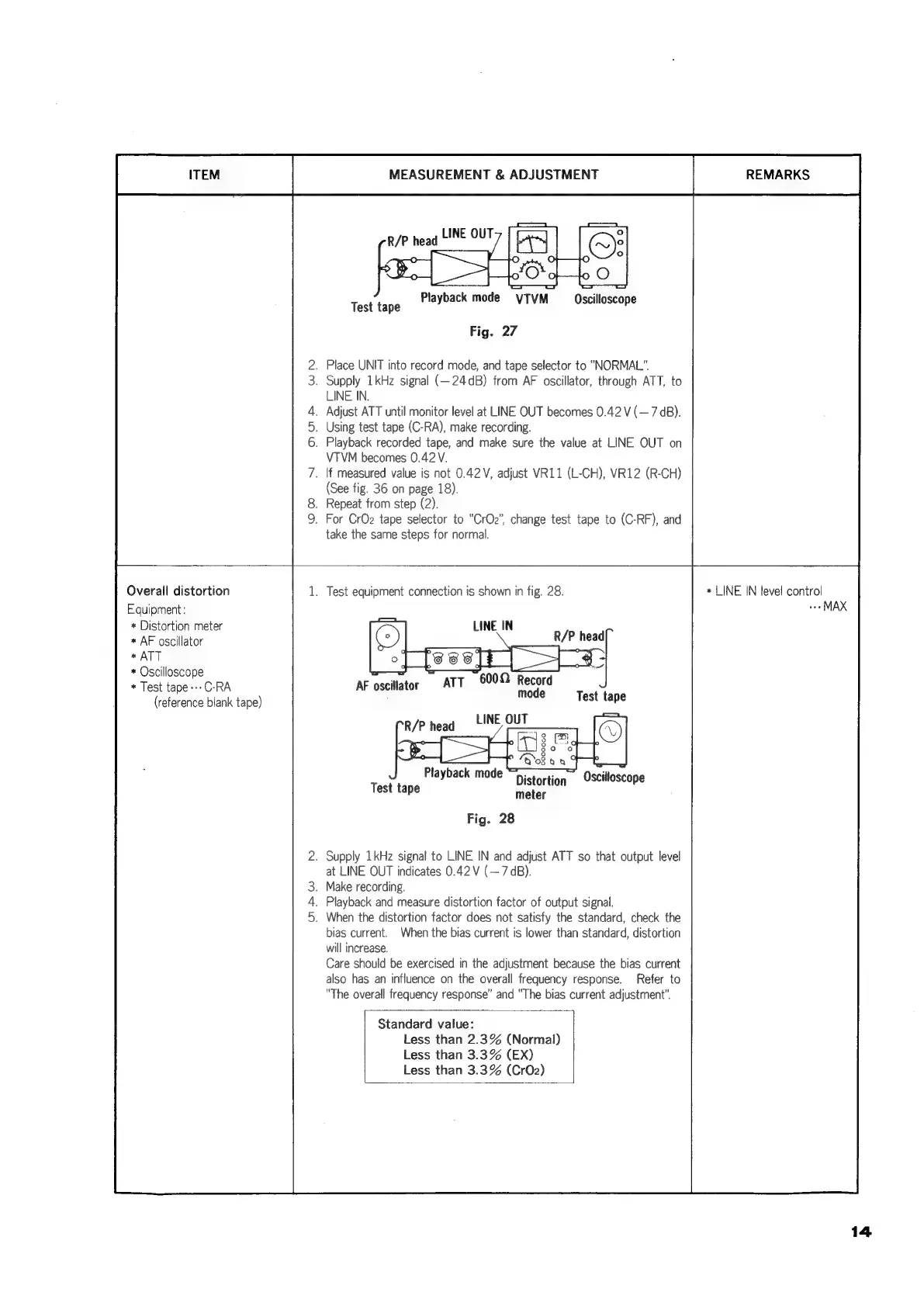
R/P
head
LINE
OUT
layback
mode
VTVM
Oscillosco
Test
tape
Playback
mode
VTVM
Oscilloscope
Fig.
27
.
Place
UNIT
into
record
mode,
and
tape
selector
to
“NORMAL”.
.
Supply
1kHz
signal
(—24dB)
from
AF
oscillator,
through
ATT,
to
LINE
IN.
.
Adjust
ATT
until
monitor
level
at
LINE
OUT
becomes
0.42
V
(—
7
dB).
.
Using
test
tape
(C-RA),
make
recording.
.
Playback
recorded
tape,
and
make
sure
the
value
at
LINE
OUT
on
VTVM
becomes
0.42
V.
.
If
measured
value
is
not
0.42V,
adjust
VR11
(L-CH),
VR12
(R-CH)
(See
fig.
36
on
page
18).
.
Repeat
from
step
(2).
.
For
CrOz2
tape
selector
to
“CrOz”,
change
test
tape
to
(C-RF),
and
take
the
same
steps
for
normal.
Overall
distortion
Equipment:
+
Distortion
meter
*
AF
oscillator
*
ATT
*
Oscilloscope
*
Test
tape
---C-RA
(reference
blank
tape)
.
Test
equipment
connection
is
shown
in
fig.
28.
IN
oe
R/P
head
ATT
600
Record
mode
Test
tape
Playback
mode
Test
tape
Distortion
meter
Fig.
28
.
Supply
1kHz
signal
to
LINE
IN
and
adjust
ATT
so
that
output
level
at
LINE
OUT
indicates
0.42
V
(—
7
dB).
.
Make
recording.
.
Playback
and
measure
distortion
factor
of
output
signal.
.
When
the
distortion
factor
does
not
satisfy
the
standard,
check
the
bias
current.
When
the
bias
current
is
lower
than
standard,
distortion
will
increase.
Care
should
be
exercised
in
the
adjustment
because
the
bias
current
also
has
an
influence
on
the
overall
frequency
response.
Refer
to
“The
overall
frequency
response”
and
“The
bias
current
adjustment”.
Standard
value:
Less
than
2.3%
(Normal)
Less
than
3.3%
(EX)
Less
than
3.3%
(CrO2)
*
LINE
IN
level
control
we
MAX
14

Related product manuals