EasyManua.ls Logo

Technics RS-615US-D - Page 16

Technics RS-615US-D
30 pages
Print Icon
To Next Page IconTo Next Page
To Previous Page IconTo Previous Page
Loading...
15
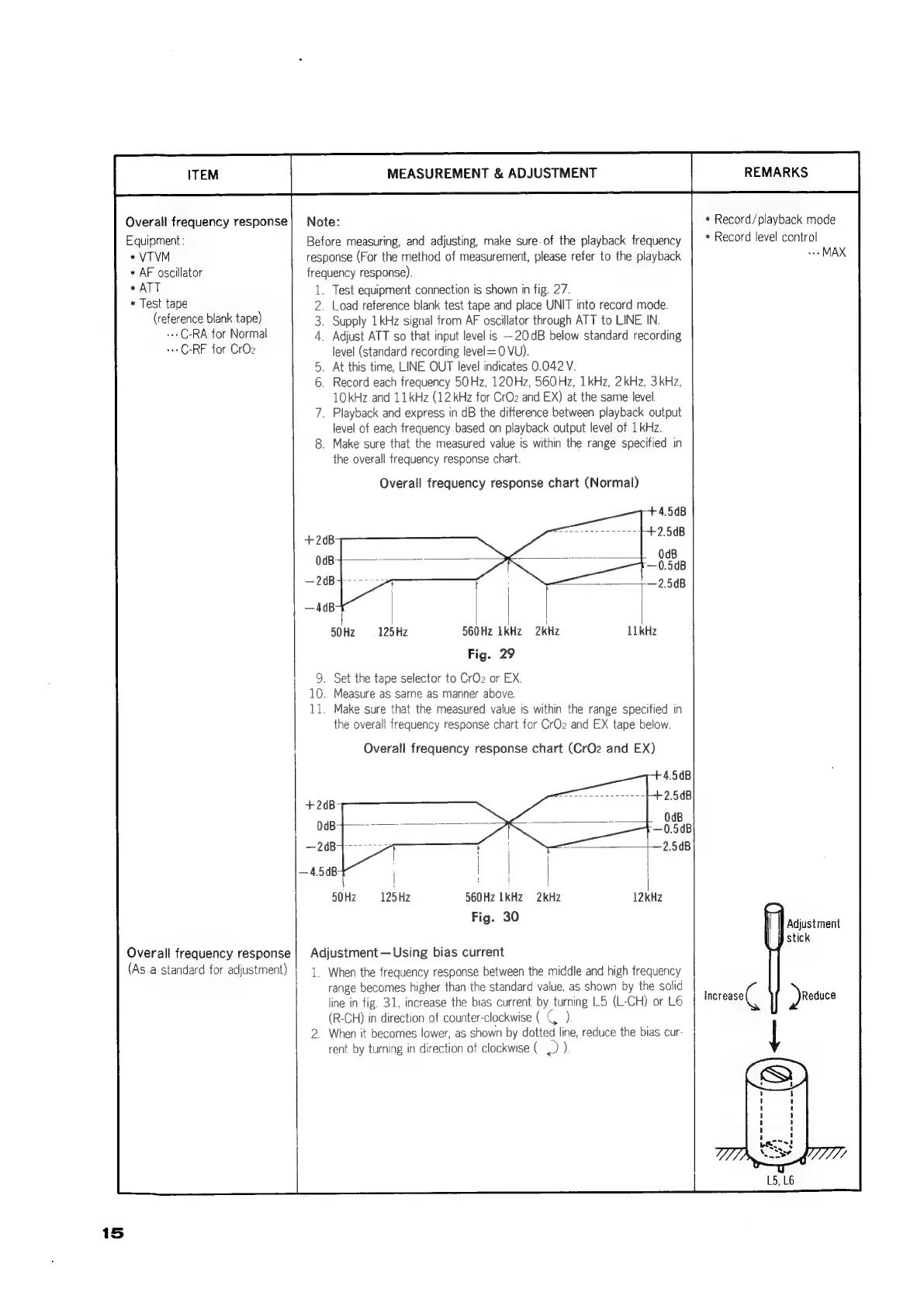
Overall
frequency
response
Equipment:
*VTVM
*
AF
oscillator
+
ATT
*
Test
tape
(reference
blank
tape)
+++
C-RA
for
Normal
+++
C-RF
for
CrO2
Overall
frequency
response
(As
a
standard
for
adjustment)
MEASUREMENT
&
ADJUSTMENT
Note:
Before
measuring,
and
adjusting,
make
sure
of
the
playback
frequency
response
(For
the
method
of
measurement,
please
refer
to
the
playback
frequency
response).
1.
Test
equipment
connection
is
shown
in
fig.
27.
2.
Load
reference
blank
test
tape
and
place
UNIT
into
record
mode.
3.
Supply
1kHz
signal
from
AF
oscillator
through
ATT
to
LINE
IN.
4.
Adjust
ATT
so
that
input
level
is
—20dB
below
standard
recording
level
(standard
recording
level=0
VU).
.
At
this
time,
LINE
OUT
level
indicates
0.042
V.
_
Record
each
frequency
50Hz,
120Hz,
560Hz,
1kHz,
2kHz, 3kHz,
10kHz
and
11kHz
(12
kHz
for
CrO2
and
EX)
at
the
same
level.
.
Playback
and
express
in
dB
the
difference
between
playback
output
level
of
each
frequency
based
on
playback
output
level
of
1
kHz.
.
Make
sure
that
the
measured
value
is
within
the
range
specified
in
the
overall
frequency
response
chart.
Overall
frequency
response
chart
(Normal)
;
|
|
}
|
|
50Hz
125Hz
560Hz
1kHz
2kHz
Fig.
29
9.
Set
the
tape
selector
to
CrO2
or
EX.
10.
Measure
as
same
as
manner
above.
11.
Make
sure
that
the
measured
value
is
within
the
range
specified
in
the
overall
frequency
response
chart
for
CrOz
and
EX
tape
below.
Overall
frequency
response
chart
(CrO2z
and
EX)
i
|
|
|
50Hz
125Hz
560Hz
1kHz
2kHz
Fig.
30
Adjustment
Using
bias
current
4
1.
When
the
frequency
response
between
the
middle
and
high
frequency
range
becomes
higher
than
the
standard
value,
as
shown
by
the
solid
line
in
fig.
31,
increase
the
bias
current
by
turning
L5
(L-CH)
or
L6
(R-CH)
in
direction
of
counter-clockwise
(
G
)
_
When
it
becomes
lower,
as
shown
by
dotted
line,
reduce
the
bias
cur-
rent
by
turning
in
direction
of
clockwise
(
)
).
REMARKS
+
Record/playback
mode
*
Record
level
control
MAX
Adjustment
stick
Increase
Reduce

Related product manuals