EasyManua.ls Logo

Technics RS-D225W - Page 14

Technics RS-D225W
24 pages
Print Icon
To Next Page IconTo Next Page
To Previous Page IconTo Previous Page
Loading...
4
(Mechanism
(1))
3
(Mechanism
(2))
al
Tape
Speed
Adj.
“3
PN1
(Mechanism
(1))
PN2
(Mechanism
(2))
1),
(2)
P.C.B.
er
are
clean.
>
(68
+9°F)
|B);
QZZCFM
Jain
adjustment
RA
villoscope
Digital
frequency
counter
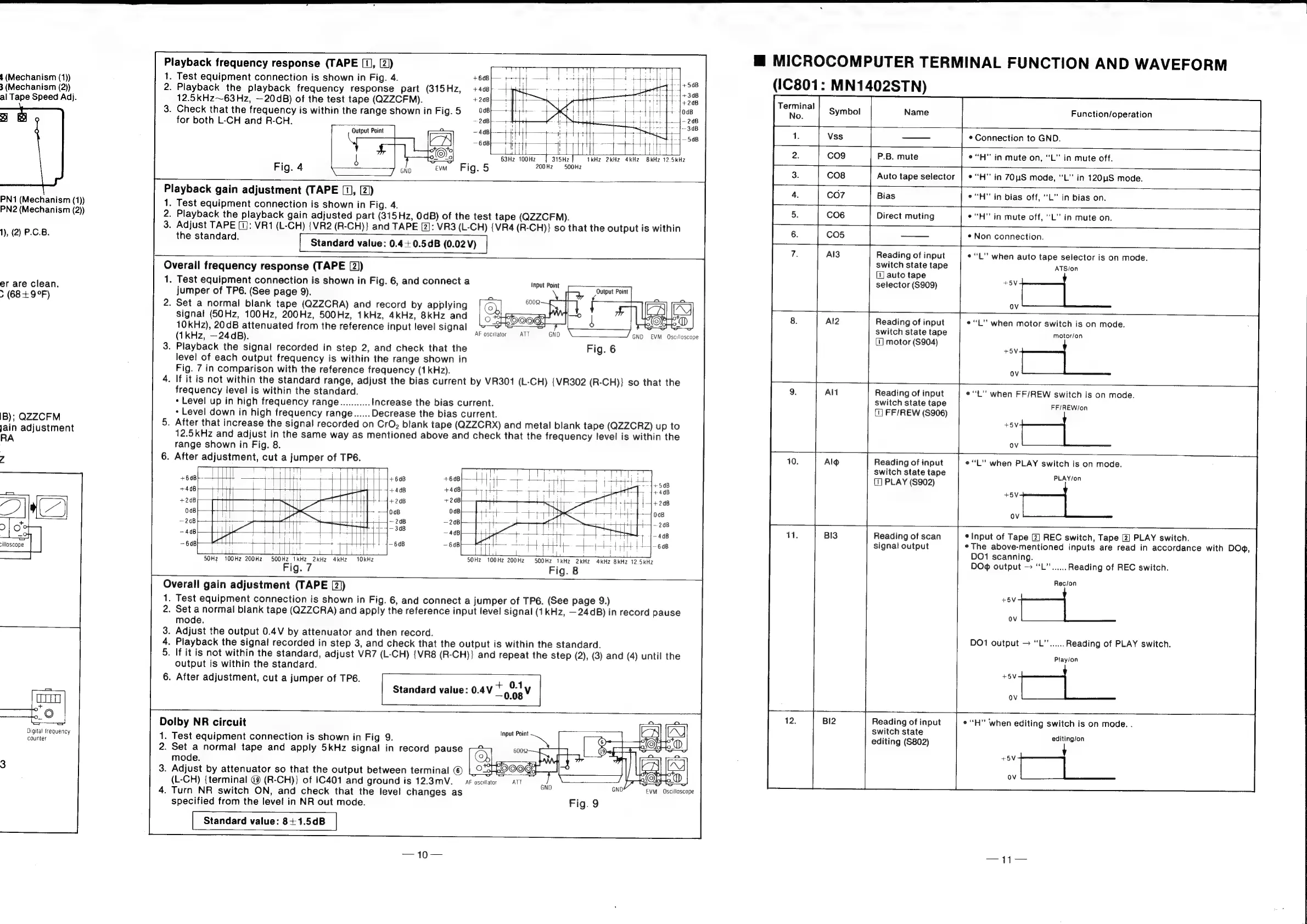
Playback
frequency
response
(TAPE
[1],
[2))
1.
Test
equipment
connection
is
shown
in
Fig.
4.
+64B}—
—t}
+4
tte
te
Is
Hy
te
+508
2.
Playback
the
playback
frequency
response
part
(815Hz,
+4«a}
-
4
He
ifs
SAE
ETT
308
12.5kHz~63Hz,
—20dB)
of
the
test
tape
(QZZCFM).
+208}
Hi
|
4
ST
a
3.
Check
that
the
frequency
is
within
the
range
shown
inFig.5
08}
—-
1
-—
-
SG
a
for
both
L-CH
and
R-CH.
~
208
——
25M
ee
Output
Point
a
Hr
Poy
*
Elceae
—6d8}
—t-4}
+t
1H
|
pet
pf
man
li
i
1
a
63Hz
toonz
1
315Hz
TkHZ
2kHZ2
4kHZ
8kHz
12.5kHz
Fig.
5
200Hz2
©500Hz
Fig.
4
Playback
gain
adjustment
(TAPE
[1],
(2)
1.
Test
equipment
connection
is
shown
in
Fig.
4.
2.
Playback
the
playback
gain
adjusted
part
(315Hz,
0dB)
of
the
test
tape
(QZZCFM).
3.
Adjust
TAPE
[1]:
VR1
(L-CH)
{VR2
(R-CH)}
and
TAPE
[2]:
VR3
(L-CH)
{VR4
(R-CH)}
so
that
the
output
is
within
the
standard.
[
Standard
value:
0.4
+0.5¢B
(0.02V)
a
Overall
frequency
response
(TAPE
[2))
1.
Test
equipment
connection
is
shown
in
Fig.
6,
and
connect
a
jumper
of
TP6.
(See
page
9).
2.
Set
a
normal
blank
tape
(QZZCRA)
and
record
by
applying
signal
(50Hz,
100Hz,
200Hz,
500Hz,
1kHz,
4kHz,
8kHz
and
10kHz),
20dB
attenuated
from
the
reference
input
level
signal
=
=
ee
EET,
<
~
(1
kHz,
—24dB).
AF
oscillator
=
ATT
GND
EVM
Oscilloscope
3.
Playback
the
signal
recorded
in
step
2,
and
check
that
the
Fig.
6
level
of
each
output
frequency
is
within
the
range
shown
in
Fig.
7
in
comparison
with
the
reference
frequency
(1kHz).
4.
If
it
is
not
within
the
standard
range,
adjust
the
bias
current
by
VR301
(L-CH)
{VR302
(R-CH)}
so
that
the
frequency
level
is
within
the
standard.
*
Level
up
in
high
frequency
range...........
Increase
the
bias
current.
+
Level
down
in
high
frequency
range......
Decrease
the
bias
current.
5.
After
that
increase
the
signal
recorded
on
CrO,
blank
tape
(QZZCRX)
and
metal
blank
tape
(QZZCRZ)
up
to
12.5kHz
and
adjust
in
the
same
way
as
mentioned
above
and
check
that
the
frequency
level
is
within
the
range
shown
in
Fig.
8.
6.
After
adjustment,
cut
a
jumper
of
TP6.
Input
Point
+60B
--|+60B
4+60B
ere
+4dB
4+4dB
+4dB
+4dB
+208
ond
js
+2qB
+2dB
008
0aB
00B
008
—2dB
+—|~
20B
—20B
—~20B
~40B
Hy
t+
!
ea},
908
4B
Pred
{48
se}
P——t
4
-
+
r++
4-648
~
648)
ep
Hl
~t-4
+H
14-608
Leitii
a
Ss
i
ittiot:
ri
tisi
i
_
pe
ee
rll
50Hz
100Hz
200Hz
SOOHz
tkHz
2kHz
4kHz
10kHz
50Hz
100Hz
200Hz
500Hz
1kHz
2kHz
4kHz
8kHz
12.5kHz
Fig.
7
Fig.
8
Overall
gain
adjustment
(TAPE
[2))
.
Test
equipment
connection
is
shown
in
Fig.
6,
and
connect
a
jumper
of
TP6.
(See
page
9.)
.
Set
a
normal
blank
tape
(QZZCRA)
and
apply
the
reference
input
level
signal
(1kHz,
—24dB)
in
record
pause
mode.
.
Adjust
the
output
0.4V
by
attenuator
and
then
record.
.
Playback
the
signal
recorded
in
step
3,
and
check
that
the
output
is
within
the
standard.
.
If
it
is
not
within
the
standard,
adjust
VR7
(L-CH)
{VR8
(R-CH)}
and
repeat
the
step
(2),
(3)
and
(4)
until
the
output
is
within
the
standard.
6.
After
adjustment,
cut
a
jumper
of
TPS.
Ot
w
p=
vt
0.1
—o.08
|
Standard
value:
0.4
Dolby
NR
circuit
1.
Test
equipment
connection
is
shown
in
Fig
9.
2.
Set
a
normal
tape
and
apply
5kHz
signal
in
record
pause
mode.
3.
Adjust
by
attenuator
so
that
the
output
between
terminal
©
(L-CH)
{terminal
@
(R-CH)}
of
1C401
and
ground
is
12.3mV.
4.
Turn
NR
switch
ON,
and
check
that
the
level
changes
as
specified
from
the
level
in
NR
out
mode.
Standard
value:
8+1.5dB
m@
MICROCOMPUTER
TERMINAL
FUNCTION
AND
WAVEFORM
(IC801:
MN1402STN)
Terminal
Function/operation
—_—
¢
Connection
to
GND.
P.B.
mute
¢“H”’
in
mute
on,
“L"
in
mute
off.
Auto
tape
selector
|
*‘‘H”
in
70S
mode,
“L”
in
120uS
mode.
——+
Bias
|
°“H”’
in
bias
off,
“L”
in
bias
on.
Direct
muting
|
¢“H”
in
mute
off,
“‘L”
in
mute
on.
¢
Non
connection.
Reading
of
input
¢L’’
when
auto
tape
selector
is
on
mode.
switch
state
tape
ATSion
[1]
auto
tape
selector
(S909)
TOM
OV
|
Reading
of
input
¢“L”
when
motor
switch
is
on
mode.
switch
state
tape
motor/on
1]
motor
(S904)
+5V
OV
Reading
of
input
e
“tL”
when
FF/REW
switch
is
on
mode.
switch
state
tape
FF/REW/on
(1]
FF/REW
(S906)
OV
Reading
of
input
e“L”
when
PLAY
switch
is
on
mode.
switch
state
tape
SLAVion
(1)
PLAY
($902)
OV
Reading
of
scan
¢
Input
of
Tape
[2]
REC
switch,
Tape
[2]
PLAY
switch.
signal
output
*The
above-mentioned
inputs
are
read
in
accordance
with
DO,
DO1
scanning.
DO®
output
-
“L’......
Reading
of
REC
switch.
Rec/on
.
a
ae
OV
DO1
output
>
“L”’......
Reading
of
PLAY
switch.
Play/on
7
eee
Reading
of
input
*“H”
When
editing
switch
is
on
mode.
.
switch
state
eee
editing
(S802)
editing/on
eer

Related product manuals