EasyManua.ls Logo

Technics RS-D225W - Schematic Diagram

Technics RS-D225W
24 pages
Print Icon
To Next Page IconTo Next Page
To Previous Page IconTo Previous Page
Loading...
@
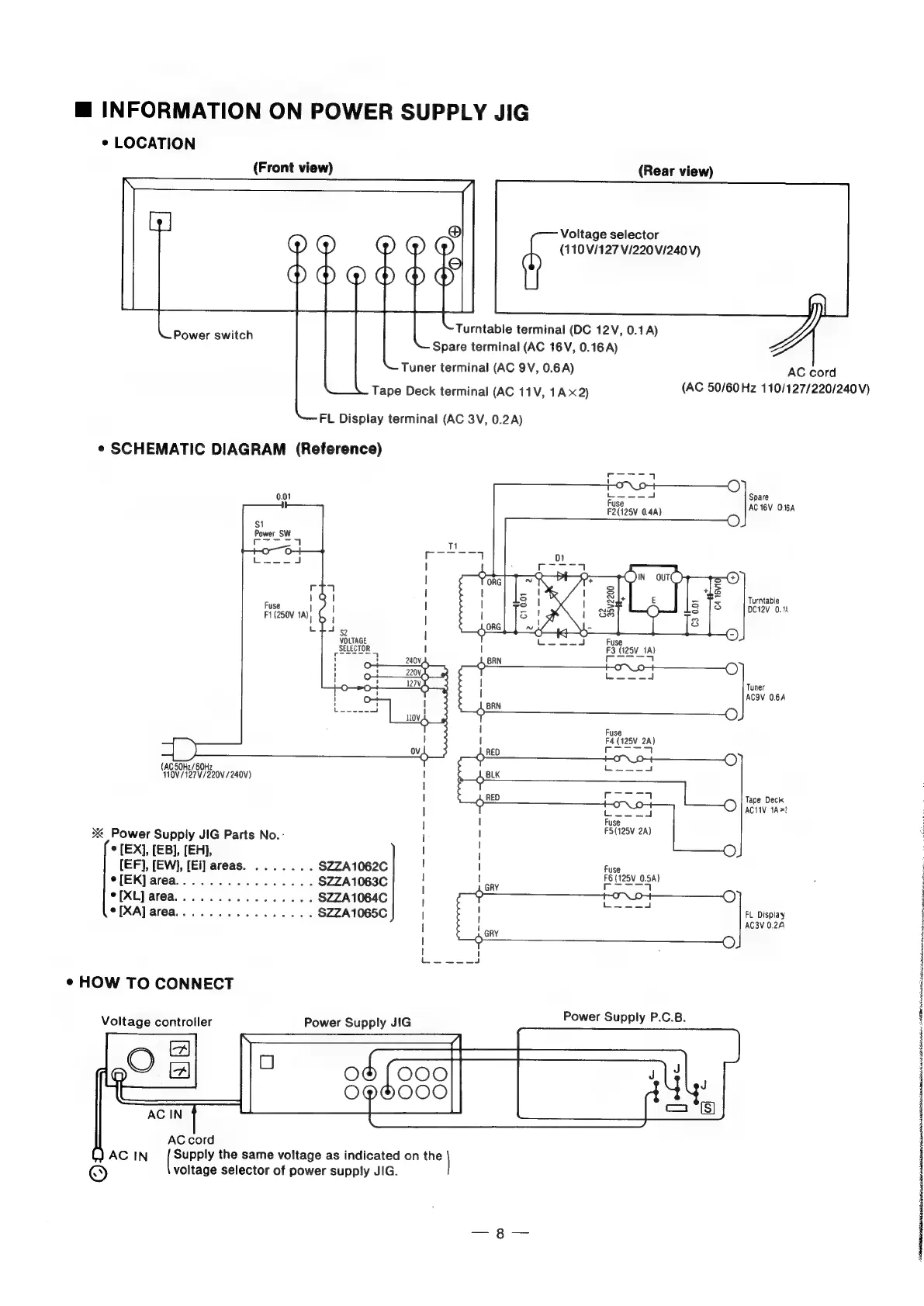
INFORMATION
ON
POWER
SUPPLY
JIG
«
LOCATION
(Front
view)
(Rear
view)
Voltage
selector
(110
V/127
V/220
V/240V)
Turntable
terminal
(DC
12V,
0.1A)
Spare
terminal
(AC
16V,
0.16
A)
Tuner
terminal
(AC
9V,
0.6A)
Tape
Deck
terminal
(AC
11V,
1A
x2)
Power
switch
FL
Display
terminal
(AC
3V,
0.2A)
¢
SCHEMATIC
DIAGRAM
(Reference)
Seana
|
1-O-~\_9++
—C)
0.01
fuse
--A
Spare
F2(125V
0.4)
AC
TBV
O.6A
$1
O
Power
SW
Ce
1
Poe
CT
7
Fuse
F1
(250V
1A)
(
emanate
|
VOLTAGE
SELECTOR
Turntable
DC12V
0.14
Fuse
F3
(125V_1A)
|
eT
|
eee
|
Tuner
|
ACOV
0.6A
Fuse
I
F4
(125V
2A)
rane
|
(AC
50H2/60Hz
110V/127V/220V/240V)
;
|
Tape
Deck
|
Cece
cl
AC1IV
1A?
|
I
fuse
2
Power
Supply
JIG
Parts
No.-
jl
sale
[EX],
[EB],
[EH],
I
i
{EF},
[EW],
[Ei]
areas.
...
2...
$ZZA1062C
!
|
Fuse
e[EK]area................
SZZA1063C
;
tae
pe
1280.54)
[XL]
area................
$ZZA1064C
f
eat
[XA]
area...
..........-..
SZZA1065C
|
FL
Display
|
cay
AC3V
0.24
|
—O)
aoa
¢
HOW
TO
CONNECT
Power
Supply
JIG
Power
Supply
P.C.B.
gO
~———
(C00
O@H000
(J
AC
IN
Supply
the
same
voltage
as
indicated
on
the
©
voltage
selector
of
power
supply
JIG.
Voltage
controller
AC
cord
(AC
50/60Hz
110/127/220/240V)
Siete:
cD
a
Ail
an
Ahn
i
a:
APR
ste:
ig
ashton
many,
ggg

Related product manuals