EasyManua.ls Logo

Technics RS-D225W - Page 8

Technics RS-D225W
24 pages
Print Icon
To Next Page IconTo Next Page
To Previous Page IconTo Previous Page
Loading...
m@
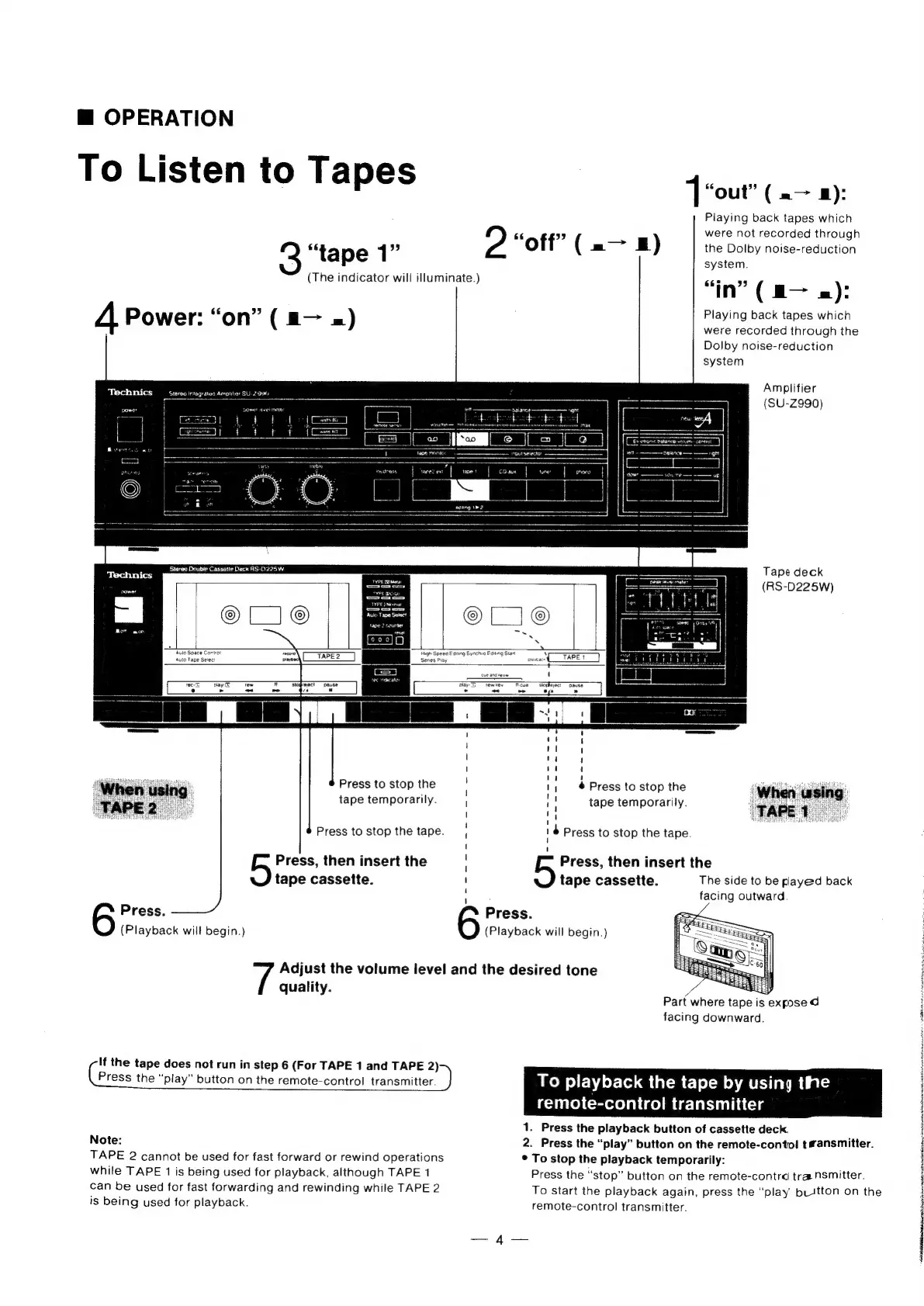
OPERATION
To
Listen
to
Tapes
“out”
(=>
8):
Playing
back
tapes
which
were
not
recorded
through
the
Dolby
noise-reduction
system.
665
5
in”
(m—
=):
Playing
back
tapes
which
were
recorded
through
the
Dolby
noise-reduction
system
2
“tape
1”
2
“oft”
(-—
a)
(The
indicator
will
illuminate.)
4
Power:
“on”
(
a—
x)
Amplifier
(SU-Z990)
Tape
deck
(RS-D225W)
‘Rute
Space
Conval
recore
High
Speed
Eating
Synchro
Fang
Stan
Auto
Tape
Select
i
Series
Play
Weve
siopfeject
pause
oe
aye
Press
to
stop
the
tape
temporarily.
#
Press
to
stop
the
tape
temporarily.
e@----------f-
Press
to
stop
the
tape.
Press
to
stop
the
tape.
Press,
then
insert
the
tape
cassette.
Press,
then
insert
the
tape
cassette.
The
side
to
be
played
back
facing
outward.
Press.
(Playback
will
begin.)
Press.
(Playback
will
begin.)
Adjust
the
volume
level
and
the
desired
tone
quality.
y
Part
where
tape
is
expose
d
facing
downward.
If
the
tape
does
not
run
in
step
6
(For
TAPE
1
and
TAPE
2)
:
Press
the
“play”
button
on
the
remote-control
transmitter.
}
ike)
playback
the
tape
by
using
tihe
iecTiio)
Coretelal
(com
te-leiuliicis
1.
Press
the
playback
button
of
cassette
deck.
Note:
2.
Press
the
“play”
button
on
the
remote-contol
tsansmitter.
TAPE
2
cannot
be
used
for
fast
forward
or
rewind
operations
while
TAPE
1
is
being
used
for
playback,
although
TAPE
1
can
be
used
for
fast
forwarding
and
rewinding
while
TAPE
2
is
being
used
for
playback.
*
To
stop
the
playback
temporarily:
Press
the
“stop”
button
on
the
remote-contra
transmitter.
To
start
the
playback
again,
press
the
“play'
buttton
on
the
remote-control
transmitter.
4
Fy
j
bilinear
i
at
gea
ll
Wi
geee
ctheats

Related product manuals