EasyManua.ls Logo

Technics SA-GX910 - Listening to Compact Discs; To Stop Play

Technics SA-GX910
76 pages
Print Icon
To Next Page IconTo Next Page
To Previous Page IconTo Previous Page
Loading...
raat
Listening
to
compact
discs
For
a
Technics
compact
disc
player
with
the
proper
remote-contro!
terminal
or
a
remote-control
sensor
only.
(Consult
your
dealer
for
details.)
Sequential
play
—£_§$
ia
Sequential
play
refers
to
play
of
the
first
track
of
the
first
disc
to
the
last
track
of
the
last
disc.
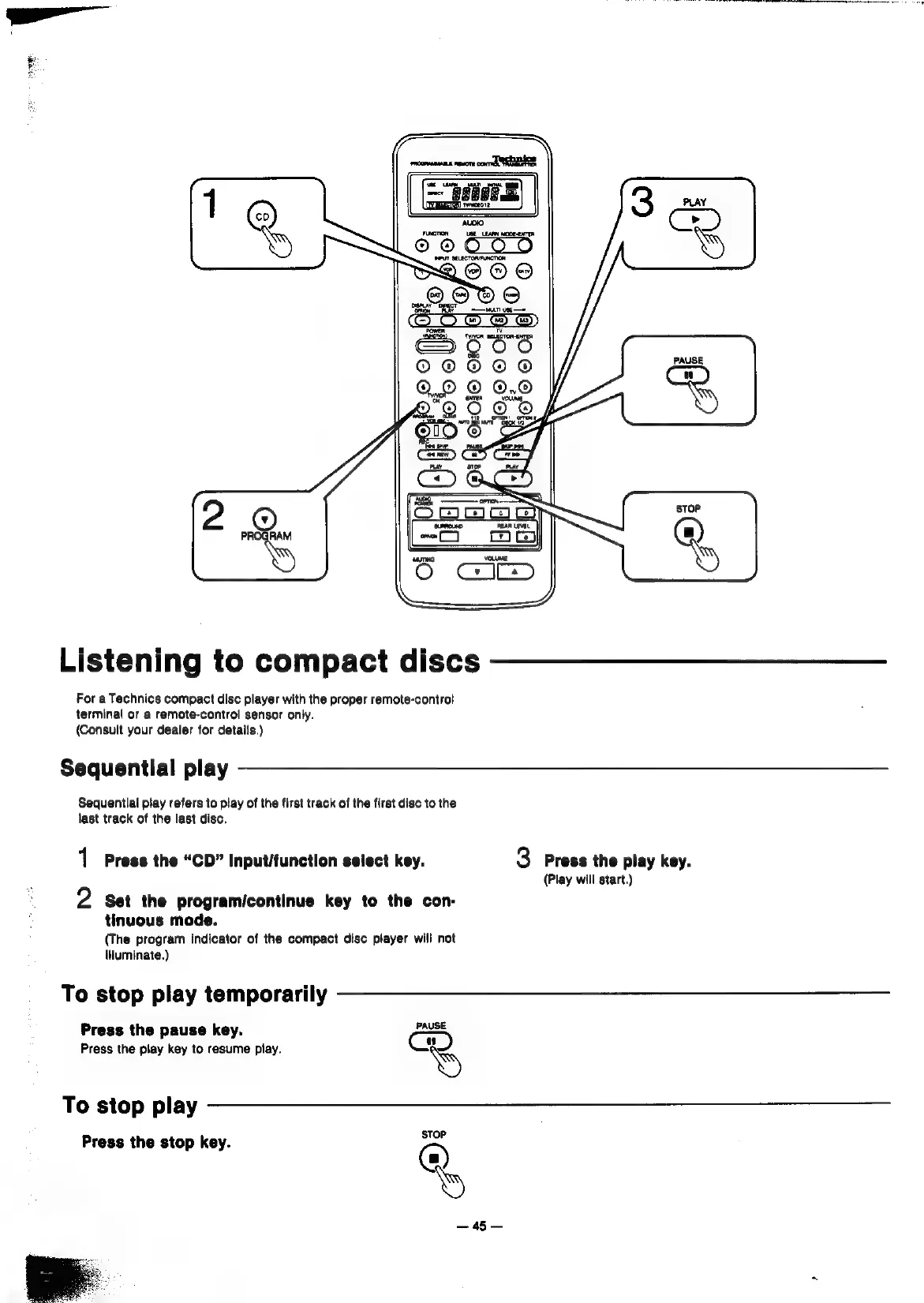
1
Press
the
“CD”
input/function
select
key.
2
Set
the
programicontinue
key
to
the
con-
tinuous
mode.
(The
program
indicator
of
the
compact
disc
player
will
not
iHuminate.)
To
stop
play
temporarily
Press
the
pause
key.
a
Press
the
play
key
to
resume
piay.
To
stop
play
Press
the
stop
key.
@.
a
3
Press
the
play
key.
(Play
will
start.)

Related product manuals