EasyManua.ls Logo

TECHVIEW QV-3149 - Chapter 2 Overview of Dvr; Front Panel

TECHVIEW QV-3149
54 pages
Print Icon
To Next Page IconTo Next Page
To Previous Page IconTo Previous Page
Loading...
USER MANUAL
2
Chapter 2 Overview of DVR
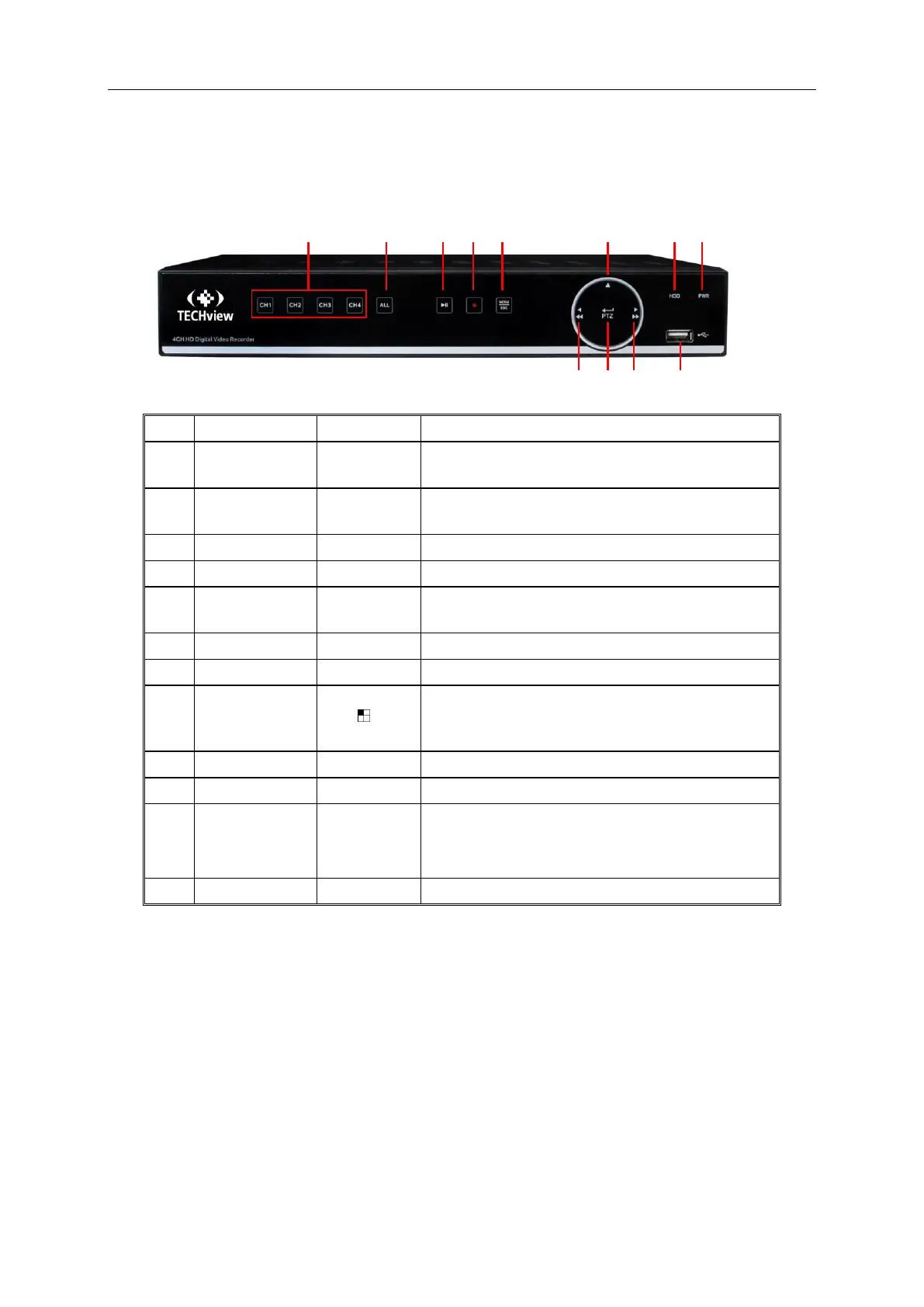
2.1 Front Panel
SN
Key or indicator
Functions
1
Power indicator
If the “Green” indicator is on, DVR is getting power
normally.
2
HDD indicator
If the “Red indicator flashes, the hard drive is being
read or written to.
3
Up key
Move up
4
Menu key
Enter into the main menu/Return
5
Manual
recording key
Start manual recording
6
7
Multiple display mode
8
CH1 CH2
CH3 CH4
Single channel selection(4-Channel DVR)
9
USB
USB port
10
Right key
Move right; Fast forward at various speed
11
Confirmation key
Enter into PTZ menu; Confirm operation; Edit
12
Left key
Move left; Fast backward at various speed
1
2
4
11
3
10
12
5
8
7
6
9

Related product manuals