27
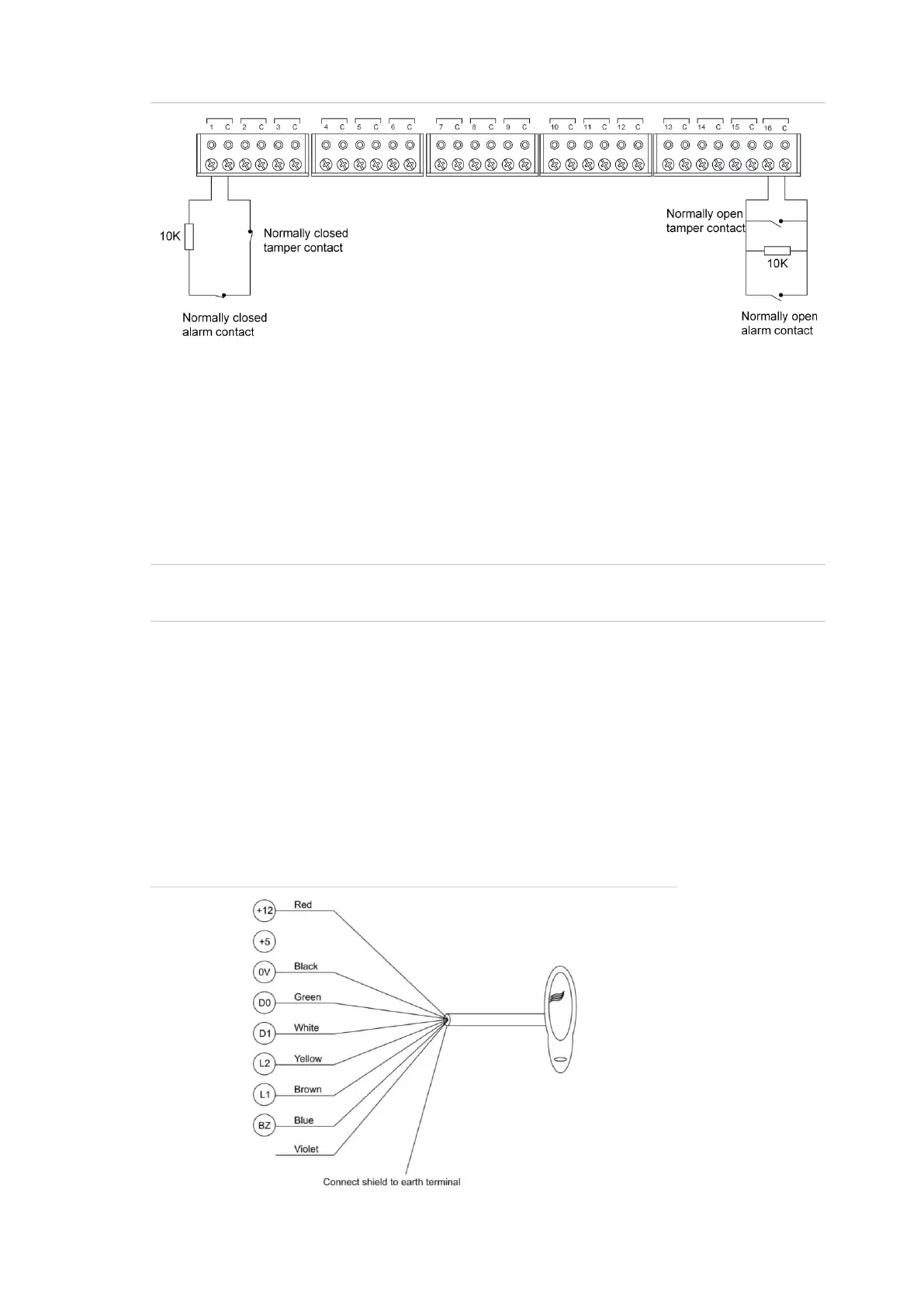
Figure 9: Two-state monitored input circuits
The panel uses the circuit’s resistance to determine the state of the input. In this
example, 10 kΩ EOL resistors have been used:
• 10 kΩ indicates sealed
• Open circuit or short circuit indicates unsealed
To use two-state monitoring, tamper monitoring must be disabled for the Network
Access Controller. See the TS1067E Network Access Controller Programming
Manual for information on disabling tamper monitoring.
Note: Two-state monitoring is not compatible with input types 33 or 40. See the
MAPROG-TS1067E Network Access Controller Programming Manual for details.
Wiegand Reader Connections
The TS1067E Network Access Controller with Wiegand Interface can
have four Wiegand devices, such as readers, connected to the ports
found on Figure 2, on page 12, item 16.
Wiegand readers can be used as an alternative to (or in addition to) local
LAN devices.
Figure 10 below details the typical Wiegand reader wiring used with a
TS0870 Smart Card Reader.
Figure 10: Connecting a Smart Card Reader as a Wiegand device



 To Next Page