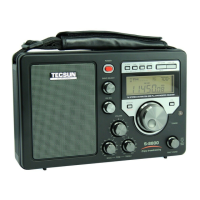
The Tecsun R-108 is a synthesized receiver designed for comprehensive radio reception across multiple bands, including FM Stereo, MW, LW, SW, DSP, and Air Band. This portable radio offers a wide array of features for both casual listening and dedicated radio enthusiasts, focusing on ease of use, memory management, and intelligent functions.
Function Description
The R-108's primary function is to receive radio broadcasts across its supported bands. It employs a synthesized tuning system, allowing for precise frequency selection. The DSP (Digital Signal Processing) technology enhances audio quality and reception stability. The radio includes an FM stereo function, providing a richer audio experience when receiving strong FM signals. For AM bands (MW, LW, SW, Air), it offers adjustable bandwidth settings (6, 4, 3, 2, 1 kHz) to optimize reception, allowing users to select a wider band for better audio fidelity on strong signals or a narrower band to reduce interference on weaker, distant stations.
Beyond basic reception, the R-108 integrates several intelligent features. It has a built-in clock with alarm functionality, allowing users to set alarms that activate either a buzzer or a pre-stored radio station. A sleep function is also included, enabling the radio to automatically power off after a set period (1 to 120 minutes, or permanently ON), conserving battery life. The device features an intelligent lighting system, where the backlight illuminates for 10 seconds after any key or knob operation, improving visibility in low-light conditions.
The R-108 supports extensive memory storage, with a total of 500 presets (100 for each band: FM, MW, LW, SW, AIR). This allows users to store their favorite stations for quick access. The radio also includes an Auto Tuning Storage (ATS) function, which automatically scans and stores all available stations within a selected band into memory.
Usage Features
Operating the R-108 is designed to be intuitive. The radio is powered on/off using a dedicated button. Band selection is done via the [BAND] button, cycling through FM, MW, LW, SW, and AIR. Tuning into stations can be achieved through multiple methods:
- Manual Tuning: Rotating the multifunctional [TUNING] knob allows for step-by-step frequency adjustment.
- Direct Keypad Entry: Users can directly input a station's frequency using the numeric keypad [0]-[9].
- Auto Tuning Storage (ATS): Pressing and holding the [BAND] button initiates an automatic scan and storage of stations for the selected band. This is particularly useful for quickly populating memories when in a new location.
Memory management is a core feature. Stations can be stored manually by tuning to a desired frequency, pressing the [MEMORY] button, selecting a memory address with the [TUNING] knob, and pressing [MEMORY] again. Listening to stored stations involves selecting the desired band, pressing the [VM/VF] button to enter memory mode, and then rotating the [TUNING] knob to browse through the stored addresses. An auto browse memory function allows the radio to scan through stored stations, pausing for about 5 seconds on each. Stored stations can also be deleted individually or all at once within a selected band.
The clock and alarm settings are straightforward. The clock is set by pressing and holding the [TIME] button, then using the [TUNING] knob to adjust hours and minutes. Similarly, the alarm time is set using the [ALARM] button and [TUNING] knob, with an additional step to set the auto alarm off timer (1-90 minutes). The alarm can be activated/deactivated to sound as a buzzer or play a pre-stored radio station. A snooze function is available, temporarily silencing the alarm for 5 minutes.
Other user-configurable settings include:
- Display Mode: When the radio is off, the [DISPLAY] button cycles through local time, alarm time, and temperature. When on, it shows local time, signal strength/SNR, alarm time, temperature, memory address, and meter band.
- Key-Lock Function: Pressing and holding the [DISPLAY] button activates or deactivates a key-lock, preventing accidental button presses.
- Squelch Function: This feature, particularly useful for AIR band, allows users to set a signal strength threshold. The radio's audio will only open when the received signal exceeds this threshold, reducing background noise.
- Tuning Speed Setting: The [SQUELCH] button can also be used to switch between FAST, SLOW, and STOP tuning speeds, providing flexibility for different tuning needs.
- Sound Mode: The radio offers "MUSIC" and "VOICE" sound modes, accessible via the "4" button, to optimize audio output for different content types.
- System Settings (Operating in OFF state): These include setting the FM frequency range (e.g., 64-108MHz, 87.5-108MHz), MW (AM) tuning step (9kHz or 10kHz), and turning the LW band ON/OFF. The "Beep (B)" sound can also be activated or deactivated.
Maintenance Features
The R-108 is designed for user-friendly maintenance, primarily focusing on battery management and general care.
- Battery Compartment: Located on the back, it accommodates a BL-5C battery.
- Intelligent Charging Function: When the radio is off and a BL-5C rechargeable battery is installed, connecting a 5V external adaptor via the USB DC-IN jack initiates charging. A battery symbol on the display animates during charging and stops when fully charged.
- Battery Care: It is recommended to remove the battery if the radio will not be used for a long period to prevent liquid leakage. The display indicates low battery power, prompting the user to charge or replace the battery.
- Reset Function: In case of improper function, a reset can be performed by inserting a pin into the "RESET" hole at the bottom of the unit, restoring the radio to its default state.
- General Care: Users are advised to avoid violent shocks, falls into water, and exposure to direct sunlight, high temperatures, or extreme cold (below 5°C or above 50°C) to protect the LCD screen. Cleaning should avoid corrosive chemicals, and users should not attempt to disassemble the radio for internal adjustments.
- Reception Improvement: For FM/SW reception, fully extending the telescopic antenna is recommended. An external wire antenna can be plugged into the dedicated jack and hung outside a window for better reception, with a caution against installing it in areas prone to thunder and lightning. For MW (LW) reception, rotating the radio or changing its location can optimize signal quality.



 To Next Page
 General