13
Assemble Forward Pivot Cover Sets
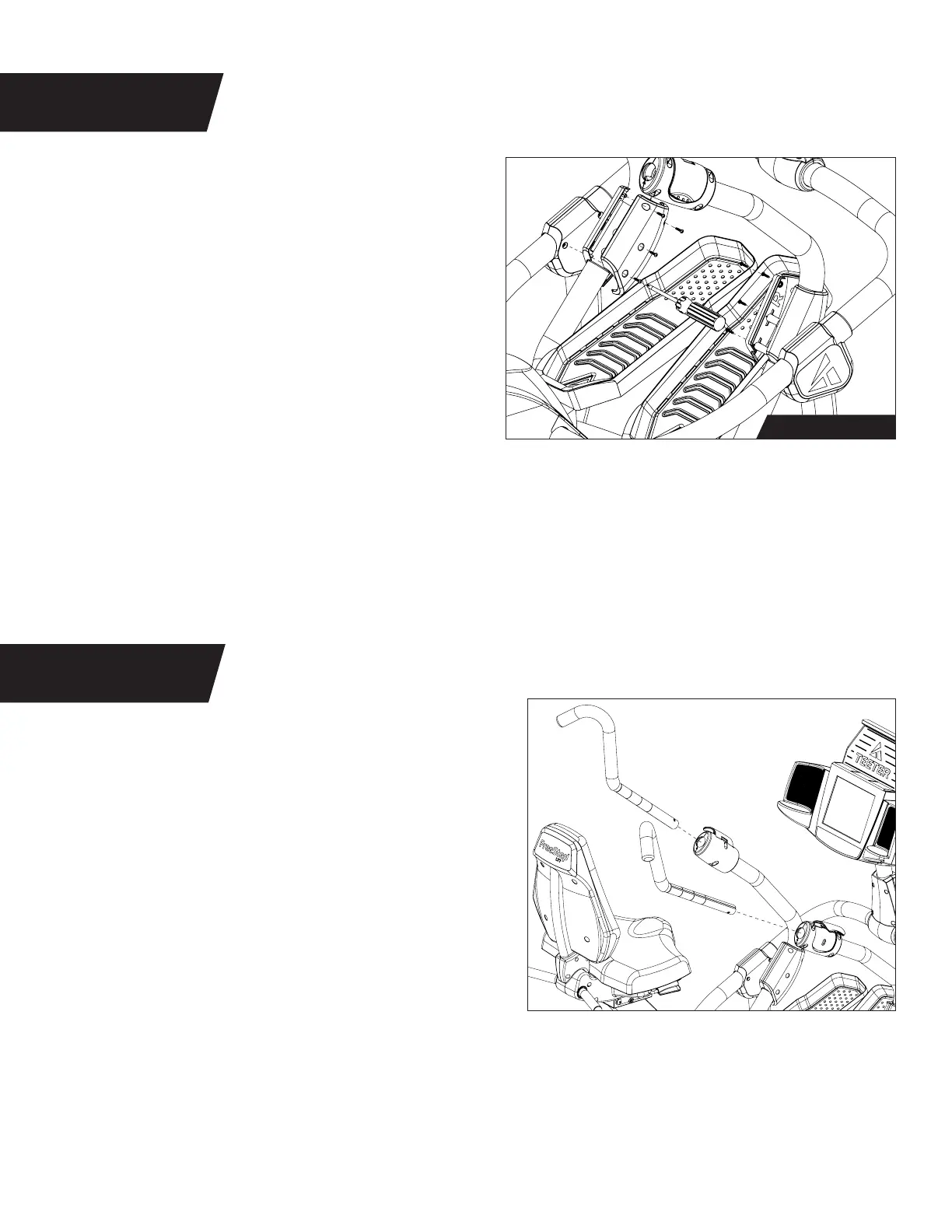
Figure 22: Locate the Forward Pivot Cover Sets,
noting Right and Left markings.
Using the Step 12 Hardware Kit fully tighten
4 × Phillips Screws on each side using the Phillips
Screwdriver.
TIP: To gain better access to the screw holes
during assembly, carefully adjust the position
of the Linkage by pushing forward or pulling
backward on the Handle Support Tubes.
STEP 12
Figure 23: Locate the Handles, noting Right and
Left markings.
Open the Handle Cam Locks and insert the
Handles while aligning the groove with the arrow
on the bottom of the opening.
Once in the desired position, close the Handle
Cam Locks.
NOTE: Refer to User Guide for more information
on Handle positions.
Figure 23
Figure 22
STEP 13
Step 12 Hardware



 To Next Page