© 2016 284_D - 05/16
45 of 60
A Watts Water Technologies Company
BAS Menu (1 of 2)
Configure Modbus
®
& BACnet
®
options.
Item Field Range Description
OFF or ON
Default: OFF
Access: ADV
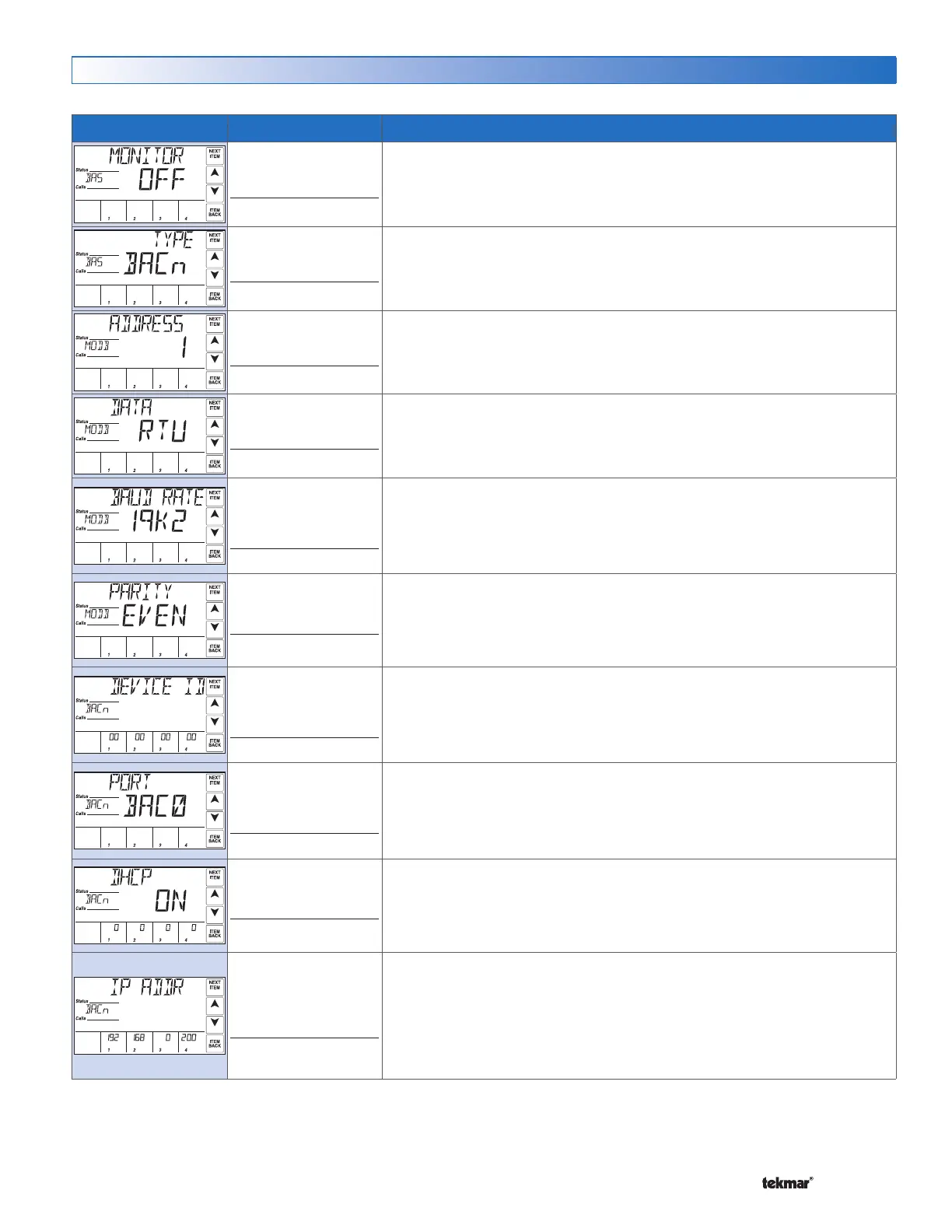
BAS MONITOR
Selects whether or not BAS monitor mode is to be used. Monitor mode allows for
read / write capability of select menu items.
This item is only available when Application Mode is set to either RSET, SETP,
DDHW or EMS.
BACn, MODB
Default: BACn
Access: ADV
BAS TYPE
Selects the communication protocol used with the BAS network. Modbus
®
communicates over RS485 & BACnet
®
is over IP.
1 to 247
Default: 1
Access: ADV
MODBUS ADDRESS
Sets the unique address within the Modbus
®
network.
This item is only available when BAS Type is set to MODB.
RTU or ASCI
Default: RTU
Access: ADV
MODBUS DATA
Selects whether the Modbus
®
data communication type is RTU or ASCII (ASCI).
This item is only available when BAS Type is set to MODB.
2400, 9600, 19K2,
57K6, 115K
Default: 19K2
Access: ADV
MODBUS BAUD RATE
Selects the communication speed. In order to ensure reliable communications, the
baud rate on the control must be same as the Modbus
®
network.
This item is only available when BAS Type is set to MODB.
NONE, EVEN, ODD
Default: EVEN
Access: ADV
MODBUS PARITY
Selects the parity used for the Modbus
®
communication.
This item is only available when BAS Type is set to MODB.
0 to 4, 0 to 99, 0 to 99,
0 to 99
Default: 0, 0, 0, 0
Access: ADV
BACNET DEVICE ID
Sets the unique address within the
BACnet
®
network. The address is set using four
number sets displayed in the source output fields. Touch the ‘Next Item’ button to
view & adjust each number set.
This item is only available when BAS Type is set to BACn.
0x1 to 0xFFFF
Default: 0xBAC0
(47808)
Access: ADV
BACNET PORT
Sets the User Datagram Port (UDP) port on the
BACnet
®
network.
This item is only available when BAS Type is set to BACn.
OFF or ON
Default: ON
Access: ADV
BACNET DHCP
Selects whether or not the Dynamic Host Configuration Protocol (DHCP) is used
to automatically assign the IP address on the
BACnet
®
network. If ON is selected,
the address is displayed in the source output fields.
This item is only available when BAS Type is set to BACn.
0 to 255, 0 to 255, 0 to
255, 1 to 254
Default: 192,168,0,200
Access: ADV
BACNET IP ADDRESS
Sets the IP address on the
BACnet
®
network. The address is set using four
number sets displayed in the source output fields. Touch the ‘Next Item’ button
to view & adjust each number set. Touch the ‘Next Item’ button to view & adjust
each number set.
This item is only available when BAS Type is set to BACn & BACn DHCP is set
to OFF.


 To Next Page