© 2007 U 541 - 08/07 2 of 12
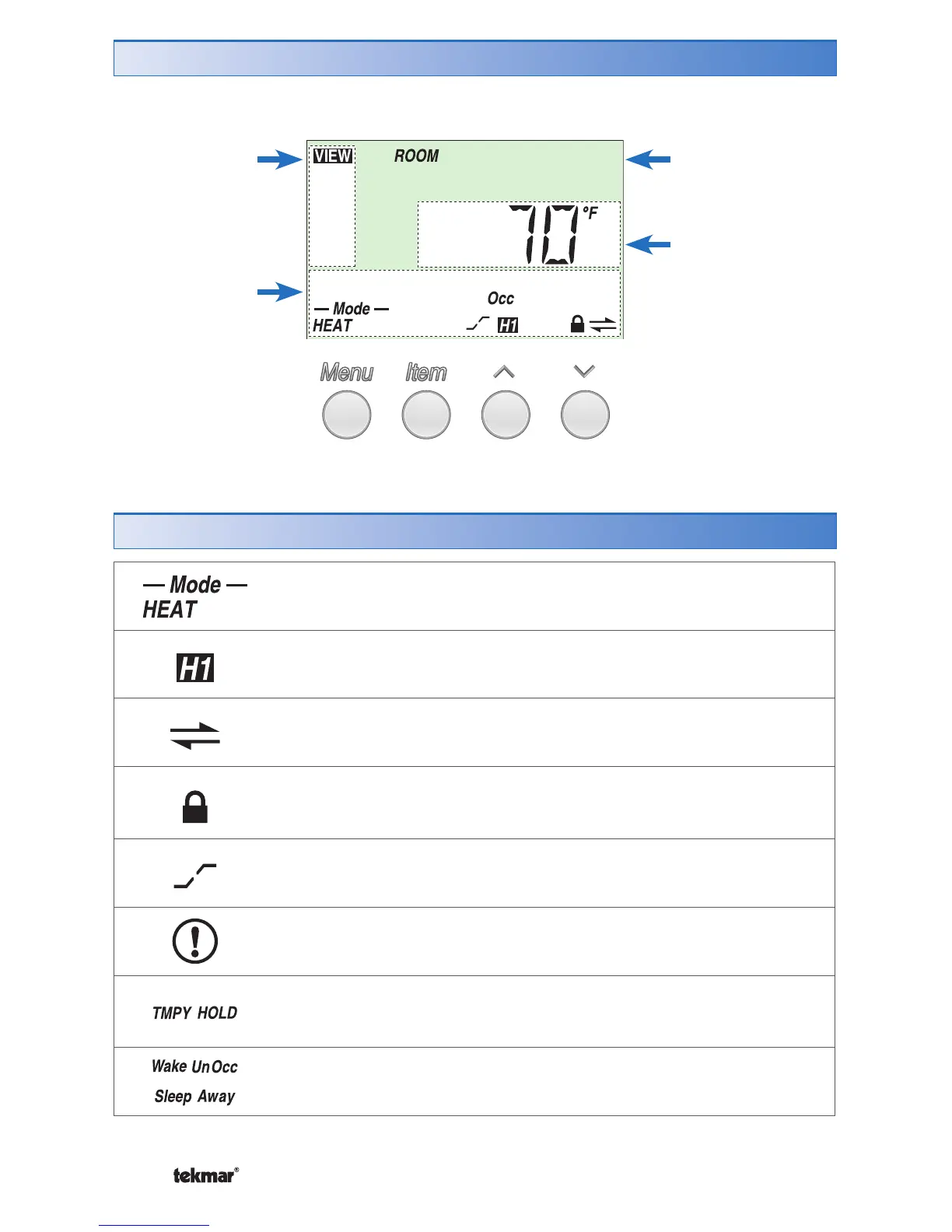
Item Field
Displays an
abbreviated
name of the
selected item
Number Field
Displays the
current value of
the selected item
Status Field
Displays the
current status
of the control’s
inputs, outputs
and operation
Menu Field
Displays the
current menu
MODE OF OPERATION
Displays whether in heating or cooling mode.
FIRST STAGE OF HEAT
Indicates when the first stage of heat is operating.
tN4 COMMUNICATION
Indicates when a communication network is detected.
LOCK
Indicates that the access levels are locked. Also indicates when
an item is visible but not adjustable.
OPTIMUM START / STOP
Indicates that Optimum Start or Optimum Stop is active.
WARNING
Indicates an error is present.
TEMPORARY HOLD
Indicates that the temperature has been temporarily adjusted
from the scheduled event temperature.
SCHEDULED EVENT
Indicates the current scheduled event.
Display
Symbols Description



 To Next Page