8
2. CONTROL ELEMENTS
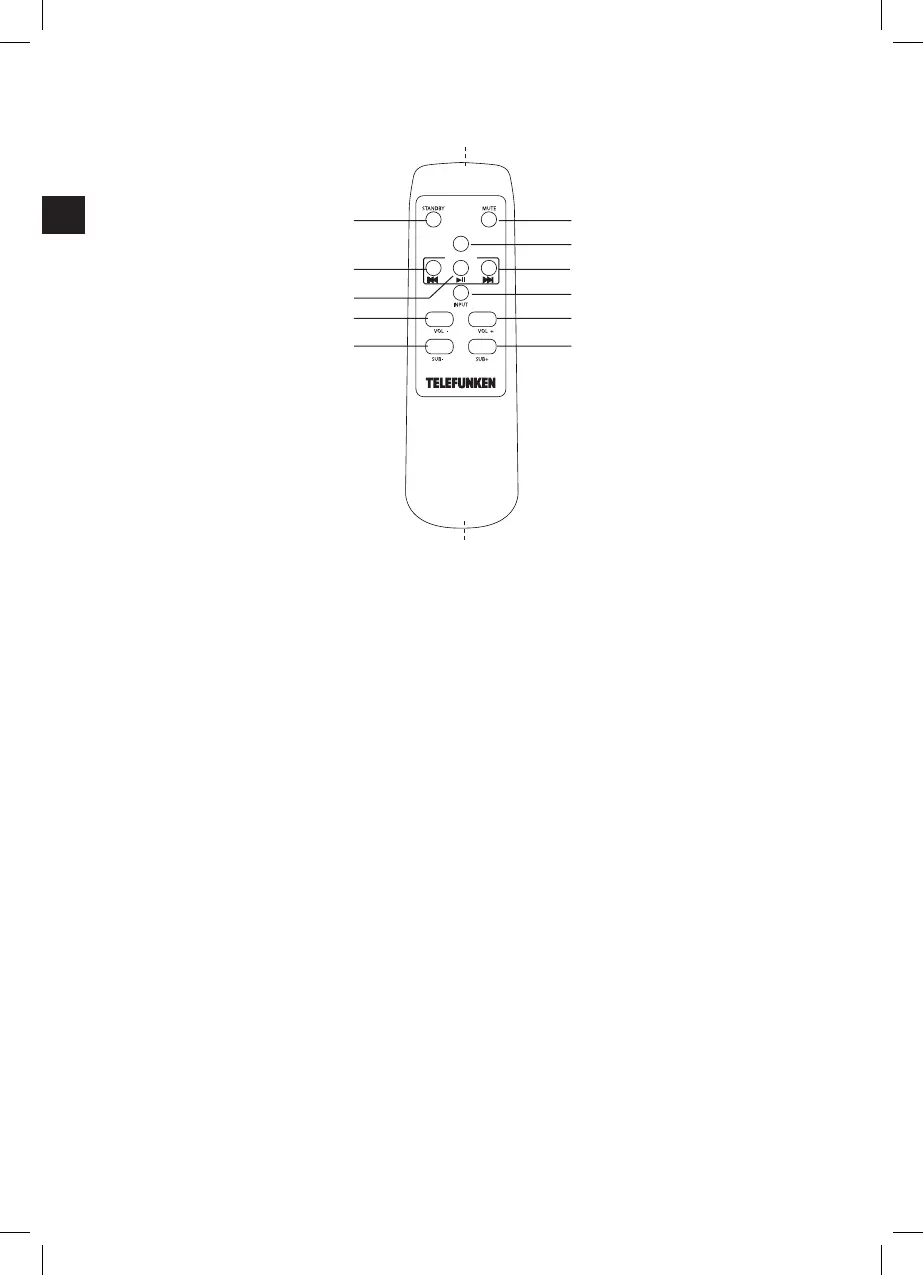
2.5 Remote Control
1 Bluetooth connection indicator
(Blue)
2 Switch ON/OPTICAL mode
indicator for soundbar
(Orange)
3 AUX mode indicator (Green)
4 Connection between soundbar
& subwoofer indicator (Green)
5 Standby mode indicator (Red)
6 Remote control signal receiver
7 OPTICAL Socket for connection to the
optical audio output of external
device
8 AUX L/R Analogue audio input for
external devices via a Cinch
(RCA) audio cable (provided)
9 Ventilation openings
10 DC28V 1.2A Socket for connecting power
adaptor
11 OFF/ON ON/OFF switch for the
soundbar
12 PAIR-LED Indicator for connection
between the soundbar and
subwoofer
13 PAIR Button for creating connection
between the soundbar and
subwoofer
14 POWER Power ON indicator for
subwoofer (Red)
15 DC28V 1.2A Socket for connecting power
adaptor
16 ON/OFF ON/OFF switch for the
subwoofer
17 Remote control signal
transmitter
18 MUTE Mute audio.
19 SUB PAIR Button for creation
connection between the
soundbar and subwoofer
20
uuI
Go to next title (under
Bluetooth)
21 INPUT Toggle among dierent
input sources (AUX/
OPTICAL/BLUETOOTH)
22 MASTER VOL+ Increase soundbar volume
23 SUB + Increase subwoofer
volume
24 Battery compartment
(back)
25 SUB − Decrease subwoofer
volume
26 MASTER VOL- Decrease soundbar
volume
27 uII Play/pause/resume
playback (under Bluetooth)
28
Itt
Go to previous title (under
Bluetooth)
29 STANDBY Switch to standby mode of
the soundbar
30 Cinch audio cable
31 Power adaptor (2x)
32 Wall plugs (2x)
33 Screws (2x)
34 EVA sheets (2x)
18
19
20
21
22
2325
26
27
28
29
17
24
BLUETOOTH
Master
SUB PAIR
(IM)953-000094_SBS100W_DE_GB_Telefunken_P150183_V1_20151207.indb 8 16/12/2015 3:14 PM


 To Next Page