11
3. BEFORE FIRST USE
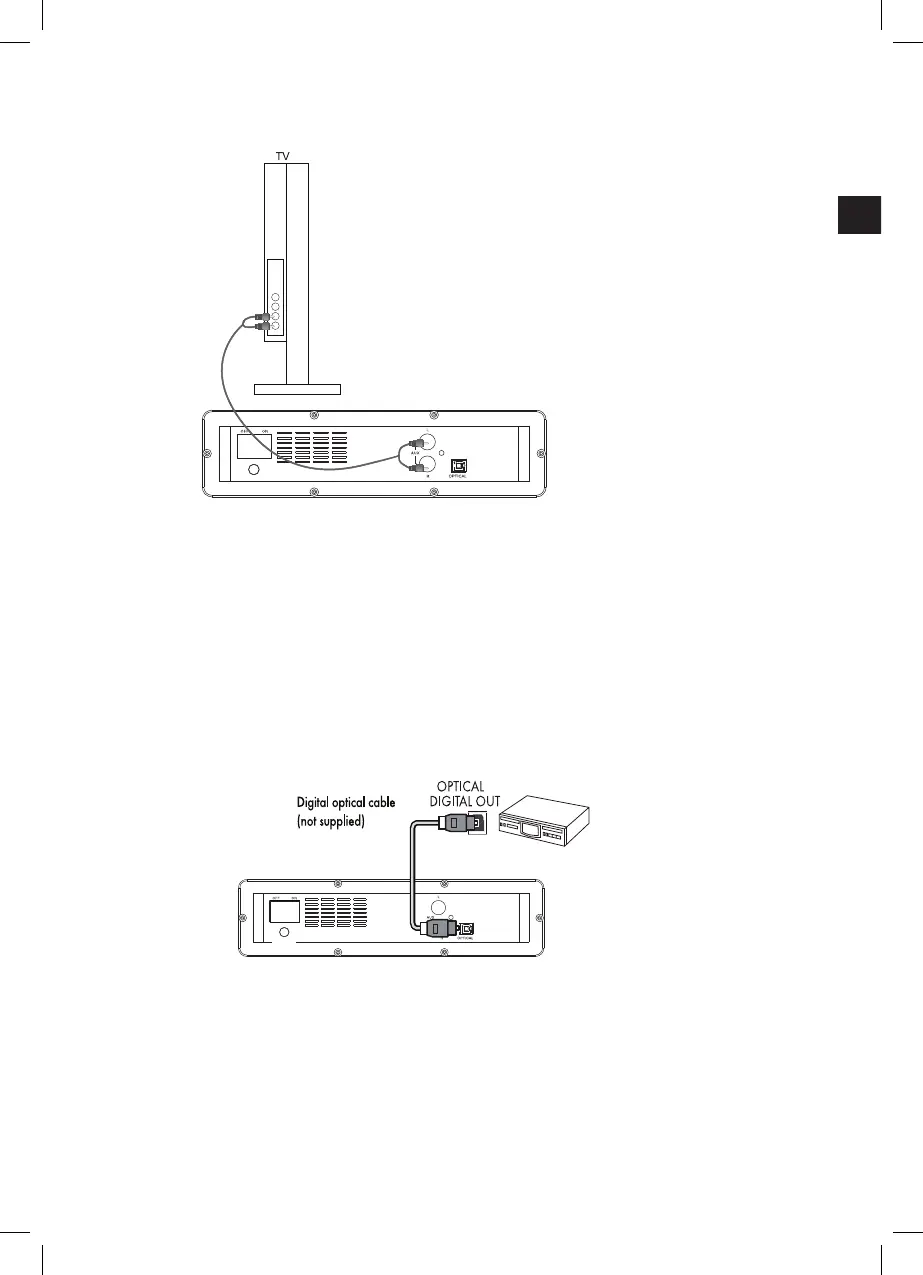
3.4 Connecting to external devices with a cinch to cinch (RCA) audio cable (supplied)
Use the Cinch audio cable provided to connect the soundbar to a television set, a DVD
player, a game console or other suitable device.
Connect one end of the Cinch audio cable provided to the output cinch sockets of your
external device.
Attach the other end of the Cinch audio cable provided to the AUX L/R input sockets (8)
of the soundbar.
Caution! Make sure that the red plugs are connected to the red sockets and that the
white plugs are connected to the white sockets.
Note: the soundbar volume is directly impacted by the volume of the TV or audio
device. Adjust the audio settings on the source device in order to optimize the audio
quality of the soundbar.
3.5 Connecting to external devices with a digital optical cable (not supplied)
Use a digital optical cable (not supplied) to create a digital connection to a TV, DVD,
Blu-Ray player or other suitable devices.
Connect one end of the digital optical cable (not supplied) to the optical digital output
socket of your source device.
Connect the other end of the digital optical cable (not supplied) to the OPTICAL input
socket (7) at the back of the soundbar.
DC28V 1.2A
DC28V 1.2A
(IM)953-000094_SBS100W_DE_GB_Telefunken_P150183_V1_20151207.indb 11 16/12/2015 3:15 PM


 To Next Page