EN
11
2.2.- Dish Check
This feature makes a scan in 6 channels of the plan
to check the LNB and the good reception of the
signal.
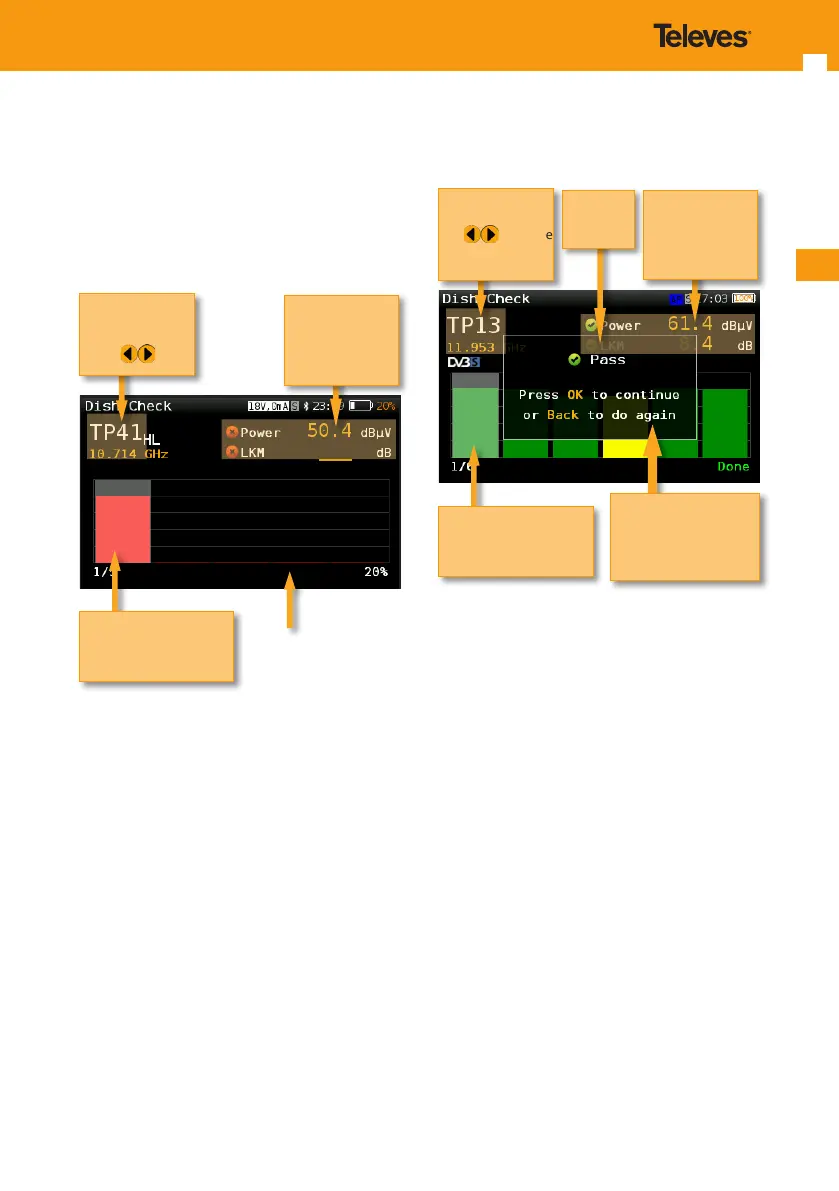
Below is a capture of the Dish Check window with
a brief explanation of its features.
If you seletected the Wideband LNB ir Hybrid LNB,
the H30FLEX SKY will show messages indicating
when you must switch between horizontal
and vertical polarization before starting the
corresponding measurement.
Channel
and
Frequency
Use to
change
Bar graph of power
measurement
Color according to
checkmarks
Power and LKM
measurements
of the selected
channel with
pass/fail indicator
When the scan is nished, the result of the scan is
shown in the screen:
If one or more channels fail, it is considered that
the dish check fails.
2.3.- Dish Logger
This feature is similar to the Dish Check one, but
in this case the device makes a scan in all the
channels of the plan.
Below is a capture of the Dish Logger window with
a brief explanation of its features.
Channel and
Frequency
Use to hange
Long press OK to
go to Channel Info
Press OK to conrm
dish check
and go to the next step
(see section 3.3.- Dish
Logger)
Bar graph of power
measurement
Color according to
checkmarks
Power and LKM
measurements
of the selected
channel with
pass/fail indicator
Result of
the scan
Channel and
Frequency
Use to hange
Long press OK to
go to Channel Info
Bar graph of power
measurement
Color according to
checkmarks
Power and LKM
measurements
of the selected
channel with
pass/fail indicator


 To Next Page
 Loading...