EN
17
Channel
plan
Frequency
Channel
Change using
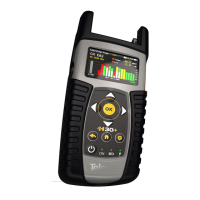
Bar graph of main
measurement.
Color according to
checkmarks
List of measurements
with pass/fail indicators
5.1.2. Setup
Press to change the Channel Info options.
- Band: Terrestrial/Satellite
- Sat Plan: Selects the satellite channel plan
- Mode: Standard/Wideband/dSCR
- UB: (only satellite band): Selects the SCR
parameters (multiswitch, standard and slots)
When a slot is enabled (for example slot 3,
freq. 1210MHz), the meter will tune into the
slof frequency (1210MHz) and will set the slot
with the meter parameters: frequency, band
(powering), and DiSEqC. In addition, a SCR
icon will be shown in the bar at the top (SCR3)
to indicate thar the slot is enabled.
While the slot is enabled, all the setting
changes of the meter, will be applied to the
currently slot (SCR3).
- Powering: Selects the LNB powering
- Tuning: Channel, Frequency
- Screen capture: Captures the current
screen and saves it as a .png image. You can
see the captures using the remote control
application
5.2. Spectrum
Real-time processing speeds ensure capture of any
fast, intermittent plant impairments.
Due to the accuracy and level of detail provided
by this spectrum analyzer, the H30FLEX SKY is
the ideal tool for identifying and locating noise,
interference, ingress and other waveforms that
may be aecting cable services quality.
5.2.1. Main window
Below is a capture of a Spectrum window with a
brief explanation of its features:
Span
User can change it
using
List of
measurements
with pass/fail
indicators
Selected channel
Change using


 To Next Page
 Loading...