HOW TO USE THE CONFIDEA FLEX
UNIT
Below you can find a description how to use the Confidea FLEX unit.
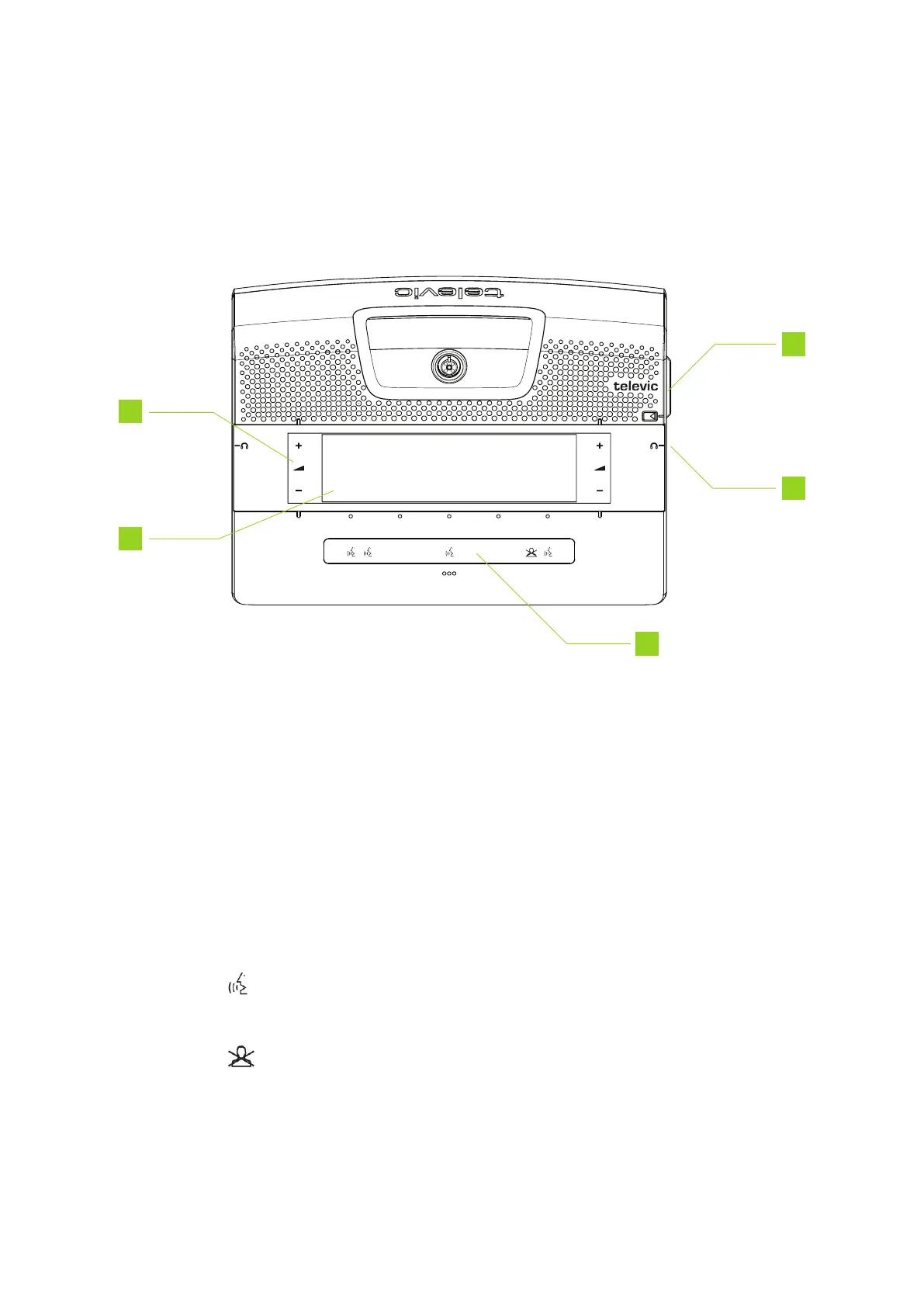
Figure 1-7 Top view of the Confidea FLEX
You can find the following functions on the Confidea FLEX unit:
1. Volume control: the volume control buttons become visible when you plug in your headphones.
2. Interactive display: shows meeting information and different controls. Which controls are
available depend on the configuration of your unit (chairperson / delegate) and the licenses active
on the unit. You can find a detailed description how to use the interface in "How to use the
Confidea Flex Interface" on page22
3. Microphone button: has different hidden LEDs indicating which functions are active. The
microphone button has the following functionality:
a. : press the button where the LEDs is active. This activates the microphone or puts
the microphone in request, if request to speak is active.
b. : PRIOR button: press and hold to temporarily mute all microphones or press and
release to deactivate all active microphones.
HO W TO USE THE CONF IDEA FL EX UNIT 20



 To Next Page