1. Navigate through the available languages using the buttons or swipe through the list. You can
feel that you pressed the arrow buttons by the haptic feedback of the unit.
2. Press the language channel of your choice. The selected channel is highlighted in white.
3. Press the cross to leave the channel selection screen.
Voting Interface
When the actual agenda item is a voting item, you can recognize it by the voting icon next to the
agenda item name. The chairperson can activate the voting session from its unit, or the operator can start it
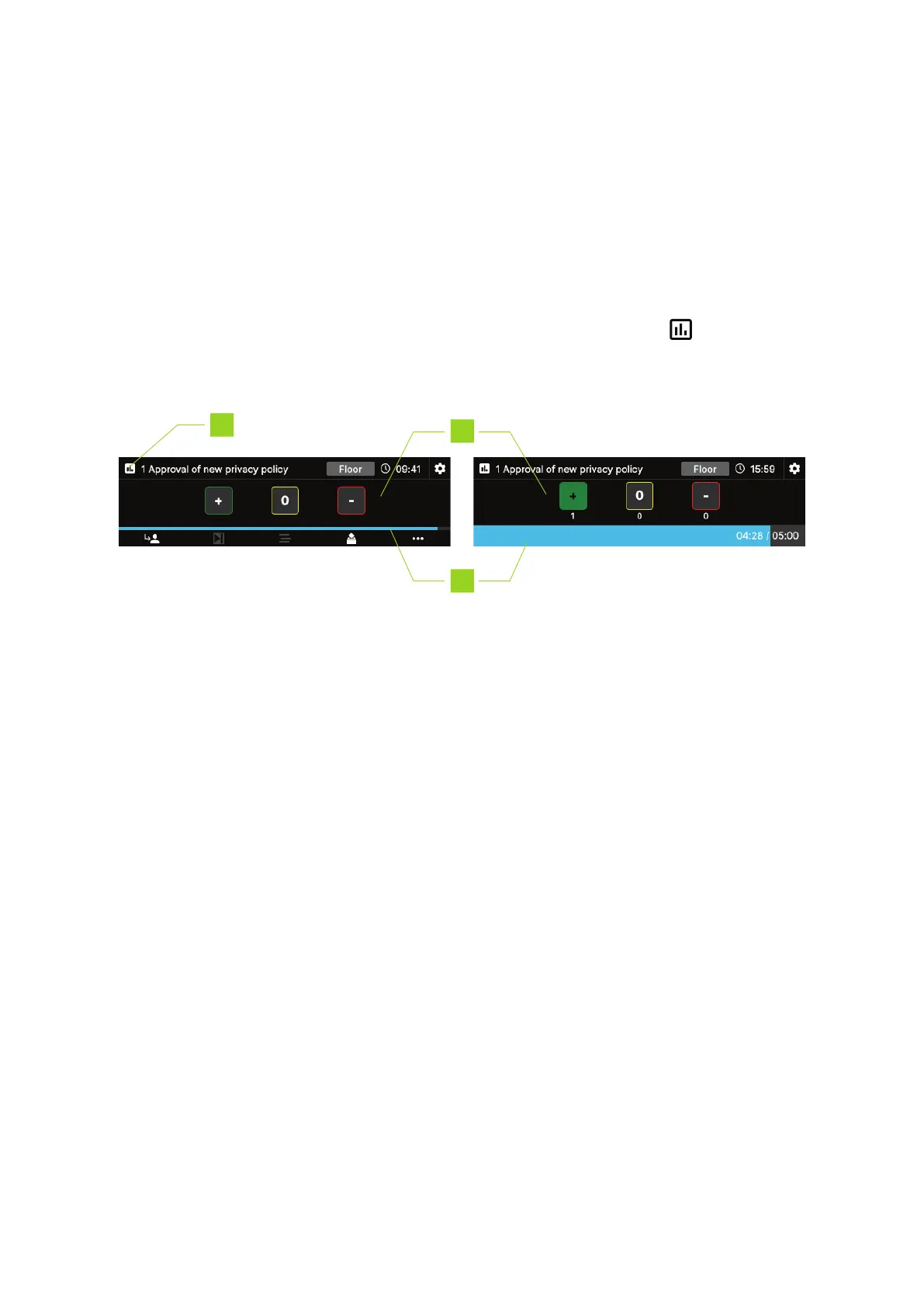
from CoCon. When the voting is active, you can see the screen shown below:
1. Icon indicating that the actual agenda item is a voting item
2. Voting options: press the option of your choice to vote. The button becomes highlighted once
you passed your vote. When voting correction is active, you can still change your vote by pressing
another button. When voting correction is inactive or the chairperson stops the voting, a lock
icon appears on the voting buttons to indicate that you it is not possible to make changes.
Below each button, you can see the voting results, if this option is active in CoCon.
3. Voting timer: shows the time left to vote, if this option is active in CoCon.
HO W TO USE THE CONF IDEA FL EX INTER F ACE 29



 To Next Page