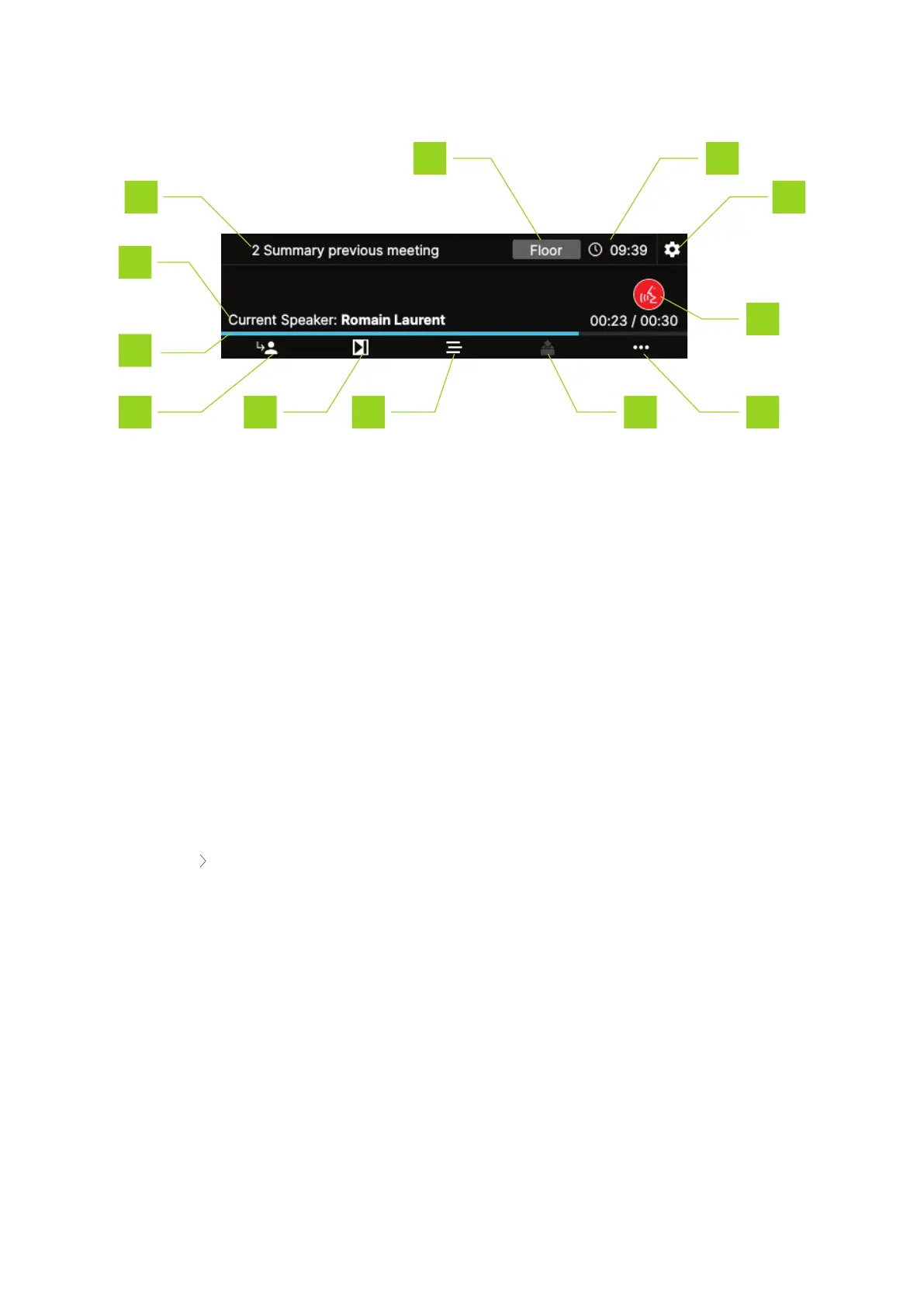
MAIN INTERFACE
1. Meeting name or the active agenda item
2. Current speaker list: when there are multiple speakers the display shows each speaker one by
one and repeats this when finished
3. Speech timer: shows the progress of the speech timer. Is only visible when the speech timer
function for chairperson is active
4. NEXT button: grants the floor to the next delegate in the request list
5. Meeting control: press this button to open the meeting control menu where you can pause,
stop or restart the meeting
6. Agenda: press the button to access the agenda and activate the agenda item of your choice
7. Voting options: when a voting agenda item is active, the voting menu icon becomes active.
8. More options: press this button to see more options
Record meeting: press the button to start or stop recording the meeting. When recording
is active, a red dot appears on the upper right corner of the interface.
9. Deactivate microphone
10. Settings: press to access the settings menu, here you can change different general settings
such as the display settings, and retrieve device information. For more information see "Settings
screen" on page30
11. Current time
HO W TO USE THE CONF IDEA FL EX INTER F ACE 23



 To Next Page