EasyManua.ls Logo

Telit Wireless Solutions GE910 - 12 General Purpose I;O

Telit Wireless Solutions GE910
83 pages
Print Icon
To Next Page IconTo Next Page
To Previous Page IconTo Previous Page
Loading...
GE910 Hardware User Guide
1vv0300962 Rev.12 2013-10-22
Reproduction forbidden without Telit Communications S.p.A. written authorization - All Rights Reserved
page 61 of 83
Mod. 0805 2011-07 Rev.2
12. General Purpose I/O
The general purpose I/O pads can be configured to act in three different ways:
input
output
alternate function (internally controlled)
Input pads: they report the digital value (high or low) present on the pad at the moment of
reading.
Output pads: can be written, set the output value of the pad, and read.
Alternate function pad: internally controlled by the GE910 firmware and acts depend on
implemented function.
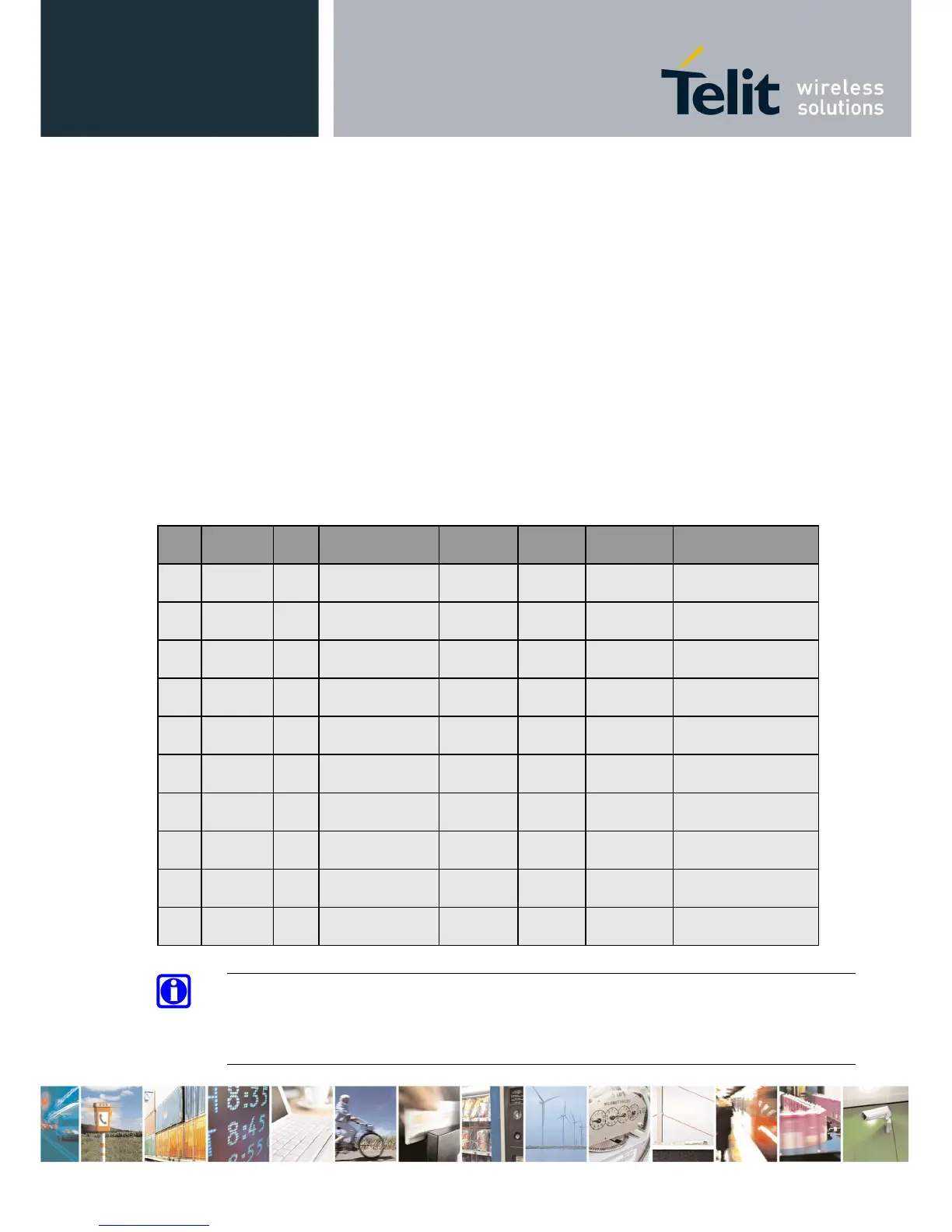
The following table shows the available GPIO on the GE910.
PAD
Signal I/O Function Type
Drive
strength
Default
State
Note
C8
GPIO_01
I/O
Configurable
GPIO
CMOS
1.8V
1 mA INPUT PD
Alternate function
STAT LED
C9
GPIO_02
I/O
Configurable
GPIO
CMOS
1.8V
1 mA INPUT PD
C10
GPIO_03
I/O
Configurable
GPIO
CMOS
1.8V
1 mA INPUT PD
C11
GPIO_04
I/O
Configurable
GPIO
CMOS
1.8V
1 mA INPUT PD
B14
GPIO_05
I/O
Configurable
GPIO
CMOS
1.8V
1 mA INPUT PD
Alternate function
RFTXMON
C12
GPIO_06
I/O
Configurable
GPIO
CMOS
1.8V
1 mA INPUT PD
C13
GPIO_07
I/O
Configurable
GPIO
CMOS
1.8V
1 mA INPUT PD
K15
GPIO_08
I/O
Configurable
GPIO
CMOS
1.8V
1 mA INPUT PD
L15
GPIO_09
I/O
Configurable
GPIO
CMOS
1.8V
1 mA INPUT PD
G15
GPIO_10
I/O
Configurable
GPIO
CMOS
1.8V
1 mA INPUT PD
NOTE:
Pull-Up or Pull-Down can be set on every GPIO, see “AT Commands Reference Guide”.
By default at start time, if no previous set were saved, they are set as Input Pull-Down.

Table of Contents

Related product manuals