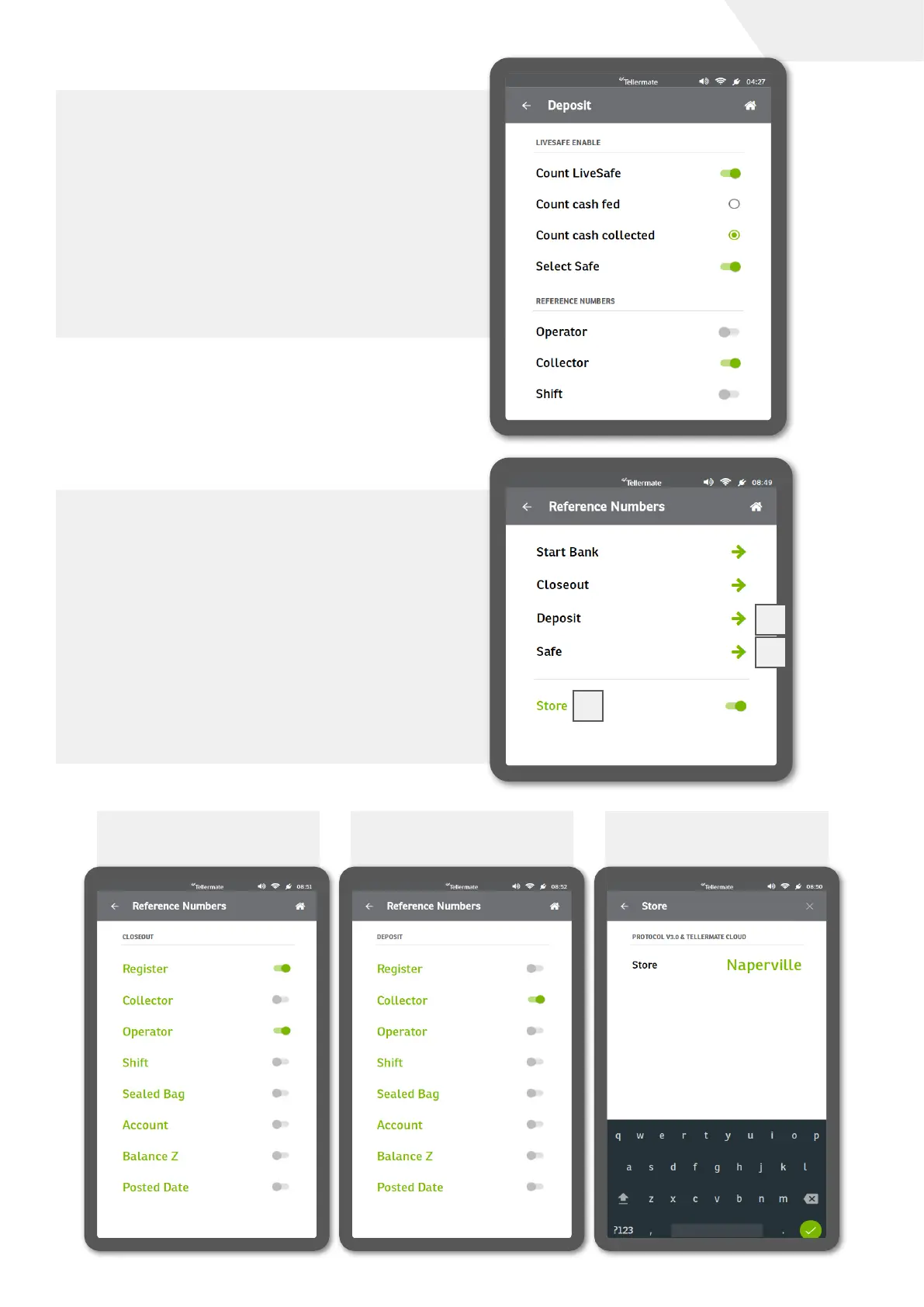
Deposit configuration
A deposit count might typically be performed at
the end of the trading day (or depending on the
depositing schedule) and involves the removal of
the cassette.
After attaching the assigned collector iButton key
to the LiveSafe door to open it, the cassette will be
removed. A new cassette may be now inserted and
the door closed and the iButton removed.
The required configuration to permit this operation is
indicated in the image on the right.
Reference Numbers
The global reference numbers in the Touch also
require configuration for the LiveSafe to operate
as described above. To ensure this, select the
Reference Numbers option in the Setup menu
(Home screen -> Settings -> Setup).
From here we can set reference numbers for
different count tasks (Closeout and Deposit shown
in screenshots below) as well as the ability to
configure the store name (required for sending
data to the Touch Viewer application previously
mentioned).
1 Reference Numbers
- Closeout
2 Reference Numbers
- Deposit
3 Reference Numbers
- Store name
1
2
3
page I 10
User Guide


 To Next Page