Repeat these steps to complete a Closeout for each register. If the safe is being shared by two
Operators, each person will need to complete a Closeout to see their LiveSafe totals as relates to their
registers.
Closeout
The Closeout task is selected when the Cashier/Operator is ready to end their shift. Throughout the
day the operator will typically add high-denomination bills to the LiveSafe.
This task allows the operator to count down the cash in the register using the touch, and include the
bills already added to the LiveSafe. In the example, we go over a standard Closeout procedure using the
LiveSafe and Touch.
Closing a Shift
Once the Operator is ready to close their shift, the cash in the register
will be counted using the Closeout task.
To complete the Closeout:
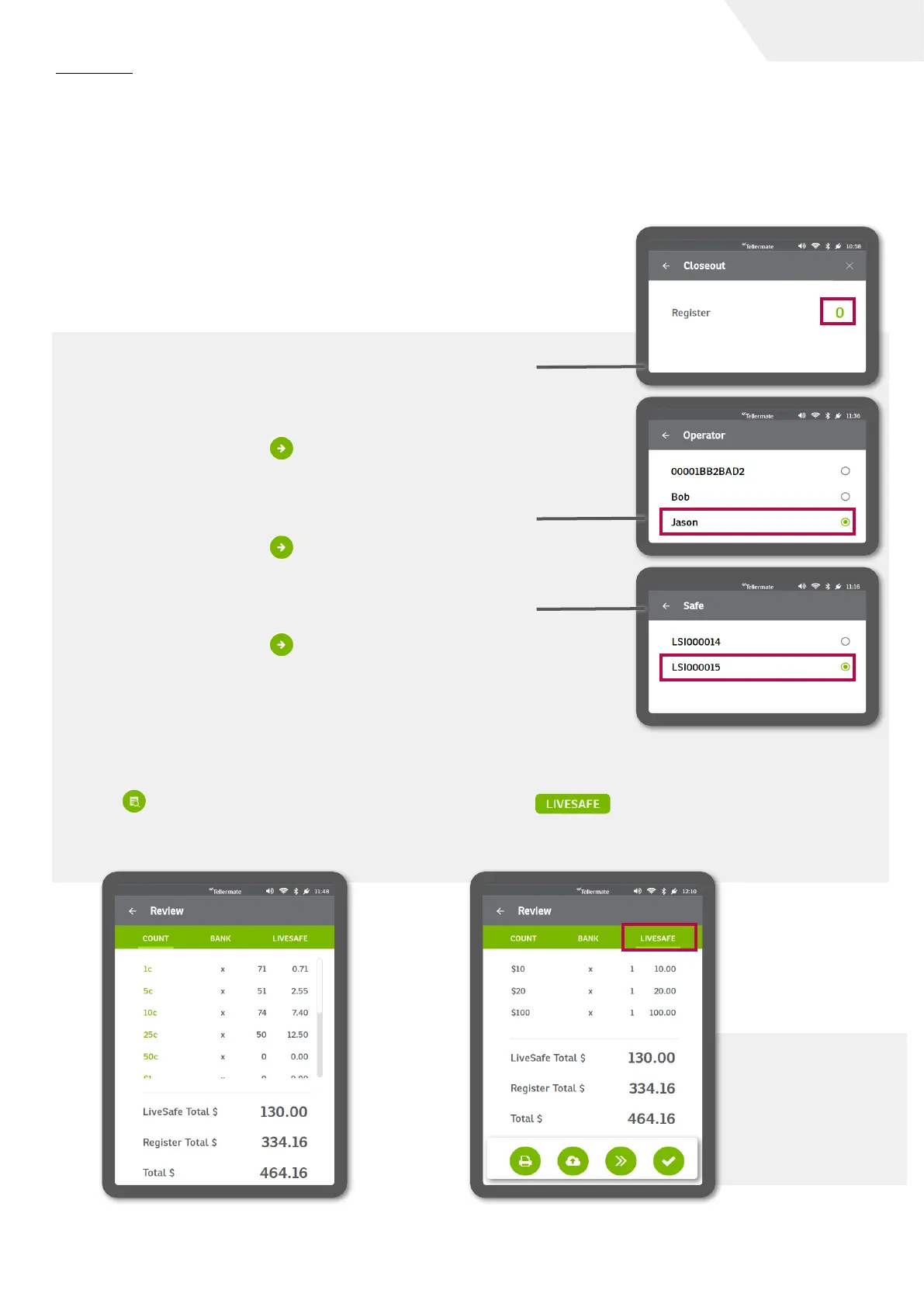
1. From the main menu, select Closeout.
2. The screen will prompt for a register number. Tap the green 0. The
keypad will be displayed, enter the register number then press the
green check to confirm.
3. Press the green arrow to continue.
4. The screen will then prompt for Operator. Choose an operator that
relates to the iButton used to deposit the bills during the shift. In
this example, we are selecting Jason.
5. Press the green arrow to continue.
6. The screen will then prompt for Safe. Choose the relevant LiveSafe
by selecting the radio button. In this example, we are selecting
LSI00015.
7. Press the green arrow to continue.
8. The screen will prompt for counting, beginning with 1c/pennies. Go
through the normal closeout counting procedures as prompted on
the Touch. See the Touch user guide or on-screen videos for more
instructions on counting tasks.
9. When the count is complete select the review
key . The Review screen will provide a
breakdown of the register total, the LiveSafe
safe total, and the overall total.
10. View a breakdown of the LiveSafe by selecting
the tab at the top right of the review
screen. This will provide a denominational
breakdown of the contents of the safe.
page I 7
User Guide
11. End the count
task via the
options at the
bottom: print,
send, next or
tick.


 To Next Page