9. End the count
task via the
options at the
bottom: print,
send, next or
tick.
Counting money
The LiveSafe and Touch permit for simple counting and accountability for both the cash in the register
and the cash secured in the safe.
Creating a Deposit
Once the Collector is ready to create their deposit, the total cash
contained in the removed cassettes and any residual bills found will be
counted using the Deposit task.
To complete the Deposit:
1. From the Touch main menu, select Deposit.
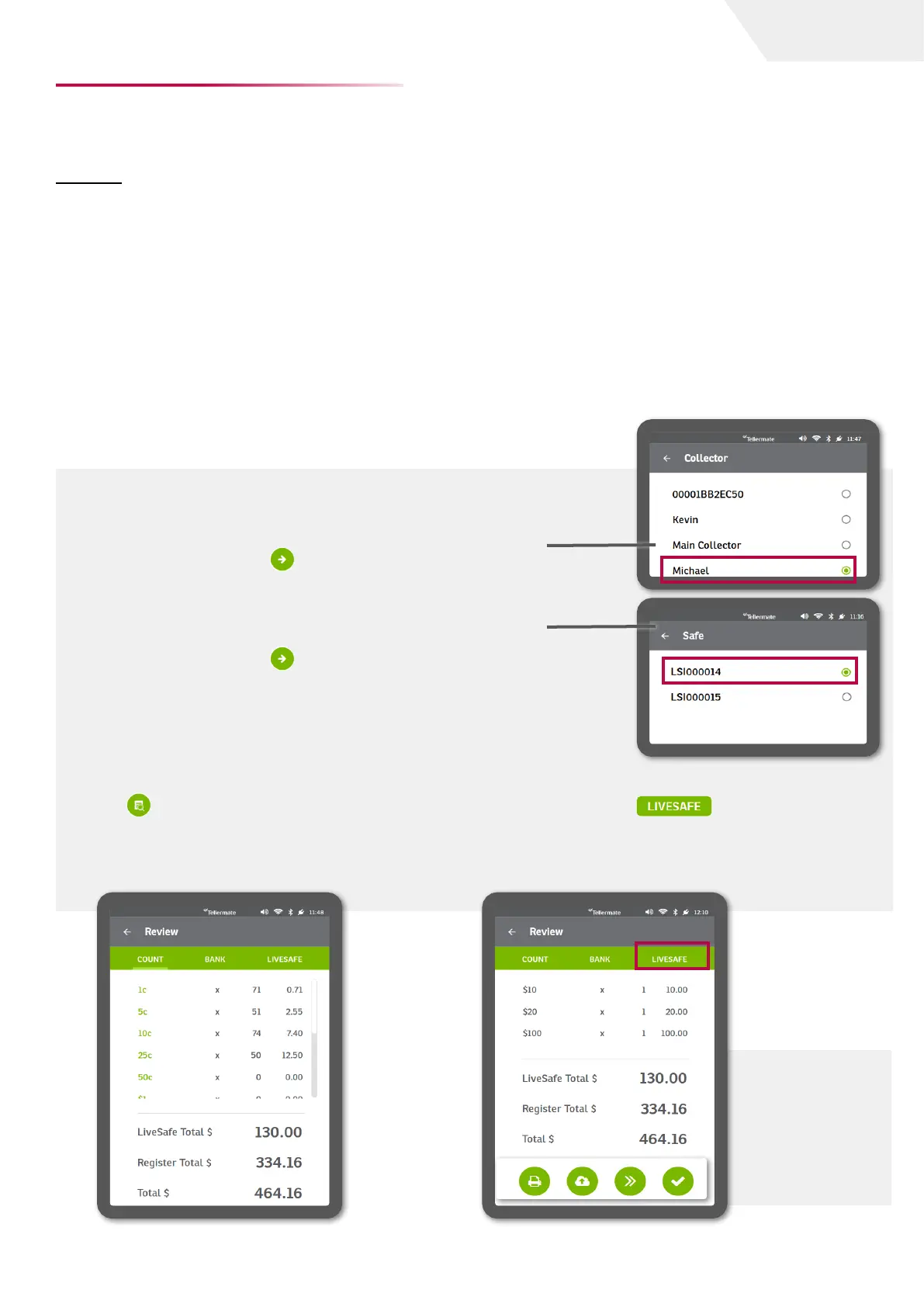
2. The screen will then prompt for Collector. Choose the Collector by
selecting the radio button. In this example, we are selecting Michael.
3. Press the green arrow to continue.
4. The screen will then prompt for Safe. Choose the LiveSafe by
selecting the radio button. In this example, we are selecting
LSI00014.
5. Press the green arrow to continue.
6. The screen will prompt for $100. Begin counting the Deposit from
the largest denomination to the smallest. Count all denominations
of residual bills in the register that form part of the deposit.
Repeat these steps to complete a Deposit for each safe.
Deposit
The Deposit task is used to remove the cassette and send the count results to Touch Cloud Viewer.
In the example, we go over a standard Deposit procedure using the LiveSafe and Touch. The
Collector will remove the contents from each safe, and prepare the deposit for banking.
The LiveSafe Dashboard allows you to view the status of what has been collected as well as what is
currently in the safe.
7. When the count is complete select the review
key . The Review screen will provide a
breakdown of the register total, the LiveSafe
safe total, as well as the overall total.
8. View a breakdown of the LiveSafe contents
by selecting the tab at the top
right of the review screen. This will provide a
denominational breakdown of the contents of
the safe.
page I 7
User Guide


 To Next Page