Timezone & Cloud configuration
Please contact Tellermate
for more information on this
feature.
Transactions
Recent
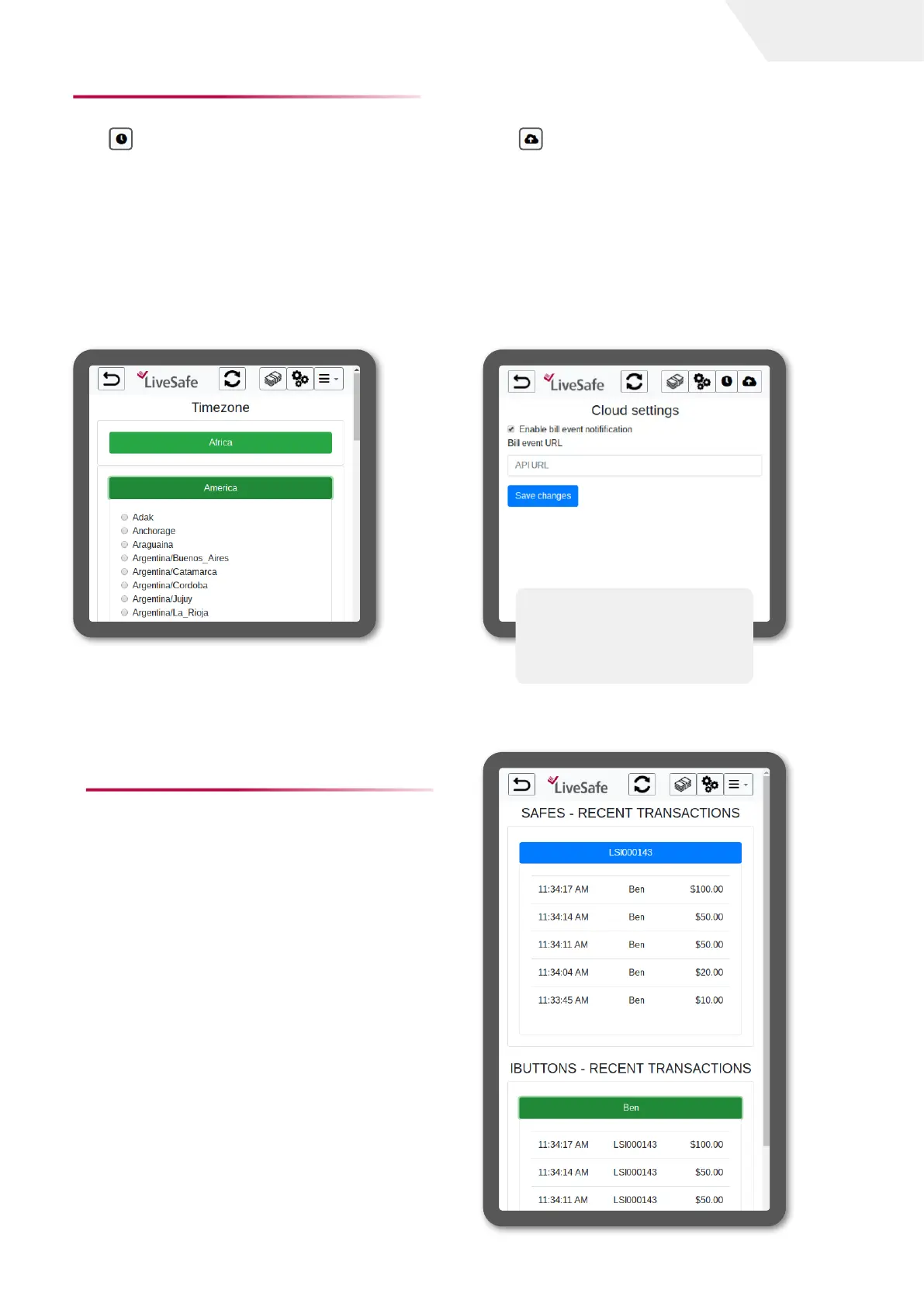
This screen shows all the recent
denominations fed into the LiveSafe(s)
connected to the network (both by LiveSafe
and the operator(s) feeding the bills into the
LiveSafe).
In this example, we are viewing all the
denominations fed into LiveSafe LS000143.
In the lower part, we see all denominations
fed in and listed by the operator; in this case,
is for Ben.
page I 4
User Guide
To edit the timezone, select the Timezone
icon .
Timezone:
This parameter will affect the system date &
time. Please choose the timezone where the
device is located by selecting the radio button
that corresponds to your timezone.
To edit the cloud settings, select the Cloud
icon .
Cloud Settings:
The Touch API can be used to receive
notifications of events related to the money
in the LiveSafe.
If this feature is enabled, enter the API URL
in the field as indicated, then select ‘Save
changes‘ to confirm.


 To Next Page