General Overview
Main Menu
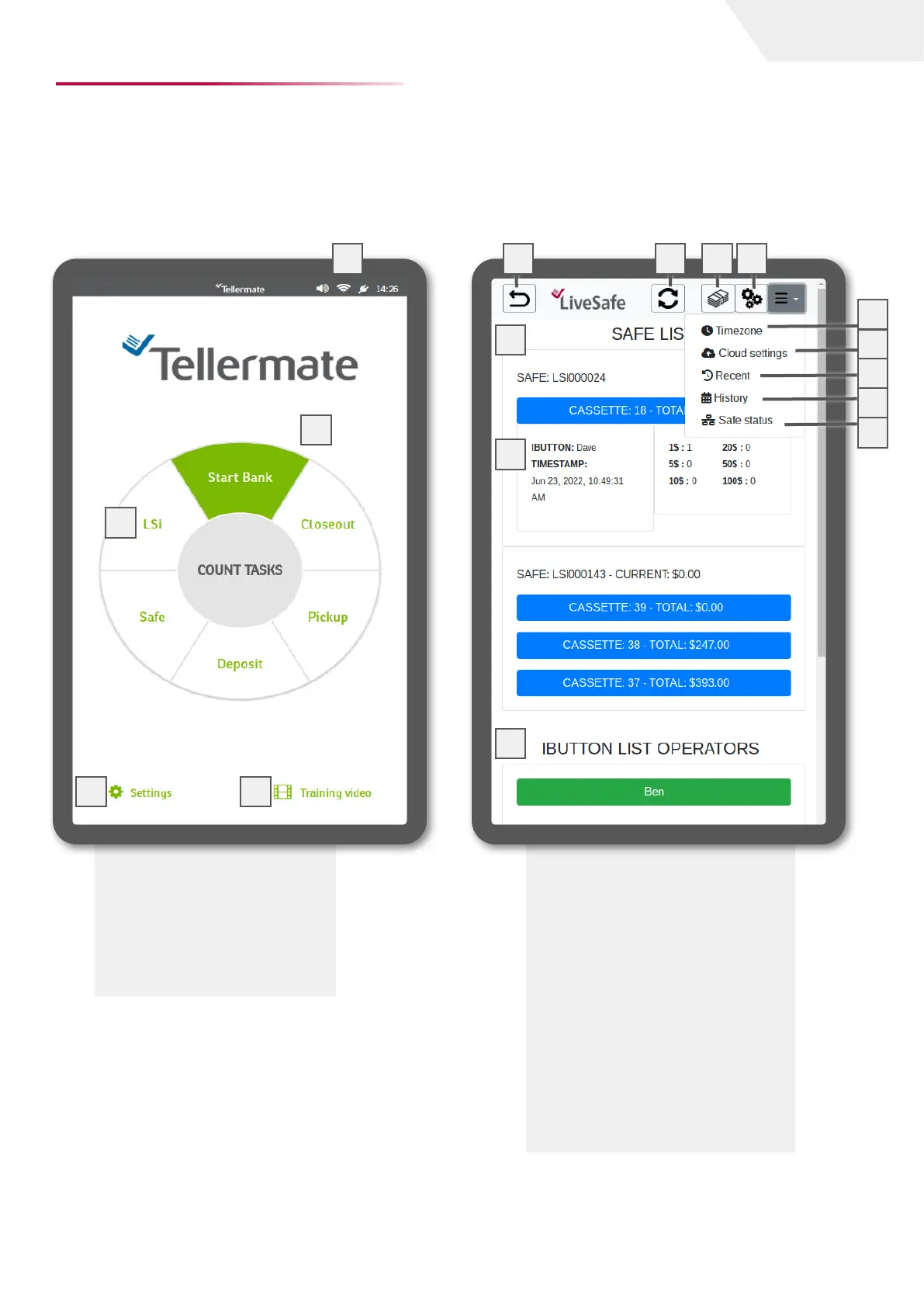
This is the Touch main menu. You can access the
LiveSafe dashboard, count tasks, Touch settings,
and training videos from this menu.
LiveSafe Dashboard
The LiveSafe dashboard is where all changes to the
LiveSafe settings can be made. To enter the dash-
board, select LSi from the main menu. Enter the
4-digit PIN when prompted.
1 Status bar
2 LiveSafe dashboard
3 Count tasks
4 Settings
5 Training videos
Your specific configuration may differ from
that shown above
1 LiveSafe cassette list
2 Return to main menu
3 Refresh
4 LiveSafe dashboard start
5 LiveSafe settings
6 Time zone
7 Cloud API
8 Recent Transactions
9 Histroic Transactions
10 Safe Status
11 Cassette breakdown
12 Operator list
4
5
2
3
1
1
2
3
4
5
6
7
8
9
page I 2
User Guide
10
11
12


 To Next Page