Page 9 of 31
on 1300 789 475 (ZTE Support hotline is available during normal business
hours, AEST 10am to 4pm)
• If you can’t connect to the internet check your SIM card is inserted correctly,
contact your service provider and check your account is active.
• To uninstall the application:
Windows users: Start > All Programs > TELSTRA 4GX WI-FI > Uninstall
MAC Users:
• Double click the Telstra Modem CDROM on the desktop to install the modem.
• To uninstall, go to Applications and run Uninstall TELSTRA 4GX WI-FI
WEB INTERFACE GUIDE
HOME TAB
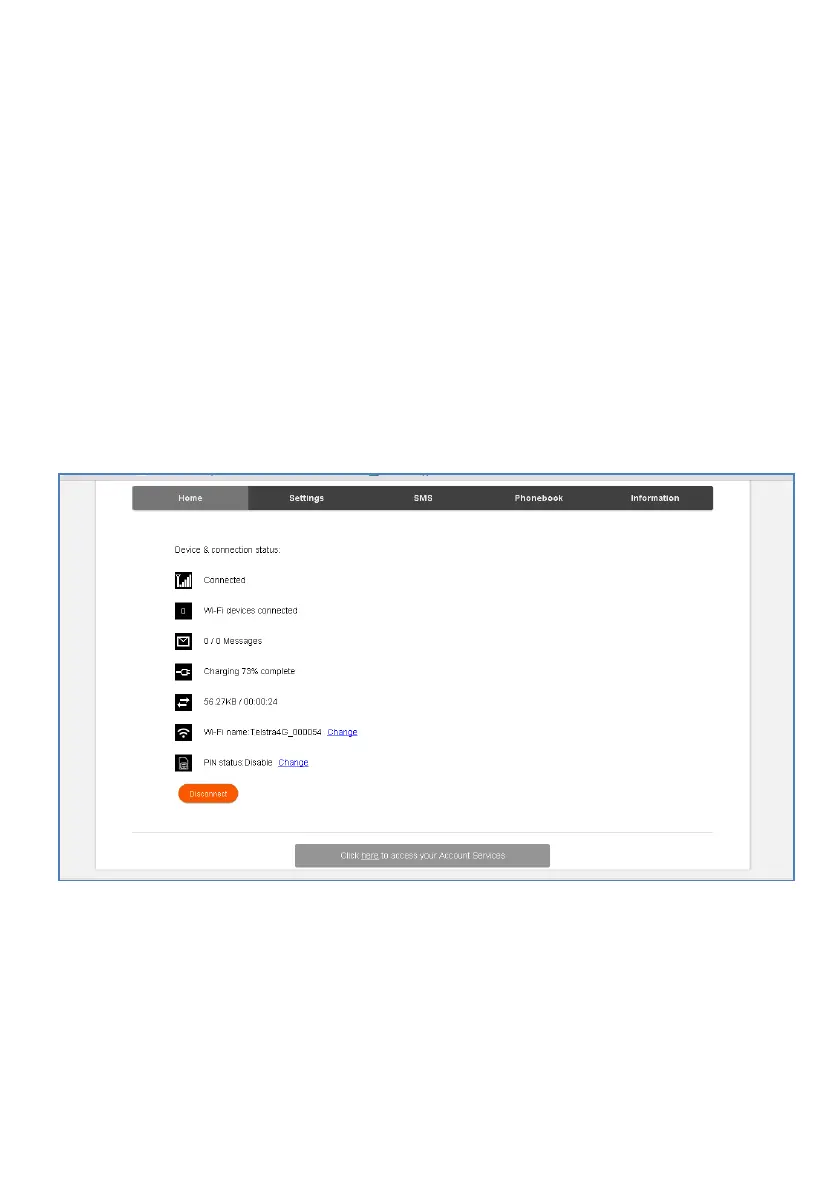
The home tab shows you how many users are connected and shows your network
connection state and data usage summary.
• The device will automatically connect to the network so it shows the Disconnect
button status by default.
• To change this behaviour press Disconnect first, then go to Settings > Network
Settings > WAN Connection Mode, and select Manual.
• The number of devices connected to your Wi-Fi hotspot is displayed
• You can click on Change to rename your hotspot SSID and enable or disable the
SIM PIN













 To Next Page