Quick Manual v2.2 // FMC640
10
QUICK SMS CONFIGURATION
Default conguration has optimal parameters present to ensure best performance of track quality and data usage.
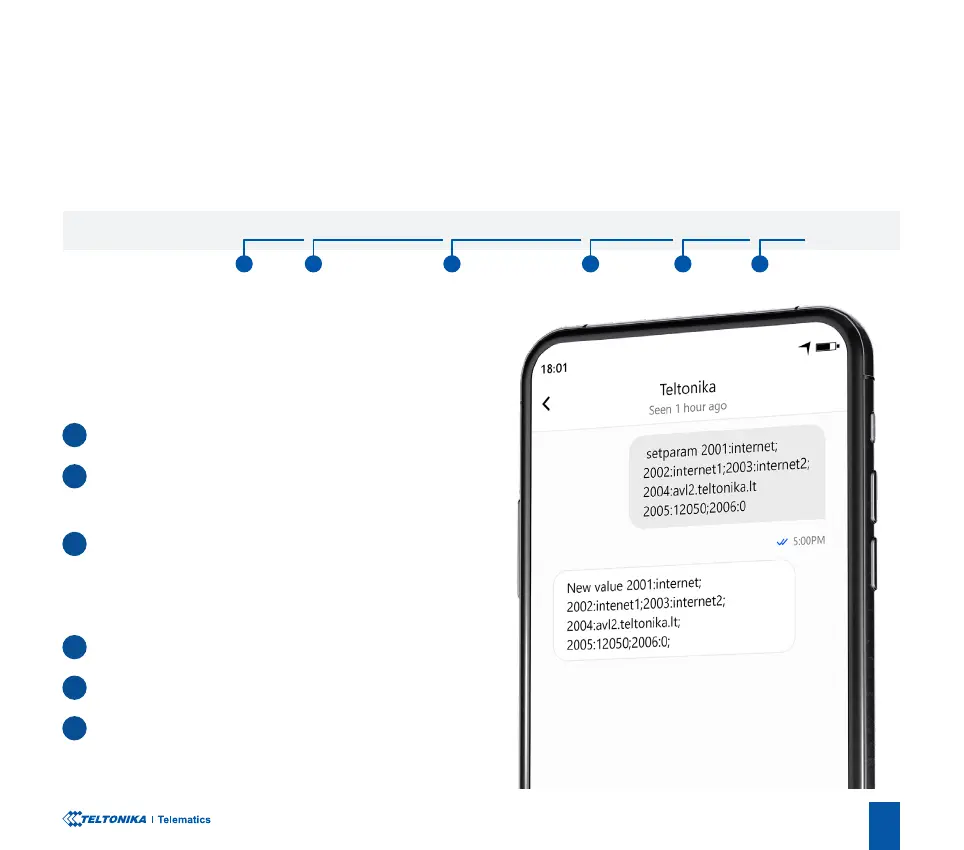
Quickly set up your device by sending this SMS command to it:
Note: Before SMS text, two space symbols should be inserted.
GPRS SETTINGS:
2001 – APN
2002 – APN username (if there are no APN username,
empty eld should be left)
2003 – APN password (if there are no APN password,
empty eld should be left)
SERVER SETTINGS:
2004 – Domain
2005 – Port
2006 – Data sending protocol (0 – TCP, 1 – UDP)
« setparam 2001:APN;2002:APN_username;2003:APN_password;2004:Domain;2005:Port;2006:0»
1 2 3 4 5 6
1
2
3
4
5
6


 To Next Page